AI agent for senior vice presidents
Key Account Executive Check-in Agent
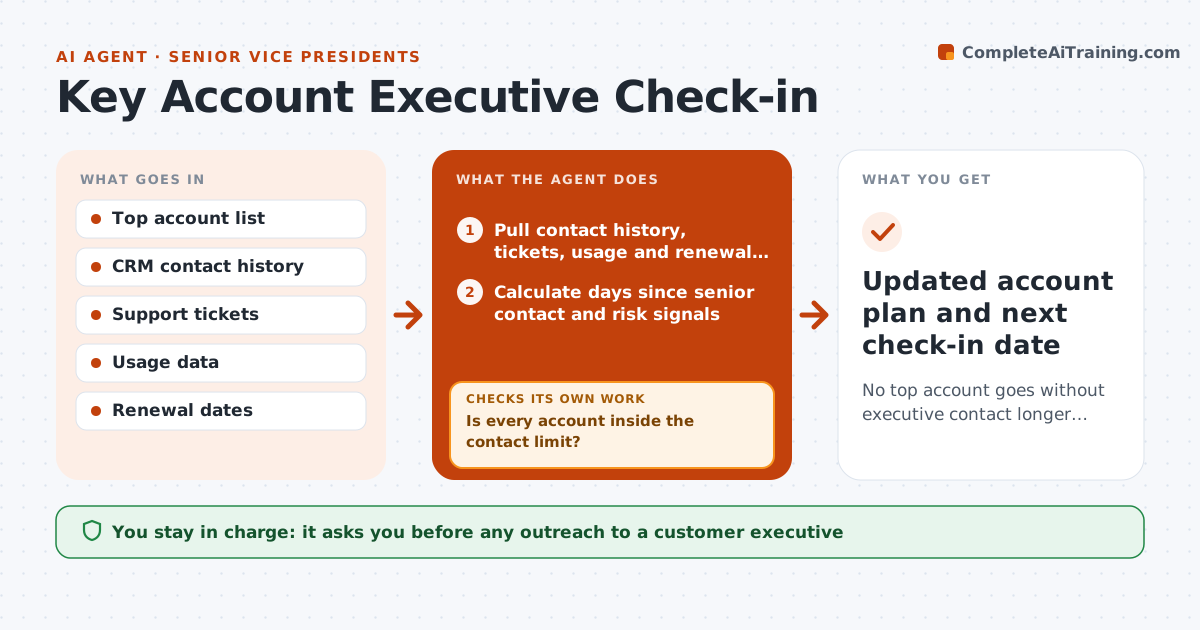
No top account goes without executive contact longer than the set period, and every contact is prepared and followed through.
What it does
The VP is supposed to be the executive sponsor on the top 20 accounts, but without a nudge contact slips for months. This agent checks each top account every week. It reads last contact dates between your executives and theirs, open support issues, usage trends and renewal dates. It flags accounts with no senior contact in the set period, especially when a risk signal exists, and prepares talking points covering recent wins, open issues and a suggested ask. After a meeting it records what was said, updates the plan and rechecks that follow-ups were done. You approve any outreach. Edge case: an account with falling usage and an open escalation jumps to the top of the list regardless of last contact date.
How it works
Follow the arrows from top to bottom. The orange dashed arrow is the loop: when a check fails, the agent goes back and tries again.
Read the steps as a list
- Weekly review
- Pull contact history, tickets, usage and renewal dates for each key account
- Calculate days since senior contact and risk signals
- Is every account inside the contact limit?If not: add the account to the outreach list with the reason. Back to step 3.
- Prepare talking points: wins, open issues and one ask
- Are all open issues in the talking points current, not already resolved?If not: recheck ticket status and rebuild the points. Back to step 2.
- VP approves outreach and talking pointsThe agent waits here for your OK.
- After the meeting, log notes and next steps
- Were last meeting's follow-ups completed?If not: remind the owner and keep the item on the next brief. Back to step 8.
- Updated account plan and next check-in date
How it decides
It ranks accounts by risk: days since senior contact, usage trend, open escalations and days to renewal.
- No senior contact in 60 days: add to the outreach list
- Usage down 20 percent plus an open escalation: put first on the list
- Renewal inside 90 days: add a renewal discussion to the talking points
- Contact changed jobs: flag the account for a new sponsor
Make it yours
Every agent is a starting point. You choose these settings for your own situation.
- Number of key accounts
- Contact limit in days (default 60)
- Risk signals and weights
- Review day
- Format of talking points
What keeps you in control
It always asks you first
- Any outreach to a customer executive
- Changes to the account plan
Hard limits
- Never contact customers directly
- Never include private internal notes in customer-facing points
It stops when
- Done: briefs ready and follow-ups tracked
- Stop: no account data available
Set it up
We guide you through the set-up, step by step
Members get the full set-up guide for this agent. No technical skills needed: you copy, paste and upload.
- One set of instructions to paste into your AI, with the clicks for ChatGPT, Claude, Microsoft 365 Copilot, Gemini and Grok
- The agent then walks you through connecting your own data, one source at a time
- A downloadable copy with the flow chart, the rules and the full guide