AI agent for product analysts
KPI Anomaly Investigation Agent
Explain every unusual KPI move within hours
What it does
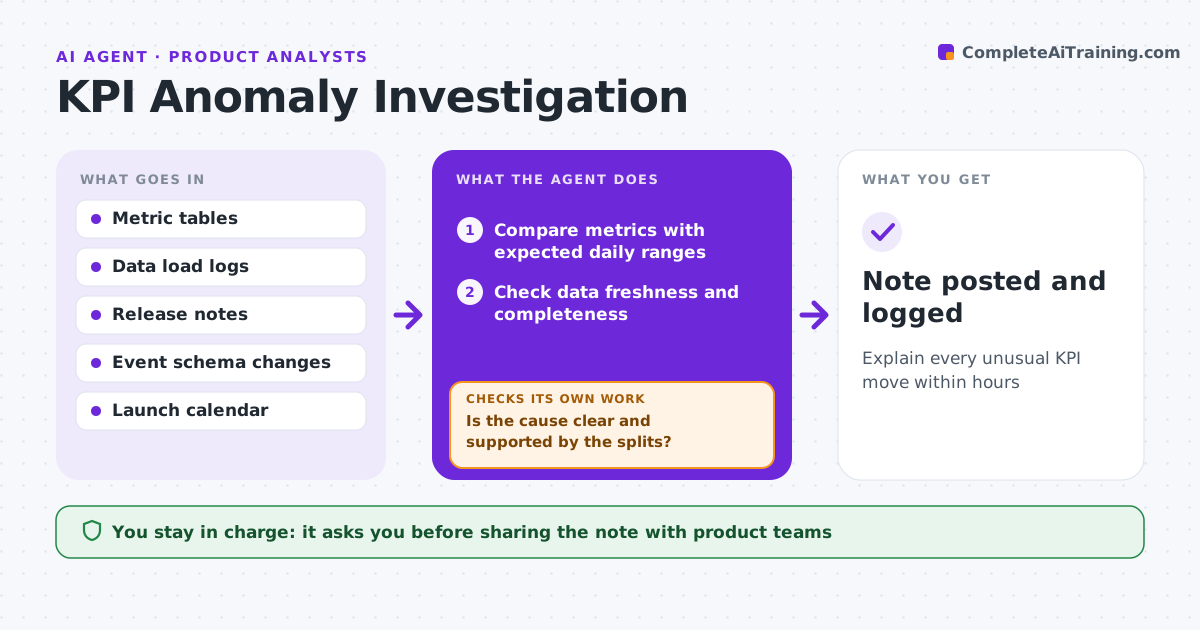
When a key metric drops overnight, product teams panic, and analysts spend hours finding out it was a tracking change. Each morning this agent checks key product metrics against their expected range for that day of the week. When one moves outside the range, it investigates in order: was data late or incomplete, did an event definition or app release change tracking, is the change limited to one platform, country or segment, and does it line up with a launch or outside event. After each step it checks whether the cause is found. If not, it moves to the next split. It drafts a short note with the cause, evidence and impact. The analyst confirms the note before it goes to the product team. Edge case: a drop only on the newest app version points to a tracking change first.
How it works
Follow the arrows from top to bottom. The orange dashed arrow is the loop: when a check fails, the agent goes back and tries again.
Read the steps as a list
- Daily data load complete
- Compare metrics with expected daily ranges
- Check data freshness and completeness
- Check release notes and event schema changes
- Split by platform, version, country and segment
- Is the cause clear and supported by the splits?If not: try the next split or check the launch calendar. Back to step 5.
- Draft the anomaly note
- Analyst confirms before sharingThe agent waits here for your OK.
- Note posted and logged
How it decides
It rules out data and tracking problems before looking for real user behavior changes.
- Rule out data delays first
- A drop on only the newest version points to tracking
- Notes go out only after analyst review
Make it yours
Every agent is a starting point. You choose these settings for your own situation.
- Metrics watched
- Range sensitivity
- Split order
- Who receives notes
What keeps you in control
It always asks you first
- Sharing the note with product teams
Hard limits
- Read-only data access
- Never changes metric definitions
It stops when
- Done: cause found and shared
- Stop: data pipeline down, alert data engineering
Set it up
We guide you through the set-up, step by step
Members get the full set-up guide for this agent. No technical skills needed: you copy, paste and upload.
- One set of instructions to paste into your AI, with the clicks for ChatGPT, Claude, Microsoft 365 Copilot, Gemini and Grok
- The agent then walks you through connecting your own data, one source at a time
- A downloadable copy with the flow chart, the rules and the full guide