AI agent for elected officials
Letter of Support Request Agent
Every request gets a consistent, documented decision and a ready draft when approved, before the grant deadline
What it does
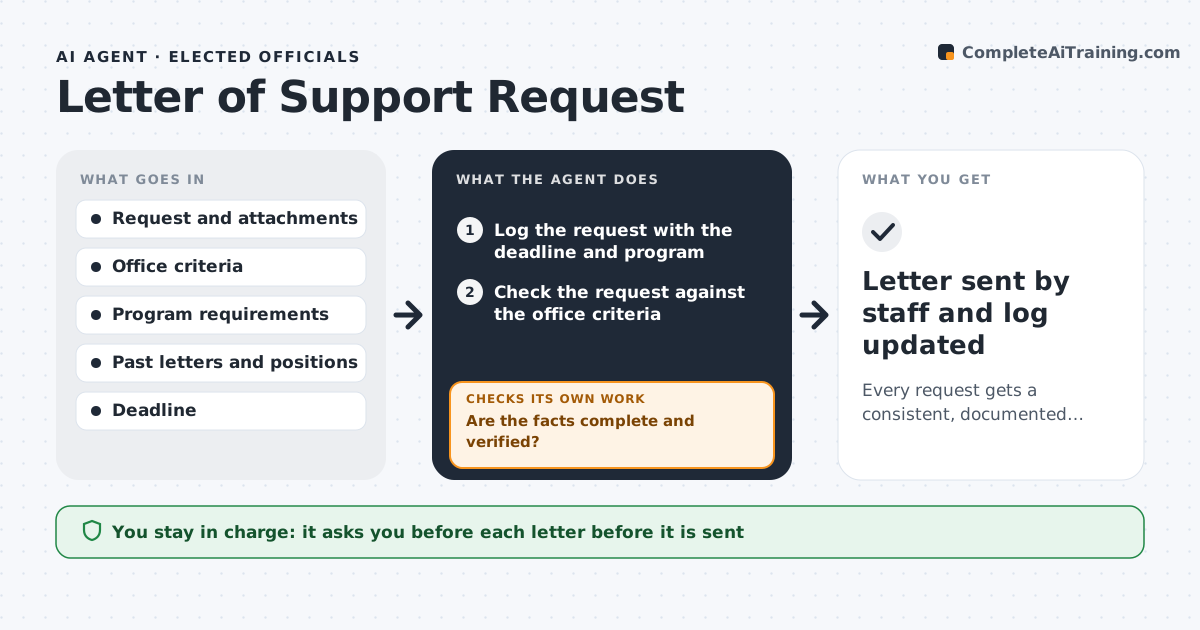
Constituents, nonprofits and companies ask for letters of support for grants, permits and projects. Each request takes research, and the office risks inconsistency: backing one applicant and refusing a similar one. This agent logs each request and checks it against the office's criteria, such as district, issue area and no conflicts. It gathers facts about the applicant and the grant: who they are, what they are asking for, what the program requires and the deadline. It looks up the member's past positions and earlier letters for similar requests. It then drafts a decision memo with a recommendation and a draft letter if the answer is yes. If key information is missing, it asks the applicant and checks again. The official approves each letter. Edge case: two competing groups apply for the same grant, and the agent flags it before any letter is drafted.
How it works
Follow the arrows from top to bottom. The orange dashed arrow is the loop: when a check fails, the agent goes back and tries again.
Read the steps as a list
- A support request is received
- Log the request with the deadline and program
- Check the request against the office criteria
- Research the applicant and the grant program requirements
- Are the facts complete and verified?If not: ask the applicant for the missing information and research again. Back to step 4.
- Search past letters and positions for similar requests
- Is the recommendation consistent with past decisions and free of conflicts?If not: revise the memo to explain the difference or flag the conflict. Back to step 3.
- Write the decision memo with a recommendation
- Draft the letter if the recommendation is yes
- Official approves each letterThe agent waits here for your OK.
- Letter sent by staff and log updated
How it decides
It compares the request with written criteria and similar past decisions, and recommends yes only when criteria are met, no conflict exists and facts are verified.
- Require the applicant to be in the district or serving it
- Flag any competing applicant for the same grant
- Allow at least 5 business days before the deadline
- Refuse requests that conflict with the member's stated positions
Make it yours
Every agent is a starting point. You choose these settings for your own situation.
- Criteria for support
- Lead time before the deadline (default 5 business days)
- Letter style
- Categories always declined
What keeps you in control
It always asks you first
- Each letter before it is sent
Hard limits
- Never sends a letter
- Does not commit the member
- Keeps applicant data private
It stops when
- Done: decision made and letter delivered or declined
- Stop: the applicant cannot be verified
Set it up
We guide you through the set-up, step by step
Members get the full set-up guide for this agent. No technical skills needed: you copy, paste and upload.
- One set of instructions to paste into your AI, with the clicks for ChatGPT, Claude, Microsoft 365 Copilot, Gemini and Grok
- The agent then walks you through connecting your own data, one source at a time
- A downloadable copy with the flow chart, the rules and the full guide