AI agent for legislative assistants
Lobbyist and Stakeholder Meeting Log Agent
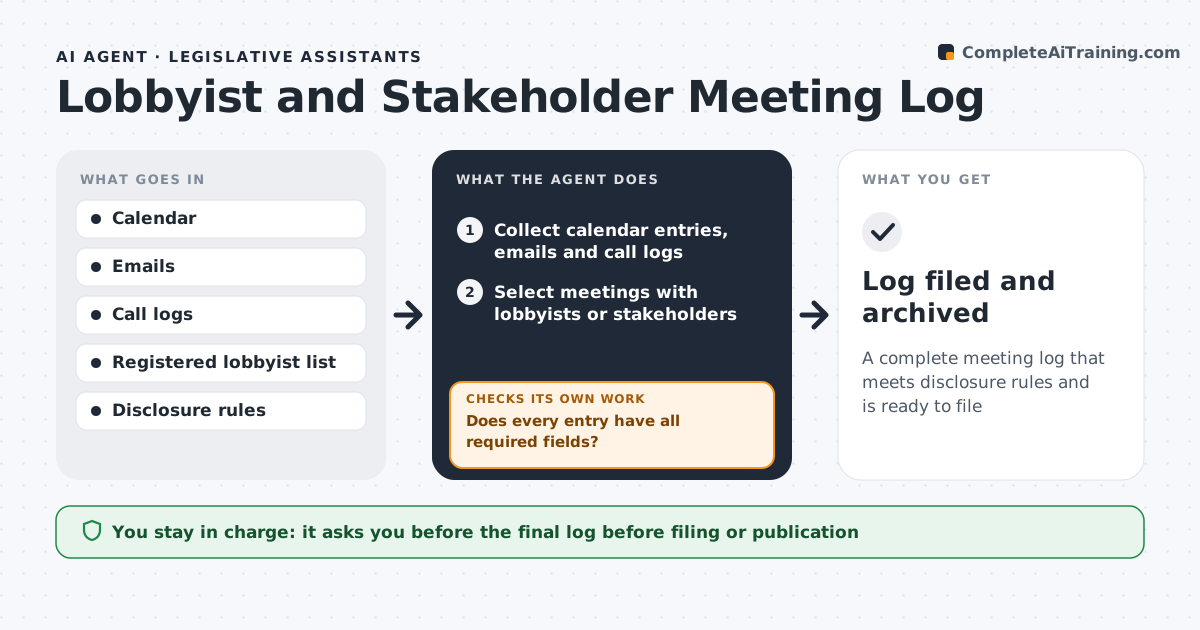
A complete meeting log that meets disclosure rules and is ready to file
What it does
Meetings with lobbyists and stakeholders happen all week, and the record is scattered across calendars and emails. This agent compiles calendar entries and emails into a meeting log with date, attendees, organization, topic and the bill or issue discussed. It checks each entry against the disclosure rules to see what must be recorded and whether the lobbyist is registered. Where details are missing, such as the client the lobbyist represented or the topic, it asks the staff member to fill them in. It rechecks the log until every required field is complete. It also checks for meetings that are in the calendar but missing from the log. The assistant approves the final log before it is filed or published. Edge case: a short call arranged by text message is found from the call log and added.
How it works
Follow the arrows from top to bottom. The orange dashed arrow is the loop: when a check fails, the agent goes back and tries again.
Read the steps as a list
- Weekly review or disclosure deadline
- Collect calendar entries, emails and call logs
- Select meetings with lobbyists or stakeholders
- Fill in the log fields from the sources
- Check each lobbyist against the registry
- Does every entry have all required fields?If not: ask staff to supply the missing details. Back to step 3.
- Send the questions and record the answers
- Does every calendar meeting on a policy matter appear in the log?If not: add the missing meetings and complete their fields. Back to step 2.
- Assistant approves the final logThe agent waits here for your OK.
- Log filed and archived
How it decides
A meeting belongs in the log if it involves a lobbyist or stakeholder on a policy matter. An entry is complete when it has every field the rules require.
- Include any meeting with a registered lobbyist
- Include stakeholder meetings that discuss pending bills
- Require client name for lobbyist meetings
- Mark an entry incomplete until a staff member confirms it
Make it yours
Every agent is a starting point. You choose these settings for your own situation.
- Fields required in each entry
- Registry used
- Review frequency
- Meetings to include or exclude
What keeps you in control
It always asks you first
- The final log before filing or publication
Hard limits
- Never publishes the log
- Never guesses a missing client or topic
It stops when
- Done: the log is complete and approved
- Stop: disclosure rules are unavailable
Set it up
We guide you through the set-up, step by step
Members get the full set-up guide for this agent. No technical skills needed: you copy, paste and upload.
- One set of instructions to paste into your AI, with the clicks for ChatGPT, Claude, Microsoft 365 Copilot, Gemini and Grok
- The agent then walks you through connecting your own data, one source at a time
- A downloadable copy with the flow chart, the rules and the full guide