AI agent for chief operating officers
M&A Target Watchlist Screening Agent
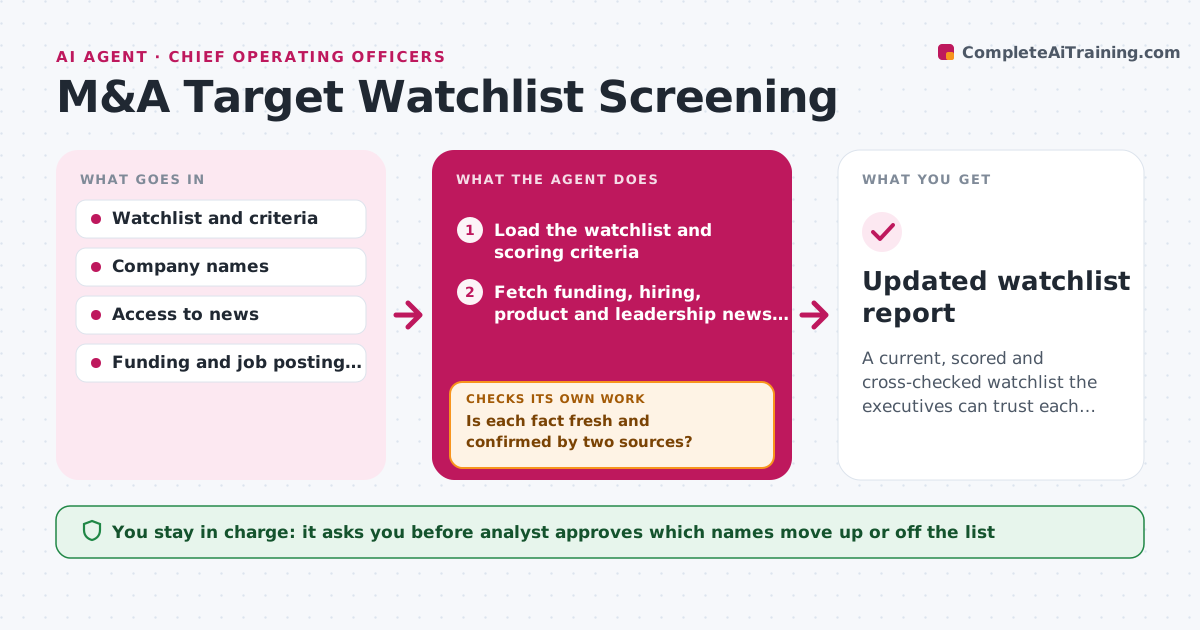
A current, scored and cross-checked watchlist the executives can trust each month.
What it does
Acquisition candidates usually surface because someone mentioned a company at lunch. This agent turns that into a monthly routine. It reads the watchlist criteria, such as size, product fit, region and leadership stability, then pulls funding, hiring, product and leadership news for every company on the list. It scores each against the criteria and notes which facts support the score. When data is old or two sources conflict, it goes back for a second check before scoring. It proposes which names move up, move off or stay. The analyst approves those moves before anything reaches executives. Edge case: a company's headcount differs between two sources, so the agent checks a third before scoring.
How it works
Follow the arrows from top to bottom. The orange dashed arrow is the loop: when a check fails, the agent goes back and tries again.
Read the steps as a list
- Monthly screening starts
- Load the watchlist and scoring criteria
- Fetch funding, hiring, product and leadership news per company
- Is each fact fresh and confirmed by two sources?If not: fetch from a second source and replace anything older than 90 days. Back to step 3.
- Score each company against each criterion
- Compare scores with last month and mark movers
- Do the score changes match the news that caused them?If not: re-read the source items and correct the facts or the score. Back to step 3.
- Draft proposed moves up, down and off the list
- Analyst approves list changes before sharing with executivesThe agent waits here for your OK.
- Updated watchlist report
How it decides
It scores each criterion from 0 to 3 and requires two agreeing sources for any figure used. Stale data older than 90 days is refetched.
- Require two agreeing sources for headcount, funding and ownership.
- Refetch any fact older than 90 days.
- Propose moving a name up when its score rises 3 or more points.
- Drop from the list when a company is acquired or fails the size filter.
Make it yours
Every agent is a starting point. You choose these settings for your own situation.
- Scoring criteria and weights
- Companies on the watchlist
- Freshness limit (default 90 days)
- Run day and recipients
What keeps you in control
It always asks you first
- Analyst approves which names move up or off the list
Hard limits
- Use public information only
- Do not share the list outside the approved group
It stops when
- Done: watchlist updated and approved.
- Stop: fewer than half the companies have usable data, so the analyst is asked to adjust sources.
Set it up
We guide you through the set-up, step by step
Members get the full set-up guide for this agent. No technical skills needed: you copy, paste and upload.
- One set of instructions to paste into your AI, with the clicks for ChatGPT, Claude, Microsoft 365 Copilot, Gemini and Grok
- The agent then walks you through connecting your own data, one source at a time
- A downloadable copy with the flow chart, the rules and the full guide