AI agent for caregivers
Medication Schedule Agent
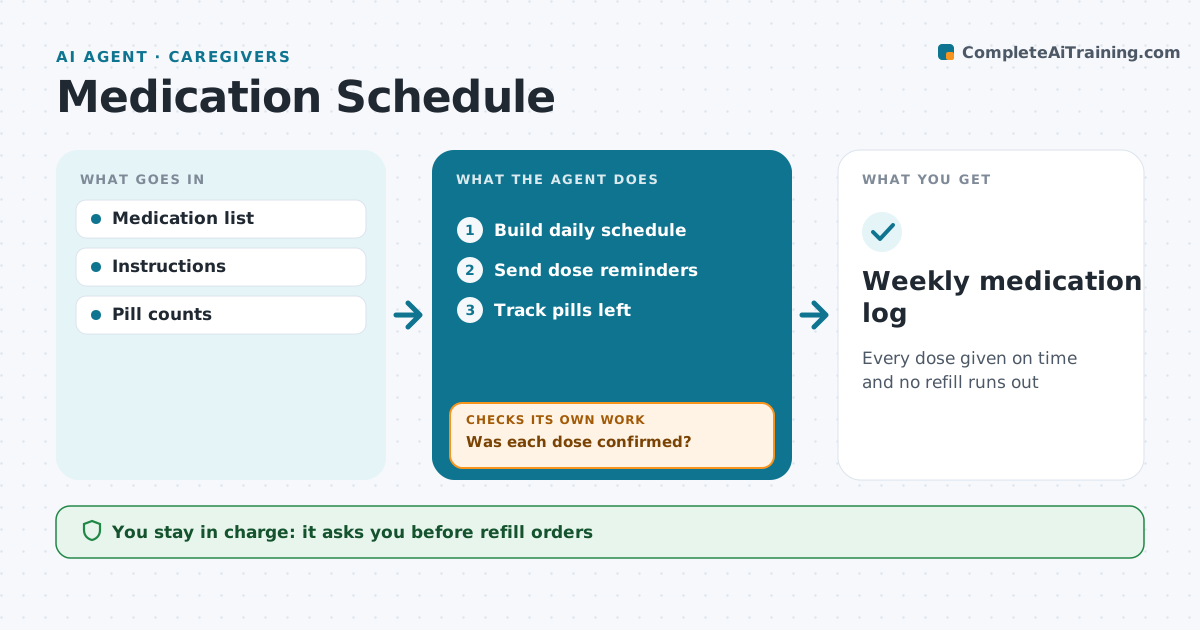
Every dose given on time and no refill runs out
What it does
Caring for someone on several medicines means keeping track of times, doses and refills, often while juggling work and family. This agent holds the medication list from the prescriber's instructions and builds a daily schedule. It sends a reminder at each dose time, and the caregiver confirms each dose or marks it missed. For a missed or double dose, it shows what the label or pharmacist instructions say to do and when to call. It tracks pills left and flags refills at 7 days of supply. The caregiver orders refills. It then checks that the refill was picked up before supply runs out. When a new medicine is added, it asks the caregiver to check with the pharmacist for interactions before adding it to the schedule. Edge case: a new medicine is not scheduled until the pharmacist check is confirmed.
How it works
Follow the arrows from top to bottom. The orange dashed arrow is the loop: when a check fails, the agent goes back and tries again.
Read the steps as a list
- Medication list entered
- Build daily schedule
- Send dose reminders
- Was each dose confirmed?If not: remind again and log missed dose with label instructions. Back to step 3.
- Track pills left
- Caregiver orders refillsThe agent waits here for your OK.
- Was the refill picked up before supply ran out?If not: remind the caregiver to collect it. Back to step 6.
- Weekly medication log
How it decides
Confirmations are compared with the schedule. Refills are due when supply drops below the set days.
- Refills flagged at 7 days left
- Missed doses follow label instructions
- New medicines checked with pharmacist
Make it yours
Every agent is a starting point. You choose these settings for your own situation.
- Reminder times
- Refill warning days
- Log format
- Contacts
What keeps you in control
It always asks you first
- Refill orders
- Adding new medicines
Hard limits
- No dosing advice beyond labels
- Refer questions to the pharmacist
It stops when
- Done: weekly log
- Stop: medicine stopped by prescriber
Set it up
We guide you through the set-up, step by step
Members get the full set-up guide for this agent. No technical skills needed: you copy, paste and upload.
- One set of instructions to paste into your AI, with the clicks for ChatGPT, Claude, Microsoft 365 Copilot, Gemini and Grok
- The agent then walks you through connecting your own data, one source at a time
- A downloadable copy with the flow chart, the rules and the full guide