AI agent for school counselors
Middle-to-High School Transition Agent
Give every rising ninth grader a matching schedule, supports and an orientation plan before summer
What it does
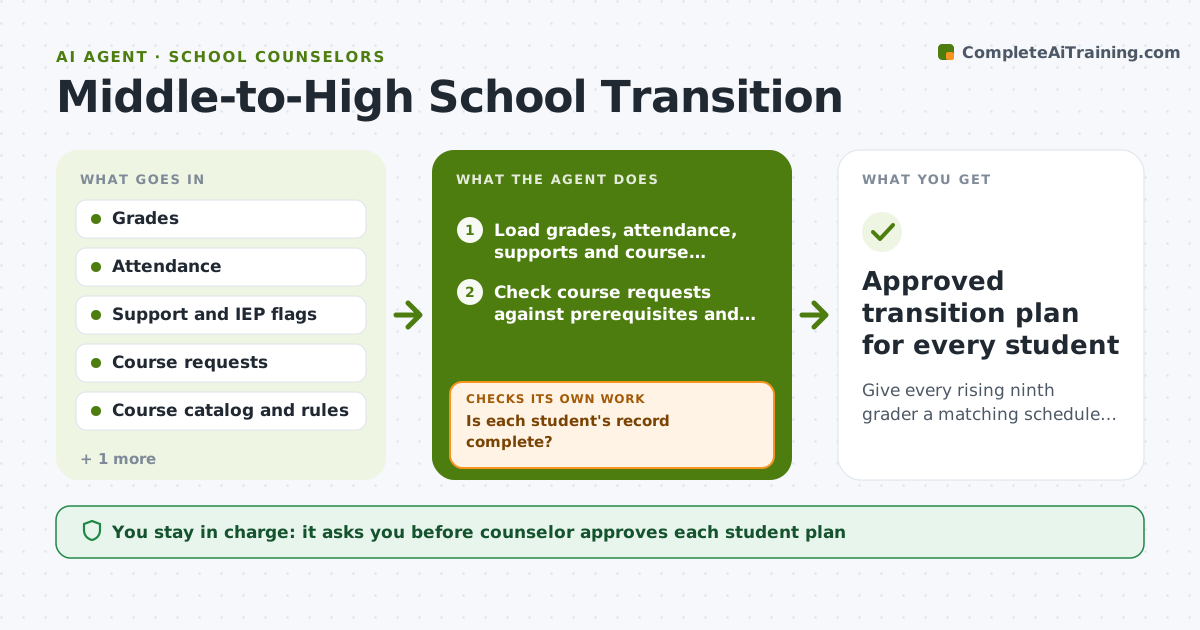
Each spring a counselor must prepare hundreds of rising ninth graders, and records arrive in pieces. This agent collects each student's grades, attendance, supports and course requests as they come in. It checks every request against the high school's course rules, such as prerequisites and graduation requirements, and flags students needing early outreach, for example those with low attendance or an IEP. It drafts a tour, orientation and schedule plan for each student and checks again whenever a new record arrives. It keeps a list of what is still missing and who owes it. The counselor approves each student plan and every family message. Edge case: if a student requests a course without the prerequisite, it proposes an alternative and asks the counselor.
How it works
Follow the arrows from top to bottom. The orange dashed arrow is the loop: when a check fails, the agent goes back and tries again.
Read the steps as a list
- Middle school records arrive for rising ninth graders
- Load grades, attendance, supports and course requests
- Is each student's record complete?If not: List missing items and who owes them, then reload when they arrive. Back to step 2.
- Check course requests against prerequisites and graduation rules
- Does every request meet the rules?If not: Propose an alternative course and mark it for the counselor. Back to step 4.
- Flag students needing early outreach by risk signals
- Draft tour, orientation and schedule plan per student
- Counselor approves each plan and family messageThe agent waits here for your OK.
- Recheck as late records arrive and update plans
- Approved transition plan for every student
How it decides
It validates each course request against rules and ranks outreach by risk flags such as attendance under 90 percent or an active support plan.
- Flag outreach when attendance is below 90 percent
- Flag outreach when a student has an IEP, 504 or English learner support
- Reject a course request that lacks its prerequisite
- Place students needing supports into an early orientation group
Make it yours
Every agent is a starting point. You choose these settings for your own situation.
- Attendance threshold for outreach (default 90 percent)
- Risk flags used (default attendance, support plan, failing grades)
- Orientation dates (default the school calendar)
- Family message language and tone (default plain and friendly)
What keeps you in control
It always asks you first
- Counselor approves each student plan
- Counselor approves family messages
Hard limits
- Never change a student schedule in the live system
- Never contact a family without counselor approval
- Keep student records limited to staff who need them
It stops when
- Done: Every student has an approved plan
- Stop: A record shows a safety concern, so hand it to the counselor right away
Set it up
We guide you through the set-up, step by step
Members get the full set-up guide for this agent. No technical skills needed: you copy, paste and upload.
- One set of instructions to paste into your AI, with the clicks for ChatGPT, Claude, Microsoft 365 Copilot, Gemini and Grok
- The agent then walks you through connecting your own data, one source at a time
- A downloadable copy with the flow chart, the rules and the full guide