AI agent for academic advisors
Advisee Caseload Prioritization Agent
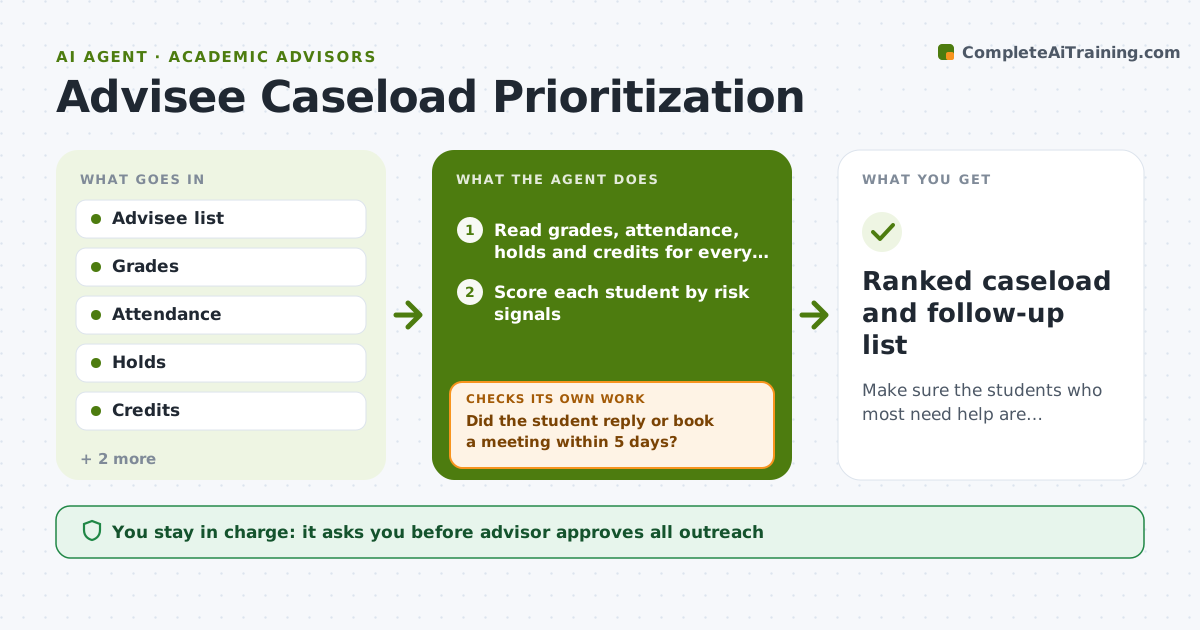
Make sure the students who most need help are contacted first and followed through.
What it does
You have 300 advisees, and the ones who email get your time, while the quiet student who stopped attending is never contacted. This agent reads grades, attendance, holds, credits and recent contact for every advisee each week. It scores risk based on rules you set, such as a failing midterm, missed classes, an unpaid hold or lack of registration. It ranks who needs contact and drafts a message that fits each reason. It tracks replies and bookings, and marks each case as contacted, replied or resolved. At the next weekly run, it reranks. If a student did not reply, it proposes a second approach, such as a call or an email from a faculty member. The advisor approves all outreach. Edge case: a student has a documented counseling referral, so the agent leaves them out of general outreach.
How it works
Follow the arrows from top to bottom. The orange dashed arrow is the loop: when a check fails, the agent goes back and tries again.
Read the steps as a list
- Weekly run
- Read grades, attendance, holds and credits for every advisee
- Score each student by risk signals
- Rank the students and select the top group
- Draft outreach that fits each reason
- Advisor approves outreachThe agent waits here for your OK.
- Send the messages and track replies and bookings
- Did the student reply or book a meeting within 5 days?If not: propose a second approach such as a call or a faculty contact. Back to step 4.
- Is the risk signal resolved after contact?If not: keep the student on the list and add a suggested next step. Back to step 3.
- Ranked caseload and follow-up list
How it decides
It adds points for each risk signal and ranks the total. A student moves down the list only when the signal is resolved or the advisor marks it as handled.
- Add the most points for a failing grade, no registration or a missed deadline
- Contact the top 20 students each week
- Wait 5 days before a second approach
- Exclude students on a documented referral from general outreach
Make it yours
Every agent is a starting point. You choose these settings for your own situation.
- Risk signals and points
- Number of students per week (default 20)
- Reply wait time (default 5 days)
- Exclusion rules
- Message tone
What keeps you in control
It always asks you first
- Advisor approves all outreach
Hard limits
- Never send a message without advisor approval
- Never share risk scores with students
It stops when
- Done: top-risk students are contacted and followed up
- Stop: the data feed is more than a week old
Set it up
We guide you through the set-up, step by step
Members get the full set-up guide for this agent. No technical skills needed: you copy, paste and upload.
- One set of instructions to paste into your AI, with the clicks for ChatGPT, Claude, Microsoft 365 Copilot, Gemini and Grok
- The agent then walks you through connecting your own data, one source at a time
- A downloadable copy with the flow chart, the rules and the full guide