AI agent for paramedics
Patient Care Report QA Agent
Complete accurate reports for every call
What it does
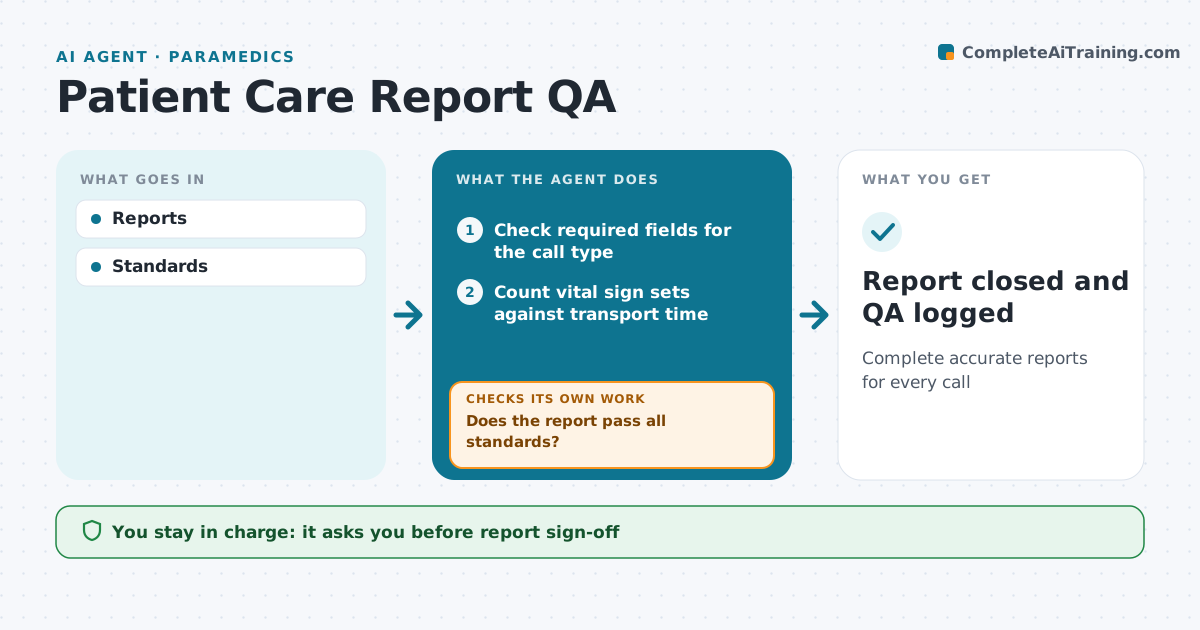
Every ambulance call needs a complete patient care report for patient safety, billing and legal reasons, and gaps are easy to miss at the end of a long shift. This agent reads each report after the call. It checks required fields, the number of vital sign sets, call times, medication doses and routes, and whether refusal forms are complete. It also reads the narrative for clarity and for gaps between the story and the coded fields. It sends the crew a list of issues with the exact field and reason, then rechecks after edits. Repeated issues across crews go to the supervisor as training topics. A supervisor signs off the report. Edge case: a refusal report without a capacity assessment and the risks explained is returned to the crew.
How it works
Follow the arrows from top to bottom. The orange dashed arrow is the loop: when a check fails, the agent goes back and tries again.
Read the steps as a list
- Patient care report saved after the call
- Check required fields for the call type
- Count vital sign sets against transport time
- Compare call times and the narrative with dispatch data
- Does the report pass all standards?If not: send the crew a list of gaps to fix, then re-check. Back to step 2.
- Prepare a short QA summary for the crew lead
- Crew lead signs the reportThe agent waits here for your OK.
- Report closed and QA logged
How it decides
Fields and rules checked.
- Two vital sets minimum
- Refusals need capacity
- Times consistent
Make it yours
Every agent is a starting point. You choose these settings for your own situation.
- Standards
- Pattern reports
- Timing
- Recipients
What keeps you in control
It always asks you first
- Report sign-off
Hard limits
- No changes by agent
It stops when
- Done: closed
- Stop: crew off duty, next shift
Set it up
We guide you through the set-up, step by step
Members get the full set-up guide for this agent. No technical skills needed: you copy, paste and upload.
- One set of instructions to paste into your AI, with the clicks for ChatGPT, Claude, Microsoft 365 Copilot, Gemini and Grok
- The agent then walks you through connecting your own data, one source at a time
- A downloadable copy with the flow chart, the rules and the full guide