AI agent for school counselors
Peer Conflict and Bullying Case Follow-Up Agent
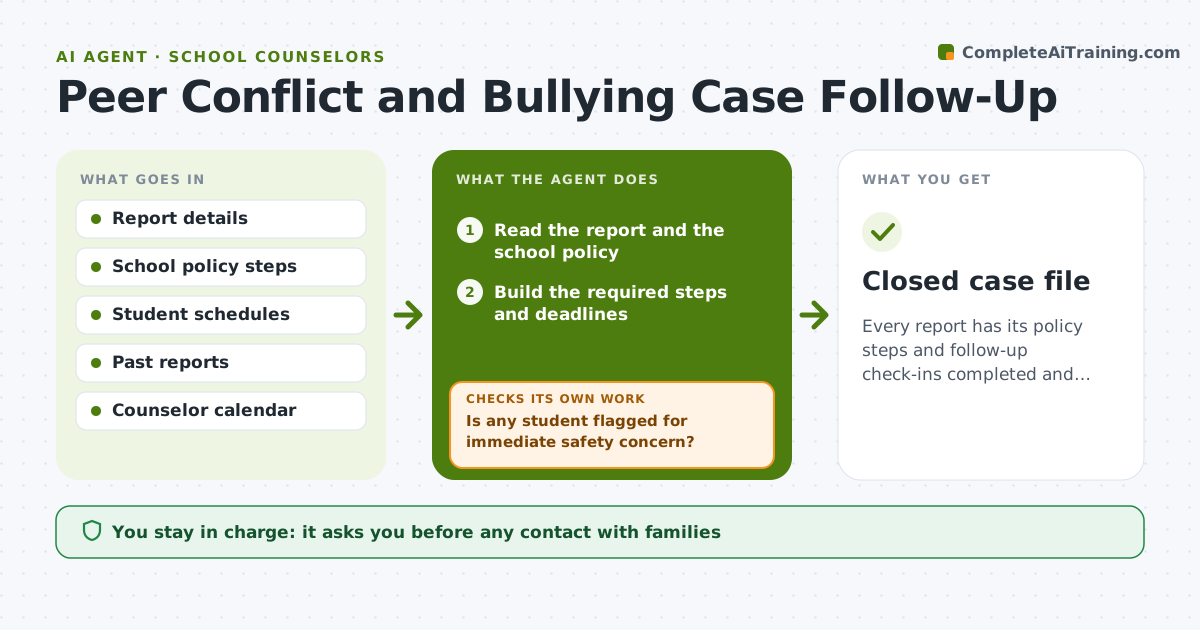
Every report has its policy steps and follow-up check-ins completed and recorded.
What it does
A counselor handles a conflict report on Monday and means to check in the next week, but five new reports arrive and the follow-up slips. This agent logs each report and builds the required steps from the school policy, such as interviews, notifying families and documenting outcomes. It schedules check-ins with each student, records what happened and watches for repeats. If the same student appears in a second report, or a check-in shows the issue continues, it escalates to the counselor with the history. Edge case: a report involves a student with a safety plan, so the agent moves it to the top and flags it for the administration. The counselor approves any contact with families or administration.
How it works
Follow the arrows from top to bottom. The orange dashed arrow is the loop: when a check fails, the agent goes back and tries again.
Read the steps as a list
- Report is logged
- Read the report and the school policy
- Build the required steps and deadlines
- Is any student flagged for immediate safety concern?If not: move to the top and alert the counselor now. Back to step 2.
- Schedule check-ins with each student
- Counselor approves contact with families or administrationThe agent waits here for your OK.
- Record each check-in outcome
- Is the issue resolved with no new reports?If not: schedule another check-in or escalate. Back to step 5.
- Compile the case summary
- Closed case file
How it decides
It follows the policy timeline, schedules the next check-in after each result, and escalates when a pattern repeats or the check-in finds continued harm.
- First check-in within 2 school days of the report.
- A second report involving the same student triggers escalation.
- Safety concerns go to the counselor immediately.
- Follow the policy timeline for family contact.
Make it yours
Every agent is a starting point. You choose these settings for your own situation.
- Check-in timing
- Escalation triggers
- Policy steps
- Summary format
- Data retention
What keeps you in control
It always asks you first
- Any contact with families
- Any report to administration
- Closing the case
Hard limits
- Do not contact families or students on its own.
- Keep case data private.
It stops when
- Done: policy steps complete and the case closed
- Stop: a safety risk is identified, so the agent stops and alerts the counselor
Set it up
We guide you through the set-up, step by step
Members get the full set-up guide for this agent. No technical skills needed: you copy, paste and upload.
- One set of instructions to paste into your AI, with the clicks for ChatGPT, Claude, Microsoft 365 Copilot, Gemini and Grok
- The agent then walks you through connecting your own data, one source at a time
- A downloadable copy with the flow chart, the rules and the full guide