AI agent for robotics engineers
Perception Failure Replay Agent
Reproduce a perception failure, fix it, and prove that earlier cases still pass
What it does
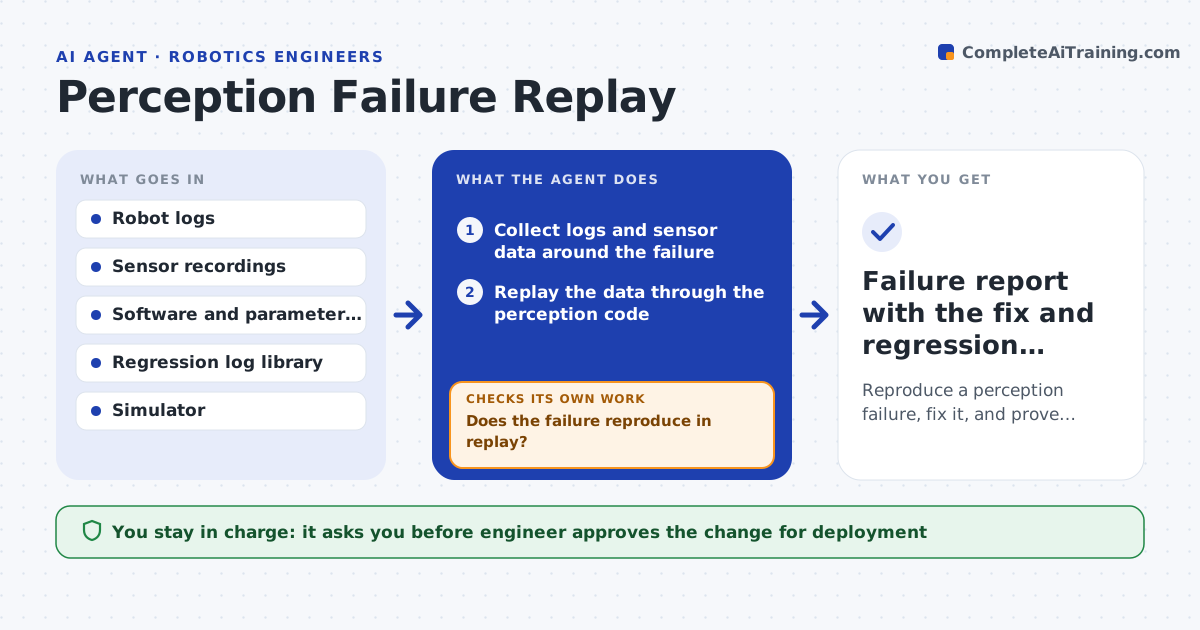
A robot misses a pallet or confuses a shadow for an obstacle, and nobody can reproduce it because the scene is gone. This agent collects the logs around the failure: camera or lidar frames, odometry, parameters and software version. It replays the sensor data through the same perception code in simulation to see if the failure reproduces. Once it does, it tests parameter changes or algorithm settings against the same recording. Next it reruns a library of earlier logs to check that nothing else got worse. If a fix helps this case but breaks others, it tries another. The engineer approves the change before it goes onto the robot. Edge case: the failure does not reproduce in replay, so the agent checks timing and clock drift in the recording.
How it works
Follow the arrows from top to bottom. The orange dashed arrow is the loop: when a check fails, the agent goes back and tries again.
Read the steps as a list
- Failure reported with time and robot
- Collect logs and sensor data around the failure
- Replay the data through the perception code
- Does the failure reproduce in replay?If not: check timestamps, clock drift and software version, and collect a longer window. Back to step 2.
- Propose parameter or setting changes
- Replay the failing log with each change
- Does the failing case pass?If not: try the next change. Back to step 5.
- Run the regression log library with the winning change
- Is the regression pass rate within 1% of before?If not: reject the change and try another. Back to step 5.
- Engineer approves the change for the robotThe agent waits here for your OK.
- Failure report with the fix and regression results
How it decides
It accepts a change only if the failing case passes and the pass rate on the regression library stays within the allowed drop.
- Replay with the exact software and parameter version first
- Change one parameter per test
- Reject a fix that lowers the regression pass rate by more than 1%
- Add the failing log to the regression library
Make it yours
Every agent is a starting point. You choose these settings for your own situation.
- Regression library location
- Allowed drop in pass rate (default 1%)
- Log window size (default 60 seconds)
- Parameters allowed to change
- Simulator used
What keeps you in control
It always asks you first
- Engineer approves the change for deployment
- Safety lead approves changes to obstacle detection
Hard limits
- Never deploy to a robot without approval
- Never remove a safety detection to fix a false stop
It stops when
- Done: the failure is fixed and regression results are held
- Stop: the failure cannot be reproduced after a longer window
Set it up
We guide you through the set-up, step by step
Members get the full set-up guide for this agent. No technical skills needed: you copy, paste and upload.
- One set of instructions to paste into your AI, with the clicks for ChatGPT, Claude, Microsoft 365 Copilot, Gemini and Grok
- The agent then walks you through connecting your own data, one source at a time
- A downloadable copy with the flow chart, the rules and the full guide