AI agent for medical coders
Pre-Bill Edit Review Agent
Clear claim edits correctly before submission
What it does
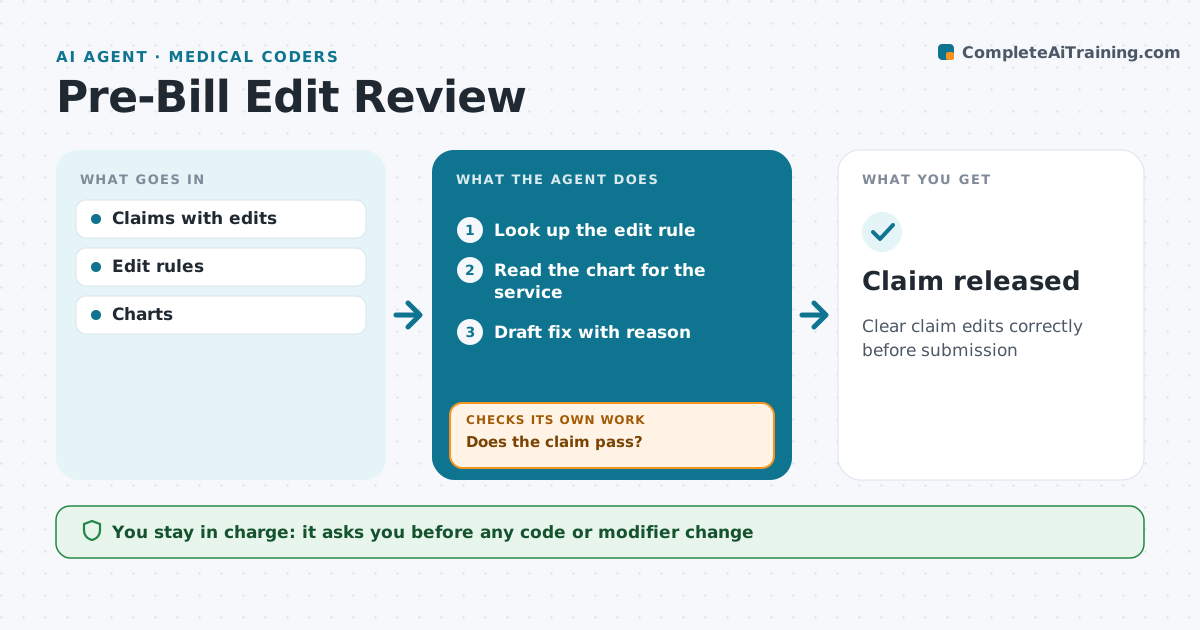
Before claims go out, edits catch problems like bundled procedures, missing modifiers or diagnoses that do not support the procedure. Working them by hand is slow. When a claim hits an edit, this agent looks up the specific rule and reads the chart for that service. It works out whether a modifier is justified, the code should change or the diagnosis link should move, and drafts the fix with the reason. Modifiers need documentation of a separate service; it never adds one just to bypass an edit. Diagnosis links follow the documentation. If the chart supports no fix, the claim is held and routed to a coder or provider question. A coder approves every change. After the fix, it reruns the edit, and loops back if the claim still fails. Edge case: an unsupported claim is held rather than forced through.
How it works
Follow the arrows from top to bottom. The orange dashed arrow is the loop: when a check fails, the agent goes back and tries again.
Read the steps as a list
- Claim hits an edit
- Look up the edit rule
- Read the chart for the service
- Draft fix with reason
- Coder approves the changeThe agent waits here for your OK.
- Rerun the edit
- Does the claim pass?If not: route to provider question or reconsider the fix. Back to step 3.
- Claim released
How it decides
A fix is proposed only when the chart supports it. Otherwise the claim is routed for a question.
- Modifiers need documented separate service
- Diagnosis links follow documentation order
- Unsupported claims are held, not forced
Make it yours
Every agent is a starting point. You choose these settings for your own situation.
- Edit types in scope
- Payer rule sets
- Review schedule
- Who approves
What keeps you in control
It always asks you first
- Any code or modifier change
- Releasing claims
Hard limits
- No modifier added only to bypass an edit
- Every change traceable to documentation
It stops when
- Done: claim released
- Stop: provider cannot support the service, hold for review
Set it up
We guide you through the set-up, step by step
Members get the full set-up guide for this agent. No technical skills needed: you copy, paste and upload.
- One set of instructions to paste into your AI, with the clicks for ChatGPT, Claude, Microsoft 365 Copilot, Gemini and Grok
- The agent then walks you through connecting your own data, one source at a time
- A downloadable copy with the flow chart, the rules and the full guide