AI agent for clinical research coordinators
Protocol Deviation Capture Agent
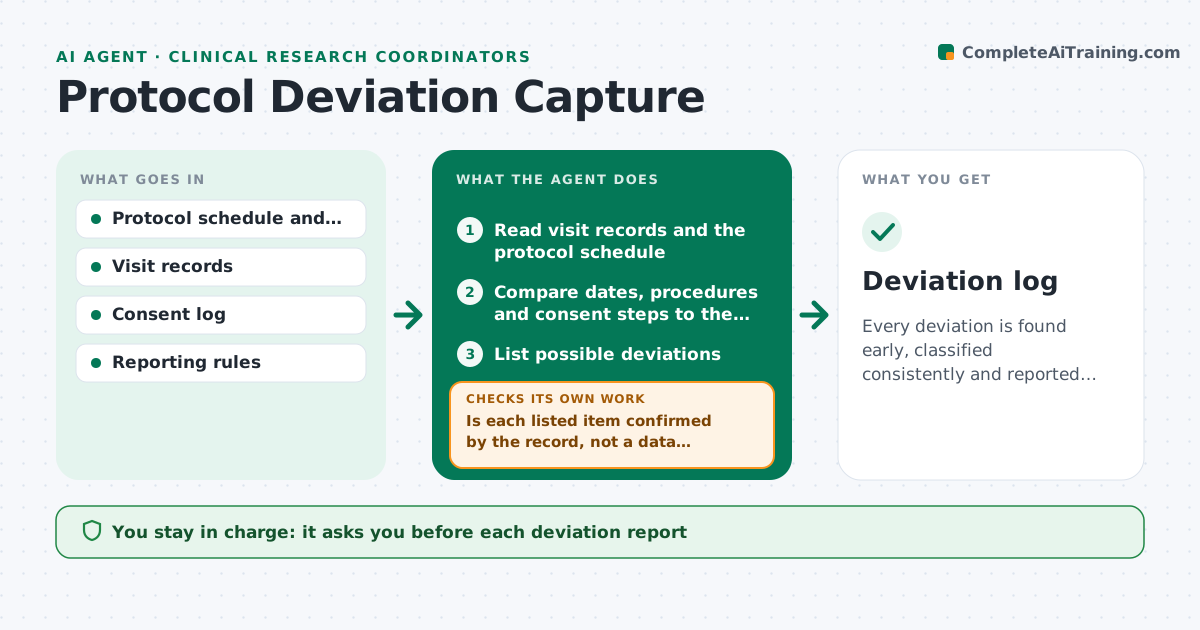
Every deviation is found early, classified consistently and reported inside its deadline.
What it does
A visit happens three days out of window, a lab is missed, or a consent step is skipped, and nobody notes it until a monitor does. This agent scans visit records and logs for out-of-window visits, missed procedures, wrong consent steps and eligibility issues. It compares them to the protocol schedule, classifies each deviation as minor, major or important, and checks reporting deadlines for the sponsor and the IRB. It drafts a deviation report for each, with the facts and a proposed corrective action. It rechecks whether the same deviation repeats. The investigator approves each report before it is filed. Edge case: a procedure not done because the participant refused is recorded as a deviation with that reason.
How it works
Follow the arrows from top to bottom. The orange dashed arrow is the loop: when a check fails, the agent goes back and tries again.
Read the steps as a list
- Visit entered or weekly scan
- Read visit records and the protocol schedule
- Compare dates, procedures and consent steps to the protocol
- List possible deviations
- Is each listed item confirmed by the record, not a data entry error?If not: ask the coordinator to confirm against source and update the list. Back to step 3.
- Classify each deviation and look up the reporting deadline
- Draft the deviation report with facts and corrective action
- Investigator approves each report before filingThe agent waits here for your OK.
- Track filing and check for repeats
- Was each report filed before its deadline?If not: escalate to the investigator with the days remaining. Back to step 9.
- Deviation log
How it decides
It compares actual dates and procedures to the protocol. Anything outside window or missing is a deviation, and the class follows the rules in the protocol and the sponsor's definitions.
- Visit outside window by more than the allowed days: deviation
- Missed safety assessment: classify as important and report fast
- Procedure refused by participant: record with the reason
- Same deviation 3 times: suggest a process fix
Make it yours
Every agent is a starting point. You choose these settings for your own situation.
- Window rules per visit
- Deviation classes
- Reporting deadlines by sponsor and IRB
- Scan frequency
- Corrective action wording
What keeps you in control
It always asks you first
- Each deviation report
- Any report to the IRB or sponsor
Hard limits
- Never file reports
- Never hide or reclassify a deviation to avoid reporting
It stops when
- Done: all deviations logged and reported
- Stop: records incomplete
Set it up
We guide you through the set-up, step by step
Members get the full set-up guide for this agent. No technical skills needed: you copy, paste and upload.
- One set of instructions to paste into your AI, with the clicks for ChatGPT, Claude, Microsoft 365 Copilot, Gemini and Grok
- The agent then walks you through connecting your own data, one source at a time
- A downloadable copy with the flow chart, the rules and the full guide