AI agent for clinical research coordinators
Research Participant Screening and Safety Agent
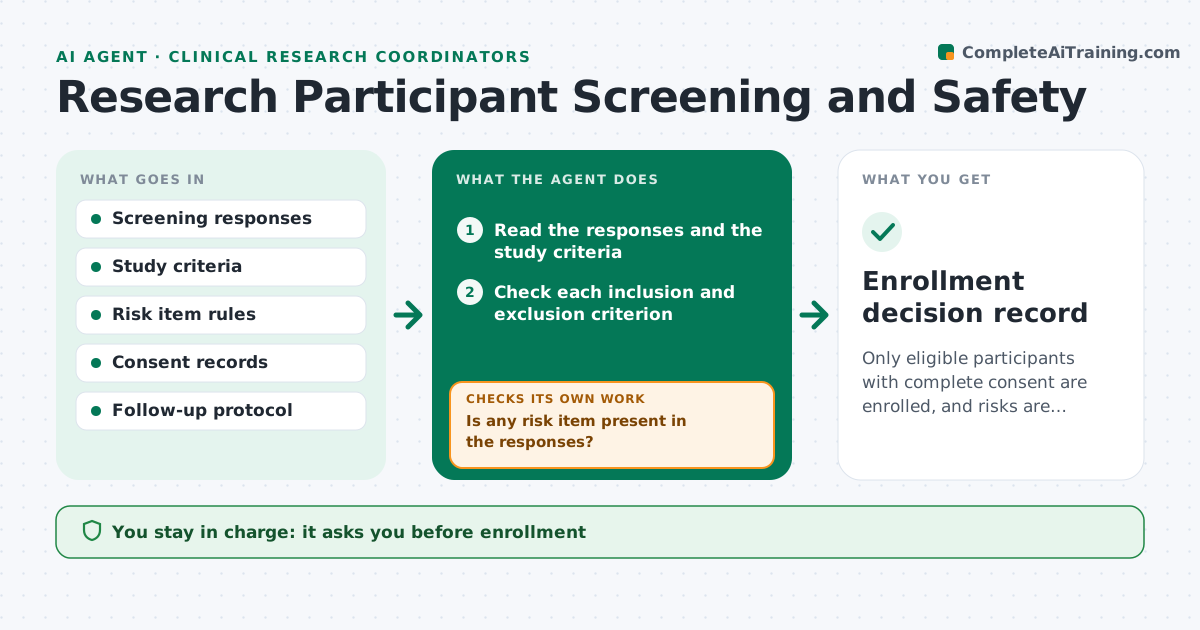
Only eligible participants with complete consent are enrolled, and risks are escalated promptly
What it does
Enrolling a participant who should have been excluded can harm them and spoil the data. This agent applies the study's screening criteria to each response set. It flags exclusion criteria and risk items, such as suicidal ideation or an unsafe condition, and sends high-risk responses to the researcher immediately. It schedules follow-up checks when something is unclear and verifies that informed consent is complete before any data collection. After answers come in, it rechecks the screening. The researcher approves enrollment. Edge case: a participant meets all criteria but a medication answer is unclear, so the agent holds enrollment until it is clarified.
How it works
Follow the arrows from top to bottom. The orange dashed arrow is the loop: when a check fails, the agent goes back and tries again.
Read the steps as a list
- Screening response received
- Read the responses and the study criteria
- Check each inclusion and exclusion criterion
- Is any risk item present in the responses?If not: alert the researcher at once and pause screening. Back to step 3.
- List unclear or missing answers
- Schedule a follow-up check for unclear items
- Read the follow-up answers
- Are all criteria resolved and consent complete?If not: keep the participant on hold and request what is missing. Back to step 4.
- Researcher approves enrollmentThe agent waits here for your OK.
- Update the enrollment log
- Enrollment decision record
How it decides
Any exclusion or unresolved item holds enrollment. Risk items are escalated at once.
- Escalate any risk item immediately
- Hold enrollment while any criterion is unclear
- Require signed consent before the first measure
- Never override an exclusion
Make it yours
Every agent is a starting point. You choose these settings for your own situation.
- Screening criteria
- Risk items and escalation contacts
- Follow-up timing
- Consent requirements
What keeps you in control
It always asks you first
- Enrollment
- Any contact with a participant at risk
Hard limits
- Never enrolls a participant
- Never gives advice to a participant at risk
It stops when
- Done: participant enrolled or excluded with reason
- Stop: risk item requires clinical follow-up
Set it up
We guide you through the set-up, step by step
Members get the full set-up guide for this agent. No technical skills needed: you copy, paste and upload.
- One set of instructions to paste into your AI, with the clicks for ChatGPT, Claude, Microsoft 365 Copilot, Gemini and Grok
- The agent then walks you through connecting your own data, one source at a time
- A downloadable copy with the flow chart, the rules and the full guide