AI agent for hr generalists
Return-to-Work Plan Coordination Agent
Create and adjust a return-to-work plan that fits the restrictions and the job.
What it does
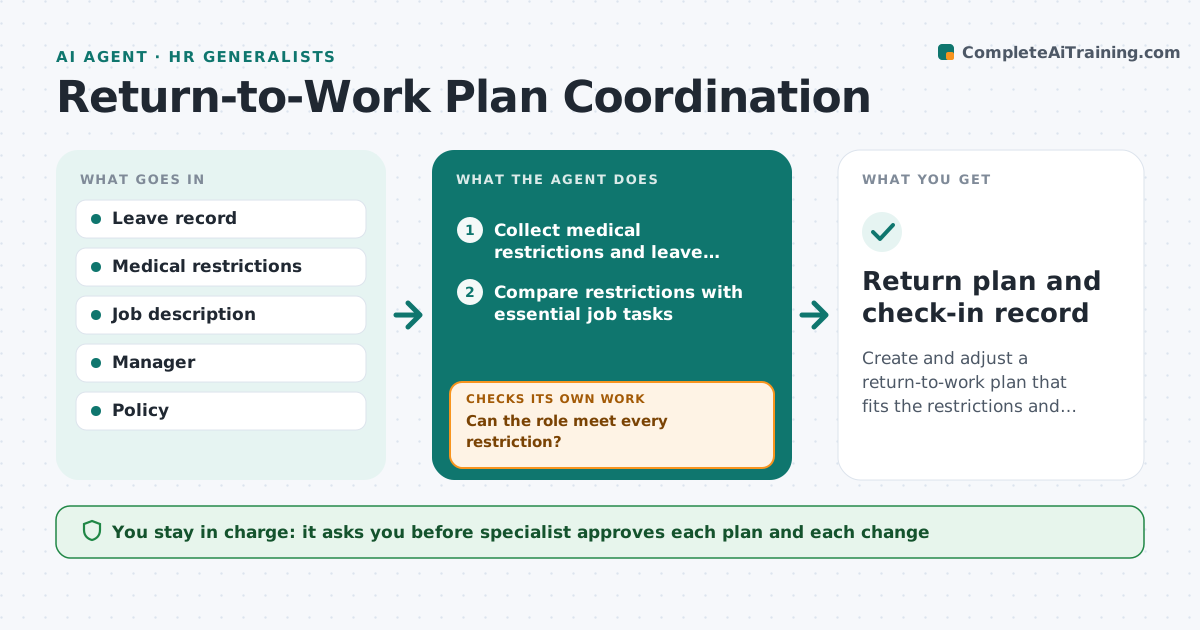
Returns after leave need accommodations, manager preparation and check-ins, and these are easy to lose. From the leave end date, the agent collects medical restrictions, checks whether the role can meet them and proposes accommodations. It prepares the manager with what they need to know and no more. It schedules check-ins, tracks how the return is going, and adjusts the plan if restrictions or work change. It flags problems early. The specialist approves each plan change. Edge case: restrictions say no lifting over 10 kg, and the role has a weekly 15 kg task, so the agent proposes reassigning that task.
How it works
Follow the arrows from top to bottom. The orange dashed arrow is the loop: when a check fails, the agent goes back and tries again.
Read the steps as a list
- Leave end date approaches
- Collect medical restrictions and leave details
- Compare restrictions with essential job tasks
- Can the role meet every restriction?If not: Propose accommodations such as changed tasks or hours. Back to step 3.
- Specialist approves the planThe agent waits here for your OK.
- Prepare a manager briefing with only the needed information
- Schedule check-ins at week 1, 4 and 8
- Collect check-in feedback
- Is the plan still working?If not: Adjust the accommodation and ask for approval. Back to step 3.
- Return plan and check-in record
How it decides
It compares each restriction with each essential task. A conflict leads to an accommodation proposal. Check-ins at set points show whether the plan still fits.
- A conflict with an essential task needs an accommodation
- Managers get the restriction, not the diagnosis
- Check-ins at 1, 4 and 8 weeks
- A new restriction reopens the plan
Make it yours
Every agent is a starting point. You choose these settings for your own situation.
- Check-in schedule
- Plan length
- Information shared with managers
- Policy used
What keeps you in control
It always asks you first
- Specialist approves each plan and each change
Hard limits
- Never shares medical details with the manager
- Never decides on accommodations alone
It stops when
- Done: plan complete and employee settled
- Stop: employee does not return or the plan changes by agreement
Set it up
We guide you through the set-up, step by step
Members get the full set-up guide for this agent. No technical skills needed: you copy, paste and upload.
- One set of instructions to paste into your AI, with the clicks for ChatGPT, Claude, Microsoft 365 Copilot, Gemini and Grok
- The agent then walks you through connecting your own data, one source at a time
- A downloadable copy with the flow chart, the rules and the full guide