AI agent for human resources managers
Employee Onboarding Dependency Agent
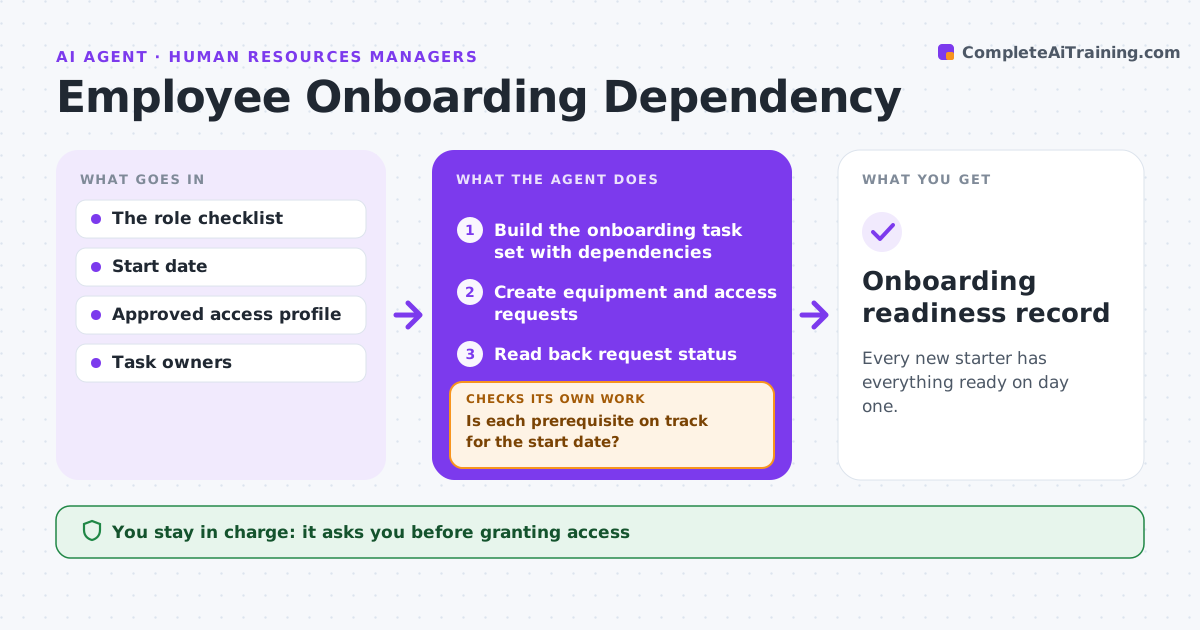
Every new starter has everything ready on day one.
What it does
New hires often arrive before their laptop, accounts or access are ready. When a hire is confirmed, this agent builds an onboarding task set from the role checklist, with dependencies and lead times. It creates internal requests for equipment and approved access, starting with the longest lead time. It reads back the status of each request and checks whether every prerequisite is on track for the start date. If not, it escalates to the owner or adjusts the task. When the start date changes, it updates its existing tasks and cancels duplicates instead of creating new ones. People ops approves access grants and messages to the employee. Edge case: a role needs a security clearance with a four-week lead time, so the agent flags the start date as at risk.
How it works
Follow the arrows from top to bottom. The orange dashed arrow is the loop: when a check fails, the agent goes back and tries again.
Read the steps as a list
- Hire confirmed
- Build the onboarding task set with dependencies
- Create equipment and access requests
- Read back request status
- Is each prerequisite on track for the start date?If not: escalate to the owner, or adjust the existing task. Back to step 4.
- People ops approves access grants and messagesThe agent waits here for your OK.
- Onboarding readiness record
How it decides
It creates or checks the next dependency based on lead times and status, and adjusts existing tasks when dates change.
- Order by lead time, longest first.
- When the date changes, update tasks and cancel duplicates.
- Escalate any prerequisite not on track for the start date.
- Access is granted only after people ops approves.
Make it yours
Every agent is a starting point. You choose these settings for your own situation.
- Role checklists and lead times
- Days before start to escalate a late item (default 5)
- Systems used for equipment and access requests
- Who approves access grants
- Readiness record format
What keeps you in control
It always asks you first
- Granting access
- Purchases
- Employee messages
Hard limits
- Requests only; never grants access itself.
It stops when
- Done: all ready.
- Escalated: a prerequisite at risk.
Set it up
We guide you through the set-up, step by step
Members get the full set-up guide for this agent. No technical skills needed: you copy, paste and upload.
- One set of instructions to paste into your AI, with the clicks for ChatGPT, Claude, Microsoft 365 Copilot, Gemini and Grok
- The agent then walks you through connecting your own data, one source at a time
- A downloadable copy with the flow chart, the rules and the full guide