AI agent for caregivers
Skin and Pressure Check Reminder Agent
Skin changes are found early, tracked over time and shared with the nurse before they become serious.
What it does
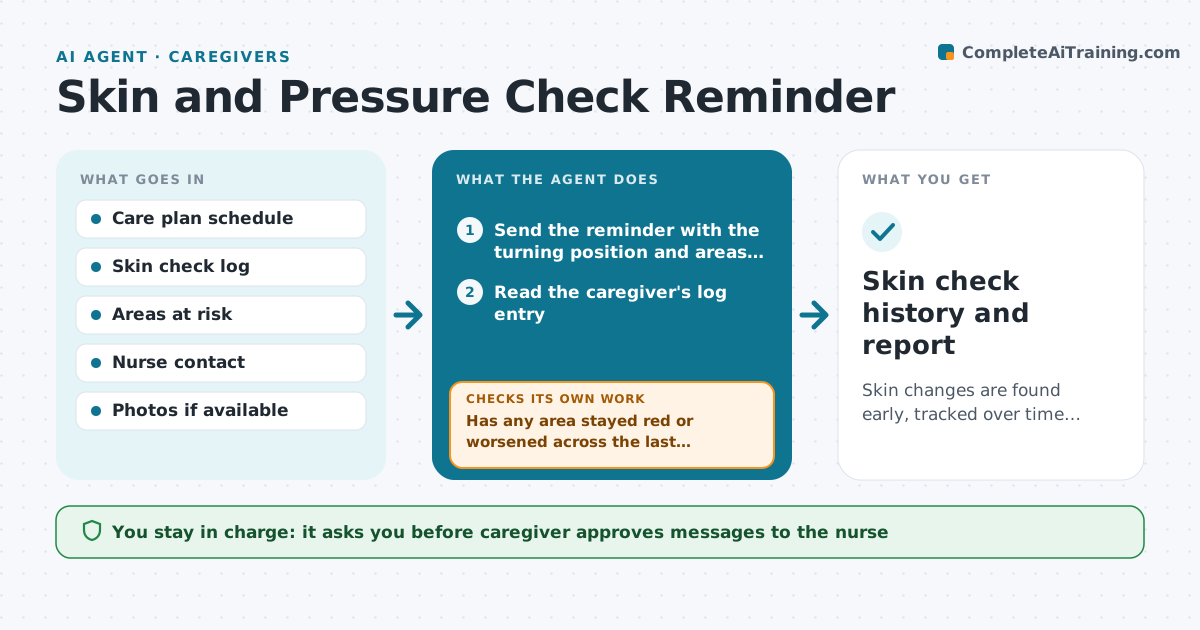
For people with limited mobility, pressure sores can start in a day and become serious in a week. The agent builds a turning and skin check schedule from the care plan and sends reminders at the set times. After each check, the caregiver logs what they saw: normal, red, broken or blistered, with the area. The agent reads the log and compares each area over time. If an area stays red or worsens, it drafts a message to the nurse with the history and photos if the caregiver adds them. It rechecks after each turning and after the nurse replies. The caregiver approves any message. Edge case: a broken skin area or a new blister goes to the nurse at once, not at the next scheduled report.
How it works
Follow the arrows from top to bottom. The orange dashed arrow is the loop: when a check fails, the agent goes back and tries again.
Read the steps as a list
- Scheduled check time
- Send the reminder with the turning position and areas to check
- Read the caregiver's log entry
- Compare each area with earlier entries
- Has any area stayed red or worsened across the last checks?If not: Increase the check frequency and draft a message to the nurse. Back to step 3.
- Draft the nurse message with the history
- Caregiver approves sending to the nurseThe agent waits here for your OK.
- Send the message and record the reply
- Has the area improved after the nurse's advice and turning?If not: Tell the caregiver to contact the nurse again or seek urgent care. Back to step 3.
- Skin check history and report
How it decides
It compares each area's findings over time and escalates when redness persists or skin breaks.
- Red for more than 30 minutes after pressure is removed means increased checks
- Broken skin or a blister goes to the nurse right away
- A missed check triggers a reminder
- Log the position after each turn
Make it yours
Every agent is a starting point. You choose these settings for your own situation.
- Check interval
- Areas to inspect
- Escalation rules
- Nurse contact
- Photo option
What keeps you in control
It always asks you first
- Caregiver approves messages to the nurse
- Nurse decides any treatment
Hard limits
- Never give treatment advice
- Never send messages without approval
- Never delay escalation of broken skin
It stops when
- Done: skin is normal and checks are on schedule
- Stop: skin breaks and the nurse or doctor takes over
Set it up
We guide you through the set-up, step by step
Members get the full set-up guide for this agent. No technical skills needed: you copy, paste and upload.
- One set of instructions to paste into your AI, with the clicks for ChatGPT, Claude, Microsoft 365 Copilot, Gemini and Grok
- The agent then walks you through connecting your own data, one source at a time
- A downloadable copy with the flow chart, the rules and the full guide