AI agent for school counselors
Small Group Counseling Outcome Agent
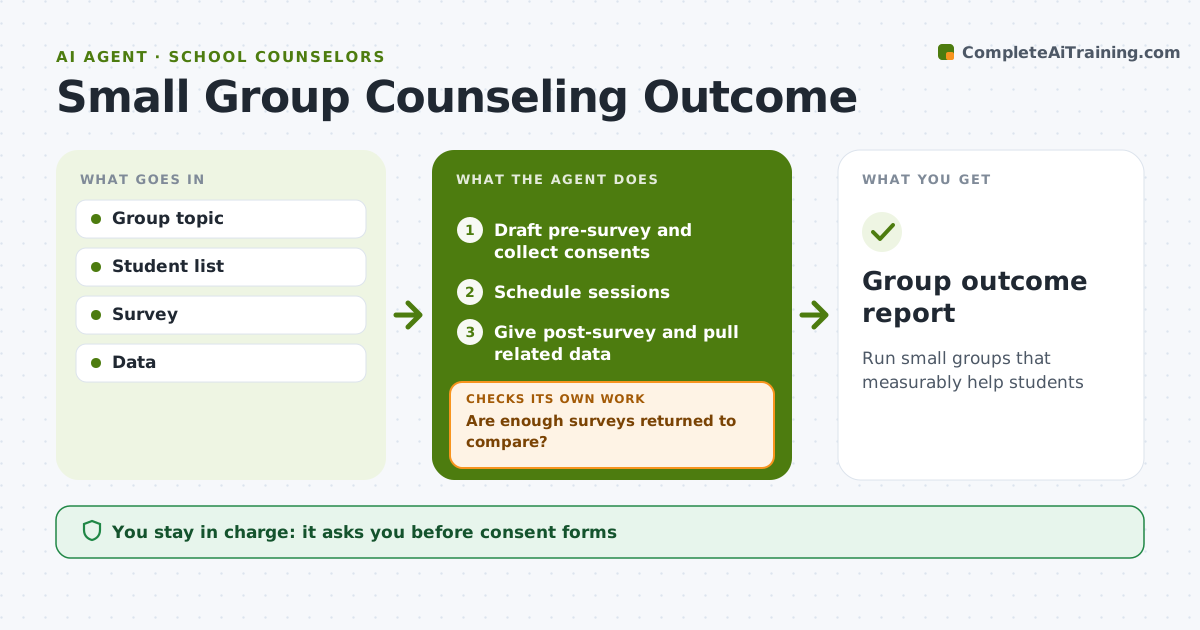
Run small groups that measurably help students
What it does
Counselors run small groups on topics like anxiety, friendship skills or study habits, but rarely have time to show whether the groups worked. This agent helps set up each group: it drafts a short pre-survey matched to the group's goals, collects consent forms before the first session, and schedules sessions that rotate class periods so no subject is missed too often. After the last session it gives the post-survey. It checks whether enough surveys came back to compare; if not, it reminds students before the window closes and checks again. It then compares results with attendance, grades or behavior data where relevant, and shows who improved and who may need individual follow-up. The counselor approves consent forms and any sharing of results. Edge case: students whose scores get worse are flagged privately to the counselor, never in a group report.
How it works
Follow the arrows from top to bottom. The orange dashed arrow is the loop: when a check fails, the agent goes back and tries again.
Read the steps as a list
- Group planned
- Draft pre-survey and collect consents
- Schedule sessions
- Counselor runs groupThe agent waits here for your OK.
- Give post-survey and pull related data
- Are enough surveys returned to compare?If not: remind students before closing. Back to step 5.
- Compare pre and post
- Group outcome report
How it decides
Pre-post change and related data show improvement.
- Consent before first session
- Worsening scores flagged
- Sessions rotate class periods
Make it yours
Every agent is a starting point. You choose these settings for your own situation.
- Survey items
- Session schedule
- Data used
- Report format
What keeps you in control
It always asks you first
- Consent forms
- Sharing results
Hard limits
- Individual answers private
- No group results that identify a student
It stops when
- Done: report
- Stop: group cancelled
Set it up
We guide you through the set-up, step by step
Members get the full set-up guide for this agent. No technical skills needed: you copy, paste and upload.
- One set of instructions to paste into your AI, with the clicks for ChatGPT, Claude, Microsoft 365 Copilot, Gemini and Grok
- The agent then walks you through connecting your own data, one source at a time
- A downloadable copy with the flow chart, the rules and the full guide