AI agent for clinical research coordinators
Sponsor Safety Letter Tracking Agent
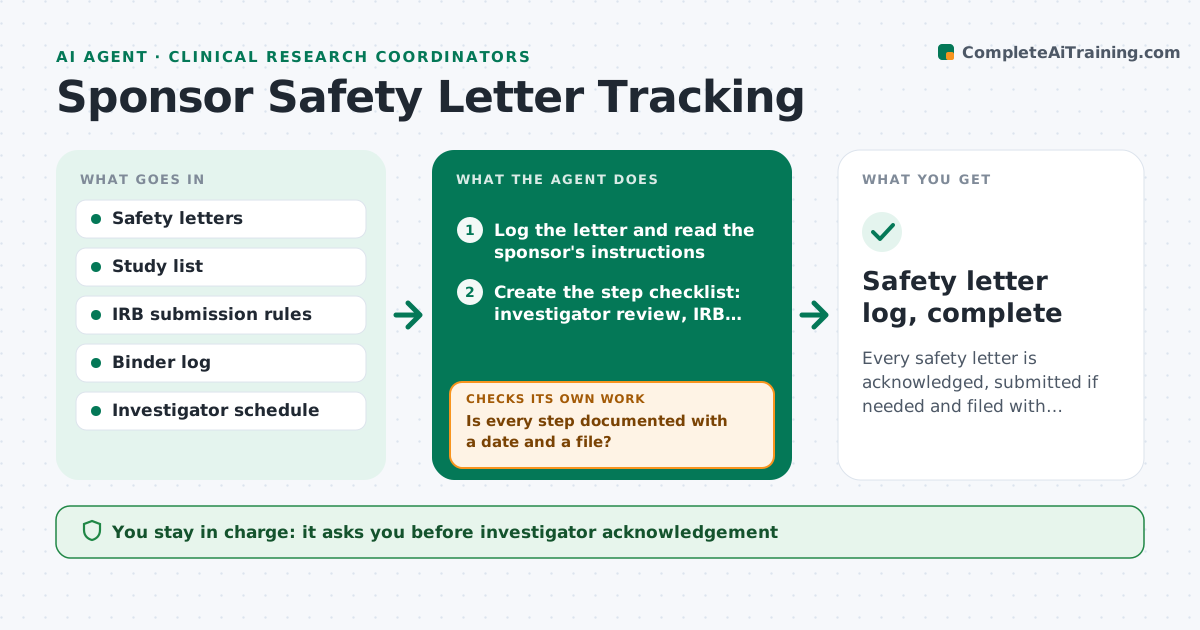
Every safety letter is acknowledged, submitted if needed and filed with dates, with no gaps at inspection.
What it does
A sponsor sends a safety letter, and for it to be compliant it must be read by the investigator, submitted to the IRB if required and filed in the binder, each with a date. This agent logs each letter when it arrives and creates a checklist for it. It checks whether the investigator has acknowledged it and whether the IRB submission was made, and chases the missing step by drafting a reminder. It rechecks until every step is documented and the file is complete. It also notes letters that change risk language and may require a consent update. The investigator approves each acknowledgement. Edge case: a letter received by one team member but not logged is found through the email scan and added.
How it works
Follow the arrows from top to bottom. The orange dashed arrow is the loop: when a check fails, the agent goes back and tries again.
Read the steps as a list
- Safety letter received
- Log the letter and read the sponsor's instructions
- Create the step checklist: investigator review, IRB submission, filing
- Draft the acknowledgement request to the investigator
- Investigator approves the acknowledgementThe agent waits here for your OK.
- Check the IRB portal and the binder for each step
- Is every step documented with a date and a file?If not: draft a reminder to the owner of the missing step. Back to step 6.
- Check whether the letter requires a consent form change
- Is the letter complete within the IRB and sponsor deadlines?If not: escalate to the investigator with the days overdue. Back to step 6.
- Safety letter log, complete
How it decides
Each letter gets steps from the IRB rules and the sponsor's instructions. It is complete only when every step has a date and a document.
- Letter reports a new risk: check whether consent must change
- IRB submission required by rule: set a deadline from receipt date
- Acknowledgement older than 5 days after receipt: remind the investigator
- Letter found in email but not logged: log it with the original date
Make it yours
Every agent is a starting point. You choose these settings for your own situation.
- IRB rules and deadlines
- Reminder interval in days
- Email inboxes scanned
- Binder format
- Escalation contact
What keeps you in control
It always asks you first
- Investigator acknowledgement
- Any IRB submission
Hard limits
- Never sign for the investigator
- Never mark a step done without a document
It stops when
- Done: all steps documented and filed
- Stop: study closed
Set it up
We guide you through the set-up, step by step
Members get the full set-up guide for this agent. No technical skills needed: you copy, paste and upload.
- One set of instructions to paste into your AI, with the clicks for ChatGPT, Claude, Microsoft 365 Copilot, Gemini and Grok
- The agent then walks you through connecting your own data, one source at a time
- A downloadable copy with the flow chart, the rules and the full guide