AI agent for network administrators
Switch Port and Cabling Audit Agent
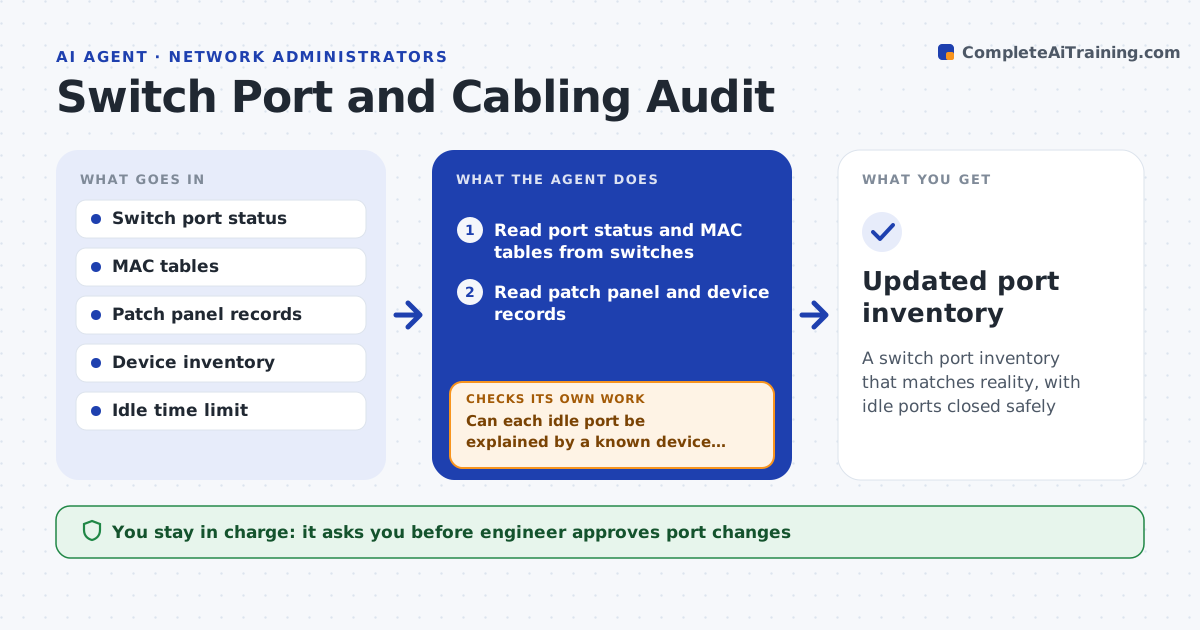
A switch port inventory that matches reality, with idle ports closed safely
What it does
Unused and mislabeled switch ports waste capacity and create security gaps. This agent reads port status, MAC address tables and patch panel records. It finds ports that are idle, ports where the device does not match the label, and ports with no record at all. It proposes lists to disable or relabel. After the change, it verifies that the connected devices still work and that nothing important went offline. Edge case: a port has been idle for 100 days but is the line for a rarely used badge reader, so the agent asks the owner before disabling it.
How it works
Follow the arrows from top to bottom. The orange dashed arrow is the loop: when a check fails, the agent goes back and tries again.
Read the steps as a list
- Quarterly port audit
- Read port status and MAC tables from switches
- Read patch panel and device records
- Find idle ports, mismatched labels and unrecorded ports
- Can each idle port be explained by a known device that is used rarely?If not: ask the owner before it goes on the disable list. Back to step 3.
- Draft the lists to disable and relabel
- Engineer approves the port changesThe agent waits here for your OK.
- Apply changes in a window
- Do all connected devices still work after the change?If not: restore the port and update the list. Back to step 8.
- Updated port inventory
How it decides
A port is idle when it shows no link for the set number of days. It is mismatched when the connected device differs from the record.
- Call a port idle after 90 days with no link
- Never disable a port with a recorded rare-use device without the owner
- Label from the connected device and record
- Check devices after each batch of changes
Make it yours
Every agent is a starting point. You choose these settings for your own situation.
- Idle days (default: 90)
- Sites and closets in scope
- Change window
- Port label format
What keeps you in control
It always asks you first
- Engineer approves port changes
Hard limits
- Never disables ports without approval
- Never changes patch panel records without a person
It stops when
- Done: ports are verified and records match
- Stop: patch panel records are missing for the site
Set it up
We guide you through the set-up, step by step
Members get the full set-up guide for this agent. No technical skills needed: you copy, paste and upload.
- One set of instructions to paste into your AI, with the clicks for ChatGPT, Claude, Microsoft 365 Copilot, Gemini and Grok
- The agent then walks you through connecting your own data, one source at a time
- A downloadable copy with the flow chart, the rules and the full guide