AI agent for medical coders
Telehealth Claim Coding Check Agent
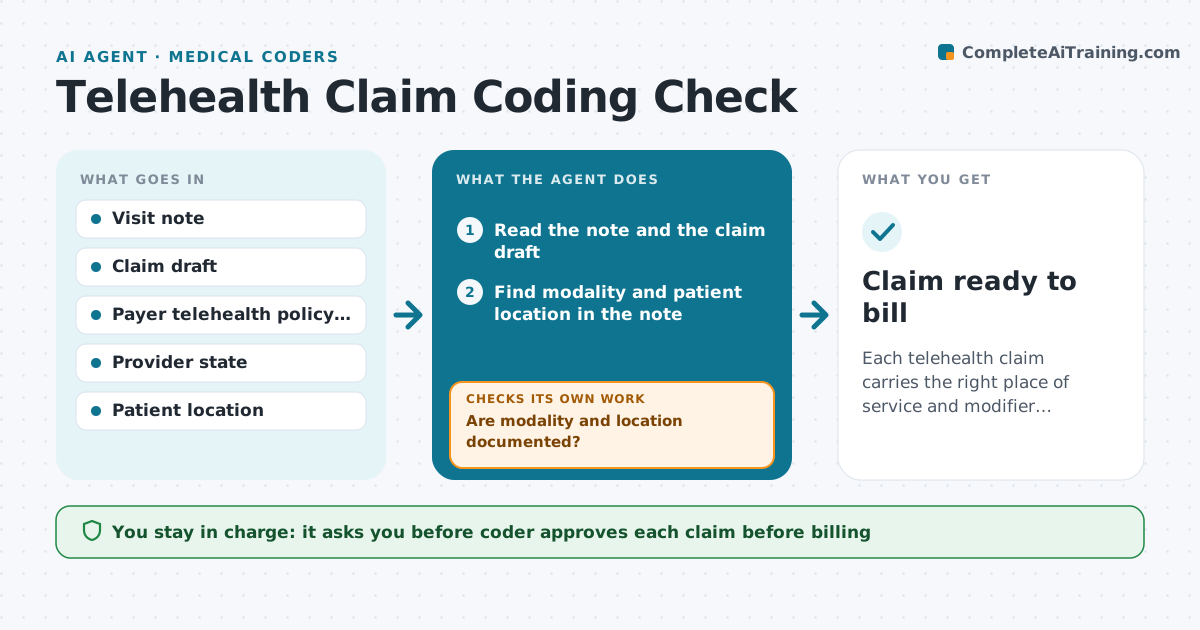
Each telehealth claim carries the right place of service and modifier, supported by the note.
What it does
For virtual visits, place of service, modifiers and payer rules change by payer and state. For each telehealth claim, the agent reads the visit note for the type of visit, such as audio-video or audio only, and where the patient was. It checks the payer policy table, then chooses the place of service and modifier. If the note lacks location or proof of audio and video, it sends a query to the provider and rechecks the note after the answer. It flags any claim where the policy says it is not payable. The coder approves before billing. Edge case: a patient who joined from a car, where the location must be recorded.
How it works
Follow the arrows from top to bottom. The orange dashed arrow is the loop: when a check fails, the agent goes back and tries again.
Read the steps as a list
- Telehealth note signed
- Read the note and the claim draft
- Find modality and patient location in the note
- Are modality and location documented?If not: Send a query to the provider and wait for an addendum. Back to step 3.
- Look up the payer policy table
- Choose place of service and modifier
- Check that the service is payable by this payer in this state
- Does the note support the choice and payment rules?If not: Revise the choice or query the provider again. Back to step 3.
- Coder approves the claim codingThe agent waits here for your OK.
- Update the claim draft
- Claim ready to bill
How it decides
It reads modality and location from the note, applies the payer's table and sends a query when either detail is missing or unclear.
- Query when audio-video proof is missing
- Follow the payer table, not a default
- Check the provider's state license
- Hold the claim until the note supports it
Make it yours
Every agent is a starting point. You choose these settings for your own situation.
- Payers and states covered
- Query wording
- Place of service codes by payer
- How long to wait before a reminder
What keeps you in control
It always asks you first
- Coder approves each claim before billing
Hard limits
- Never bill a claim itself
- Do not guess location or modality
It stops when
- Done: claim coded and approved
- Stop: the payer does not cover the service and billing staff decide
Set it up
We guide you through the set-up, step by step
Members get the full set-up guide for this agent. No technical skills needed: you copy, paste and upload.
- One set of instructions to paste into your AI, with the clicks for ChatGPT, Claude, Microsoft 365 Copilot, Gemini and Grok
- The agent then walks you through connecting your own data, one source at a time
- A downloadable copy with the flow chart, the rules and the full guide