AI agent for medical coders
Unbilled Encounter Agent
Keep unbilled days low by clearing every hold quickly
What it does
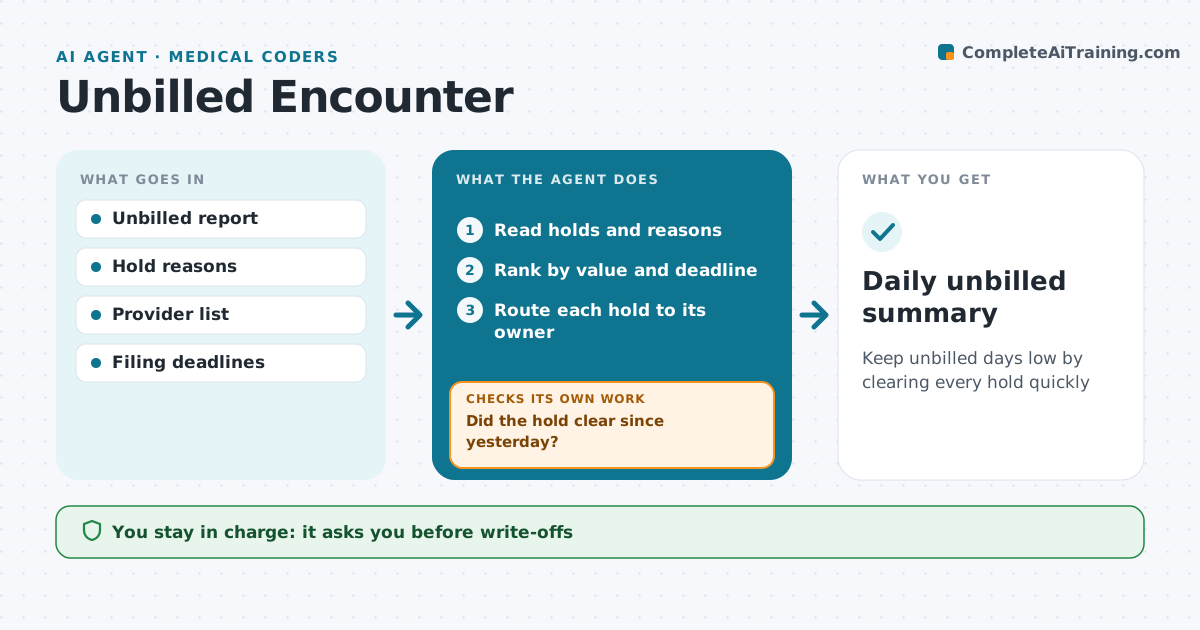
Every day encounters sit in an unbilled queue for different reasons, and each day of delay pushes cash out and risks filing deadlines. This agent reads the unbilled list, finds the reason for each hold, such as an unsigned note, missing charge, pending coding query or missing authorization, and routes it to the right owner with its age. It sorts items by value and filing deadline. Each morning it checks what cleared since yesterday. Items that did not move get a reminder, and anything older than five days is escalated. It also spots patterns, such as one provider with many unsigned notes, and reports them to the manager. Coders and managers decide on any write-off. Edge case: a likely duplicate encounter is flagged for review and never deleted by the agent.
How it works
Follow the arrows from top to bottom. The orange dashed arrow is the loop: when a check fails, the agent goes back and tries again.
Read the steps as a list
- Daily unbilled report
- Read holds and reasons
- Rank by value and deadline
- Route each hold to its owner
- Did the hold clear since yesterday?If not: remind the owner, escalate after 5 days. Back to step 4.
- Manager decides on write-offs or duplicatesThe agent waits here for your OK.
- Daily unbilled summary
How it decides
Holds are ranked by value and days to deadline. Each reason maps to an owner.
- Holds over 5 days are escalated
- Encounters within 15 days of the filing deadline go first
- Patterns by provider are reported weekly
Make it yours
Every agent is a starting point. You choose these settings for your own situation.
- Escalation age
- Owner per hold type
- Report time
- Value threshold for priority
What keeps you in control
It always asks you first
- Write-offs
- Deleting duplicates
Hard limits
- No encounter deleted by the agent
- No coding without documentation
It stops when
- Done: hold cleared
- Stop: encounter cancelled, close with note
Set it up
We guide you through the set-up, step by step
Members get the full set-up guide for this agent. No technical skills needed: you copy, paste and upload.
- One set of instructions to paste into your AI, with the clicks for ChatGPT, Claude, Microsoft 365 Copilot, Gemini and Grok
- The agent then walks you through connecting your own data, one source at a time
- A downloadable copy with the flow chart, the rules and the full guide