AI agent for dispatchers
Unit Availability Board Agent
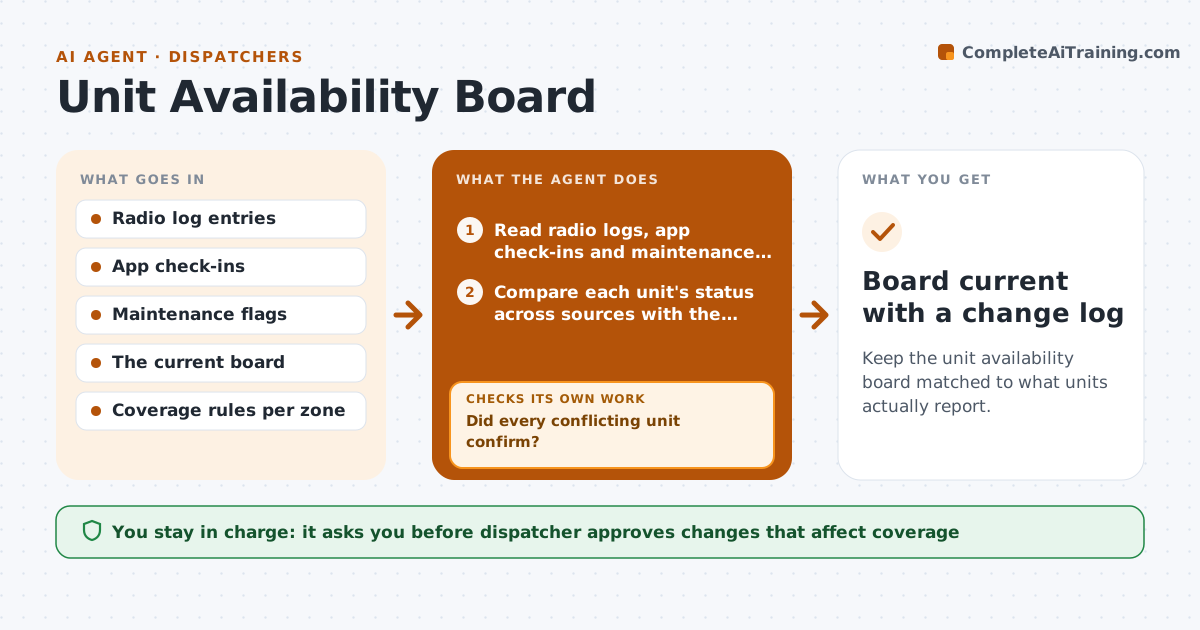
Keep the unit availability board matched to what units actually report.
What it does
The board of available units is only useful if it is true, but status lives in three places: radio logs, app check-ins and maintenance flags. This agent reads all three on a schedule and compares them with the board. When a unit shows available on the board but its last check-in is two hours old, or a maintenance flag says it is in the shop, the agent marks a conflict. It messages the unit to confirm status and waits for a reply. When the answer arrives it prepares the board update. Updates that remove a unit from an area, and so change coverage, go to the dispatcher first. Edge case: a unit that never replies is shown as unconfirmed rather than available.
How it works
Follow the arrows from top to bottom. The orange dashed arrow is the loop: when a check fails, the agent goes back and tries again.
Read the steps as a list
- Scheduled check or shift change
- Read radio logs, app check-ins and maintenance flags
- Compare each unit's status across sources with the board
- List conflicts and stale entries
- Message conflicting units to confirm status
- Did every conflicting unit confirm?If not: Wait the set time, resend once, then mark the unit unconfirmed. Back to step 4.
- Prepare board changes and note any coverage gaps
- Dispatcher approves changes that affect zone coverageThe agent waits here for your OK.
- Update the board
- Does the board now match the latest sources?If not: Re-read the sources and repeat the comparison. Back to step 2.
- Board current with a change log
How it decides
It trusts the most recent confirmed source, and treats a unit as unconfirmed when sources disagree and no one has replied.
- A check-in older than 90 minutes makes a unit stale
- An open maintenance flag overrides an available status
- Changes that leave a zone below minimum coverage need dispatcher approval
- Show unconfirmed units separately, never as available
Make it yours
Every agent is a starting point. You choose these settings for your own situation.
- Check-in age that counts as stale (default 90 minutes)
- How often the agent runs (default 15 minutes)
- Minimum units per zone (default 2)
- Wait time before resending a request (default 10 minutes)
What keeps you in control
It always asks you first
- Dispatcher approves changes that affect coverage
Hard limits
- Never mark a unit available without a confirmation or a recent check-in
- Never change the board for coverage without approval
It stops when
- Done: board matches confirmed sources
- Stop: a zone falls below minimum coverage and the dispatcher takes over
Set it up
We guide you through the set-up, step by step
Members get the full set-up guide for this agent. No technical skills needed: you copy, paste and upload.
- One set of instructions to paste into your AI, with the clicks for ChatGPT, Claude, Microsoft 365 Copilot, Gemini and Grok
- The agent then walks you through connecting your own data, one source at a time
- A downloadable copy with the flow chart, the rules and the full guide