AI agent for legislative assistants
Vote Prep Briefing Memo Agent
A one-page vote memo on the current version of the bill, with every fact sourced
What it does
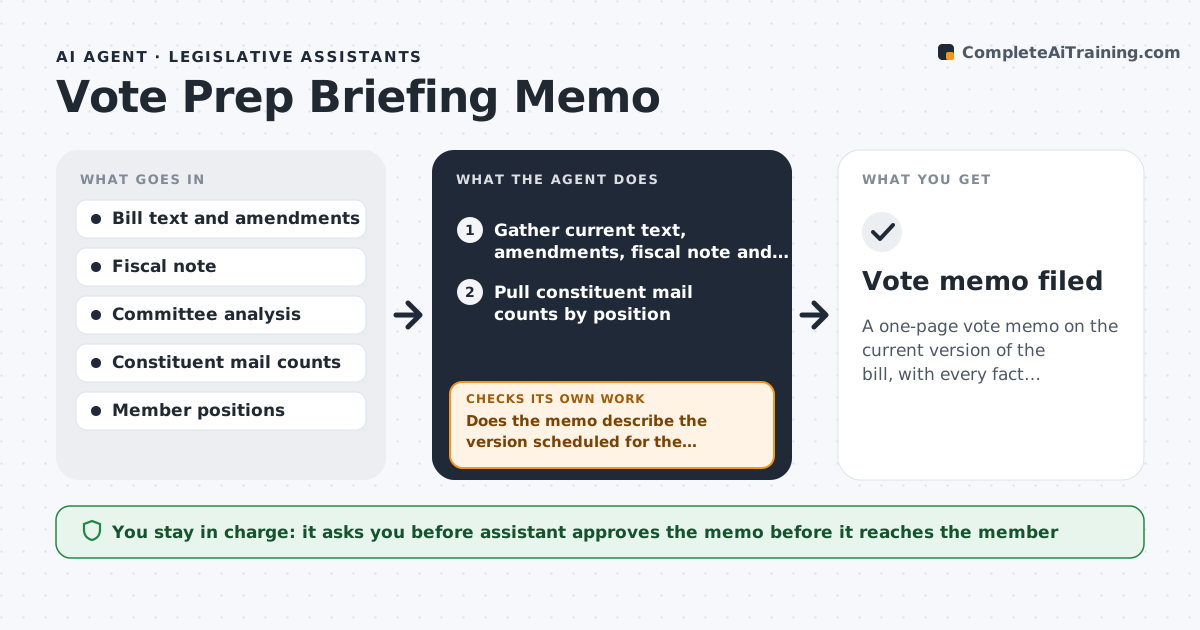
Before each vote, the member needs a short memo: what the bill does, what changed, the fiscal note, who supports and opposes it, and how it affects the district. Pulling this together under deadline is stressful. This agent gathers the latest bill text, amendments, fiscal note, committee analysis and constituent mail counts, then drafts a one-page memo with sources. It checks that the memo describes the version actually scheduled for the vote, and redrafts if a newer version appears. A second check confirms every number and claim links to a source; anything unsourced is removed or marked for staff. The recommendation section is left blank. The assistant edits and sends the memo, and the member decides the vote. Edge case: if the fiscal note is older than the latest amendment, the memo says so plainly.
How it works
Follow the arrows from top to bottom. The orange dashed arrow is the loop: when a check fails, the agent goes back and tries again.
Read the steps as a list
- Bill appears on a vote calendar
- Gather current text, amendments, fiscal note and analysis
- Pull constituent mail counts by position
- Draft the one-page memo with sources
- Does the memo describe the version scheduled for the vote?If not: fetch the newest version and redraft the summary. Back to step 2.
- Does every number and claim link to a source?If not: remove the claim or mark it for staff to confirm. Back to step 4.
- Assistant reviews and sends the memo to the memberThe agent waits here for your OK.
- Vote memo filed
How it decides
It always works from the latest version on the calendar. Facts without a source are removed or marked for staff to confirm.
- Use the version on the calendar, not the introduced bill
- Flag fiscal notes older than the latest amendment
- Recommendation section is left blank for staff
Make it yours
Every agent is a starting point. You choose these settings for your own situation.
- Memo length (default one page)
- Sections to include (district impact, mail counts, stakeholder list)
- Which committees or floors to cover
- Delivery format (PDF, email, briefing book)
What keeps you in control
It always asks you first
- Assistant approves the memo before it reaches the member
- The member alone decides the vote
Hard limits
- Never recommends how to vote
- Never contacts outside groups
It stops when
- Done: memo sourced and on the current version
- Stop: bill text not available
Set it up
We guide you through the set-up, step by step
Members get the full set-up guide for this agent. No technical skills needed: you copy, paste and upload.
- One set of instructions to paste into your AI, with the clicks for ChatGPT, Claude, Microsoft 365 Copilot, Gemini and Grok
- The agent then walks you through connecting your own data, one source at a time
- A downloadable copy with the flow chart, the rules and the full guide