AI tool
OneLiner (For Figma)
Transform your Figma designs with OneLiner, a free plugin that crafts tailored landing page copy in under 30 seconds. Its intuitive interface guides you seamlessly, making quick and effective copywriting accessible for everyone, now available in beta.
About: OneLiner (For Figma)
OneLiner is an innovative Figma plugin specifically designed to streamline the copywriting process for landing pages, allowing users to craft compelling text in under 30 seconds. With an intuitive user interface, OneLiner guides users step-by-step through the creation of effective copy, making it accessible to both seasoned copywriters and those new to the field.
Key features include customizable templates tailored for various industries, real-time suggestions that enhance text quality, and a user-friendly dashboard that simplifies the editing process. OneLiner is particularly beneficial for designers and marketers who need to generate persuasive content quickly without sacrificing quality.
Currently in beta and offered at no cost, this plugin stands out by integrating seamlessly with Figma, enabling users to create visually appealing designs alongside their copy. The combination of speed, efficiency, and ease of use makes OneLiner a valuable tool for anyone looking to produce impactful landing page content effectively.
Review: OneLiner (For Figma)
Introduction
OneLiner is a Figma plugin designed to help users create landing page copywriting in under 30 seconds. This tool is especially useful for designers, copywriters, and startup teams looking for a fast and easy way to generate compelling landing page content directly within Figma. Its relevance is heightened by the increasing demand for rapid content creation in design workflows, and the plugin’s beta status means it’s evolving with active user feedback.
Key Features
OneLiner offers several core functionalities that make it a handy tool for quick copywriting:
- Fast Copy Generation: With just a one-line input describing the project (for example, “landing page for a video game about cats”), the plugin generates a tailor-made copy in less than 30 seconds.
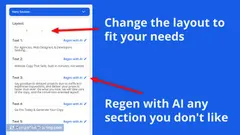
- User-Friendly Interface: The guided UI walks users through the copywriting process, ensuring that all necessary elements are included.
- Beta Feedback Integration: As the tool is still in beta, the development team actively seeks and integrates user feedback to improve core functions and the overall UI.
Pricing and Value
OneLiner is available for free, making it a very attractive proposition for Figma users looking to streamline their copywriting process without incurring extra costs. Considering its fast turnaround time and user-friendly design, the free pricing model offers excellent value, especially when compared to other paid copywriting tools and design integrations available on the market.
Pros and Cons
- Pros:
- Quick and efficient copy generation within Figma.
- User-friendly guided interface that simplifies the copywriting process.
- Free access, providing great value for professionals and teams on a budget.
- Active beta development that welcomes user feedback for continuous improvement.
- Cons:
- Being in beta, the plugin may exhibit occasional bugs or unfinished UI elements.
- Some users have experienced issues with licensing redirects, which could affect the workflow.
Final Verdict
Overall, OneLiner is a promising tool for Figma users who need to generate landing page copy quickly and efficiently. Its strengths lie in its ease of use, rapid output, and cost-free access. However, potential users should be aware of its beta status and be prepared for occasional glitches or UI improvements in future updates. If you are an early adopter or a design professional who values speed in copy creation and is willing to provide feedback to refine the tool further, OneLiner is definitely worth trying.
Jobs OneLiner (For Figma) suits
We checked OneLiner (For Figma) against 500+ jobs; these get the most out of it.
Alternatives to OneLiner (For Figma)
Other tools that do the same main job. Our AI compared OneLiner (For Figma) with similar tools and kept the ones you could use instead.