AI app for human resources · no coding needed
Managed AI headshot production platform
Reduce headshot retake and retouching cycles while keeping a consistent, approved staff image.
Made for: HR and employer-brand teams producing consistent professional headshots for staff and candidates
What it does for you
The problem
Staff and candidate headshots arrive in mixed quality, lighting and backgrounds, so HR teams chase retakes and manual retouching across many people.
What it gives you
Reviewer-approved headshot sets linked to each person's record
What you give it
Consented selfiesbrand style rulesrole requirements
Build your own version of PhotoFuse, Alter AI: AI Headshot Generator and more
One app with what these 10 AI tools do, yours to keep and change: PhotoFuse, Alter AI: AI Headshot Generator, AirBrush Studio, GetAvatars.ai, PicStudio.AI, 1PhotoAI, Instaheadshots, BetterPic, AI Headshots, Fhotosonic.
Everything these tools do, in one app
- Selfie to Portrait Transforms user-uploaded selfies into professional-looking portraits or headshots.Found in PhotoFuse, Alter AI: AI Headshot Generator, GetAvatars.ai and 5 more
- Multiple Variations Generates several different portrait options from a single input or set of selfies.Found in Alter AI: AI Headshot Generator, GetAvatars.ai, PicStudio.AI and 3 more
- Style Selection Allows users to choose from various predefined styles or themes for the generated portraits.Found in PhotoFuse, GetAvatars.ai, PicStudio.AI and 2 more
- Background Customization Enables changing or selecting backgrounds for the portraits.Found in PhotoFuse, AI Headshots
- Outfit Customization Lets users select different clothing options for the portraits.Found in PhotoFuse, AI Headshots
- Prompt Customization Provides a way to modify text prompts to influence the generated image style.Found in Fhotosonic
- Visual Prompt Builder Offers toggles or selectors for backgrounds, styles, outfits, accessories, lighting, and expressions without text prompts.Found in PhotoFuse
- Guided Training Guides users through uploading selfies with suggestions for optimal lighting, angles, and expressions.Found in PhotoFuse
- Private AI Model Creates a personalized AI model from user images without sharing photos publicly.Found in PhotoFuse
- Fast Generation Produces portraits quickly, often within seconds or minutes.Found in PhotoFuse, GetAvatars.ai, 1PhotoAI and 2 more
- High-Resolution Output Generates images at high resolution suitable for printing and digital use.Found in PicStudio.AI
- Realistic Details Produces images with realistic skin textures, pores, and precise hand details.Found in PicStudio.AI
- Regular Updates Adds new portrait packs or styles regularly to expand creative options.Found in PicStudio.AI
- Batch Processing Allows editing or generating multiple photos simultaneously.Found in BetterPic, AI Headshots
- Background Removal Removes or replaces the background of a photo.Found in BetterPic, AI Headshots
- Skin Smoothing Automatically smooths skin and removes blemishes in portraits.Found in AirBrush Studio, BetterPic
- Teeth Whitening Whitens teeth in photos.Found in AirBrush Studio
- Eye Brightening Brightens eyes in photos.Found in AirBrush Studio
- Real-Time Preview Shows edits in real time as they are applied.Found in AirBrush Studio
- Filters and Lighting Provides adjustable filters and lighting enhancements.Found in AirBrush Studio
- Background Blurring Blurs the background to create a shallow depth-of-field effect.Found in AirBrush Studio
- Automatic Enhancements Automatically adjusts brightness, contrast, and color balance.Found in BetterPic
How it works, step by step
- Transform consented selfies into professional-looking portraits
- Generate several portrait variations from one input set
- Select predefined styles and themes
- Change or select portrait backgrounds
- Select clothing options for portraits
- Modify text prompts that influence image style
- Offer toggles for background, style, outfit, accessories, lighting and expression
- Guide users through selfie upload with lighting, angle and expression suggestions
- Build a private model from user images without public sharing
- Produce portraits quickly within seconds or minutes
- Export high-resolution images for print and digital use
- Preserve realistic skin texture, pores and hand detail
- Add new portrait packs and styles on a regular schedule
- Process multiple photos in a batch
- Remove or replace photo backgrounds
- Smooth skin and remove blemishes
- Whiten teeth
- Brighten eyes
- Show edits in real time as they are applied
- Apply adjustable filters and lighting enhancements
- Blur backgrounds for a shallow depth-of-field effect
- Adjust brightness, contrast and colour balance automatically
- Compare the reviewed result with the recorded baseline and value assumptions
- Capture corrections and named-owner approval before consequential use
- Export a versioned reviewer-approved headshot set with source references and unresolved questions
Jobs this app suits
Our AI checked this app against 500 jobs; these get the most out of it. Each job links to its learning path.
Build it yourself with your AI system
Build this app yourself, no coding needed
Start with a quick version you can try in a few minutes. Like it? Then build the full app by copying and pasting our step-by-step instructions: everything is prepared for you.
Sign in to see how to build it yourself
Build a quick version to try, or get the full app pack for Managed AI headshot production platform with the step-by-step building instructions. You don't need any technical skills: you copy, paste and answer a few questions. Both are included in the membership.
4 Have it built for you days to a few weeks
Rather not do it yourself, or want it fully tailored to your data, your way of working and your brand? Nexibeo builds Managed AI headshot production platform with you.
What's in the app pack
Included in the Complete AI Training membership.
- The building instructions your AI follows, step by step
- The questions your AI will ask you about your business before it starts
- A clickable demo you can open in your browser, to see how it should work
- A detailed blueprint of the screens, the information it keeps and the checks it runs
Become a member to get the app packAlready a member? Sign in
The files, for the technically curious
- START-HERE.mdHow to build it with your own AI (read first)3 KB
- README.mdOverview and links5 KB
- questions.mdQuestions to answer before you build3 KB
- prompt-cloudflare.mdThe full build prompt, hosted on Cloudflare27 KB
- prompt-vps.mdThe same build on your own server (Docker)27 KB
- spec.jsonData model, API, AI pipeline, acceptance criteria14 KB
- demo/index.htmlThe working demo on sample data192 KB
Questions
Do I need to know how to code?
No. You copy and paste the prompts on this page into ChatGPT or Claude, and the AI does the building. When it asks you something, you answer in your own words.
What does it cost?
The quick version, the app pack and the step-by-step instructions are for members: you pay the membership price, not a price per app (see the plans). Building the full app uses your own ChatGPT or Claude subscription. Putting it online is often cheap or no cost at the start, and your AI tells you before anything costs money.
How long does it take?
The quick version: about two minutes. The real app: an afternoon for a first version you can use, longer if you want every feature.
Can I change it to fit my business?
Yes. Tell your AI what to change in plain words, like “add a column for the price” or “use our logo and colours”. Or have Nexibeo build and customise it for you.
More detailsHow the AI works, safeguards and what to build first
Reduce headshot retake and retouching cycles while keeping a consistent, approved staff image. For HR and employer-brand teams producing consistent professional headshots for staff and candidates, convert consented selfies, brand style rules and role requirements into reviewer-approved headshot sets linked to each person's record. The benefit is a testable hypothesis, measured through approved headshots per production hour and retakes after publication; do not assume that AI output alone produces business value.
Confirm the buyer's problem and scope, collect consented selfies, brand style rules and role requirements, then follow this sequence: 1. Transform consented selfies into professional-looking portraits. 2. Generate several portrait variations from one input set. 3. Select predefined styles and themes. Resolve uncertain cases with qualified reviewers, approve reviewer-approved headshot sets linked to each person's record, and measure approved headshots per production hour and retakes after publication against a documented baseline.
How the AI works
Use AI to interpret permitted inputs, suggest structured mappings and generate candidate outputs for the three stated task modules. Use deterministic code for arithmetic, schema validation, hard constraints and reproducible tests. Review source-linked explanations and uncertainty before accepting results. One approved brand style set and licensed background library; final likeness and publication checks remain human. A model suggestion is never a verified fact, professional decision or authorization to act.
Safeguards
Preserve likeness, consent, source attribution and usage permissions. Staff approve substantive changes and publication scope. One approved brand style set and licensed background library; final likeness and publication checks remain human. Keep all consequential actions under authorized human control and do not fabricate missing inputs, permissions, professional judgments or market evidence.
What to build first
Pilot scope: One approved brand style set and licensed background library; final likeness and publication checks remain human. Implement one approved input format, a bounded representative case set and the first two task modules: transform consented selfies into professional-looking portraits; generate several portrait variations from one input set. Support the third module with operator review: select predefined styles and themes. Include source references, corrections, basic organization access, approval states, export and value measurement. Use managed operator assistance for unresolved exceptions. The cost estimate covers this narrow prototype, not unrestricted multi-tenant scale, complex production integrations, specialist certification or physical operations.
What it can connect to
Consented staff selfies, HR system records and permitted brand asset libraries. Cloud asset storage, HRIS import/export and publishing destinations. Start with file exchange and validate destination specifications before promising direct publishing. Start with authorized file exchange. Validate current provider access, usage rights and schema behavior before promising a connector.
The screens in detail
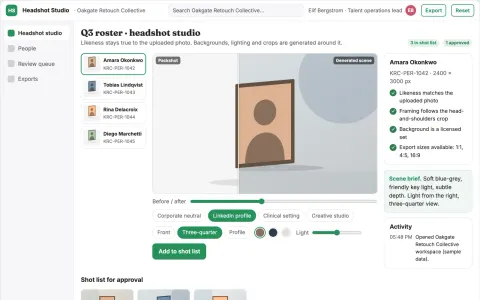
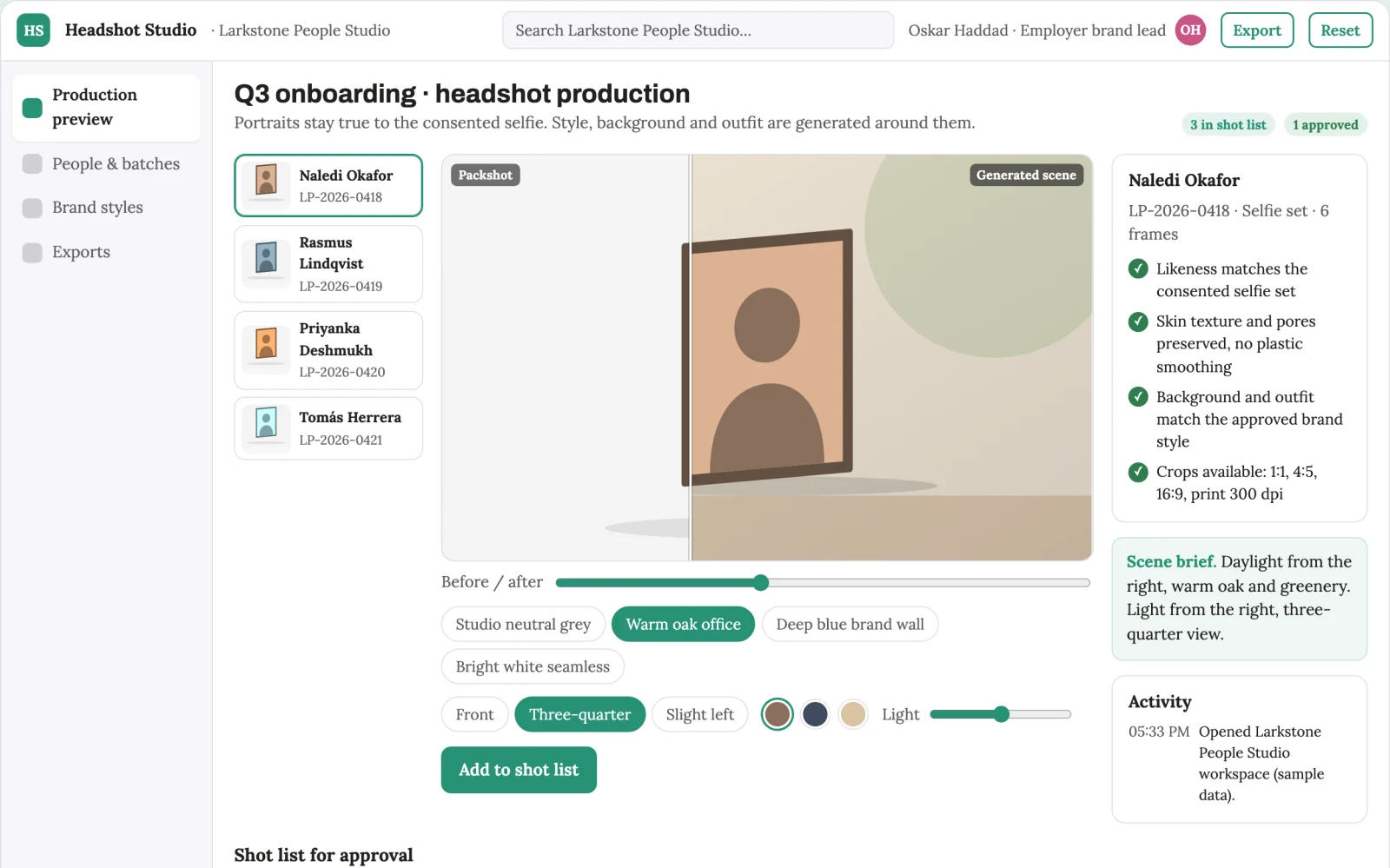
Primary screens: Consent and brand brief, Editable production preview, Client proof and delivery. Use a thumbnail gallery for people and batches, a large central editing canvas, and a right-hand panel for style, background, outfit and comment controls. Let users compare variations side by side. Display draft, changes requested and approved states. Provide a client preview link with comments anchored to the relevant portrait. Make the task-specific outcome reviewer-approved headshot sets linked to each person's record visible beside its evidence, review state and value baseline.