MCP server · Research
Hlido MCP server
Let your AI look up trust scores, claim audits and comparisons for AI agents before you rely on one.

Hlido is an independent review site for AI agents. Think of it like a review page that tests agents and publishes a score, a verdict, and evidence for each claim. This MCP server lets your AI read that review data for you, so you can ask questions like "is this agent any good?" and get an answer with evidence.
What is an MCP server? The 30-second version
On its own, your AI can only chat with you using what it already knows. An MCP server is a small helper program that gives your AI a new skill or a connection to an outside service. This one connects your AI to Hlido, the AI agent review platform. Once connected, your AI can look up Hlido's scores, audits and comparisons and bring the results back into your chat.
What this MCP server does
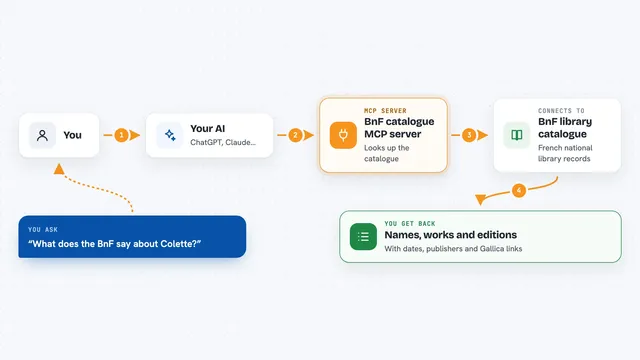
You ask your AI a question about an AI agent, like whether it is trustworthy or whether it really does what it claims. Your AI sends that question to this Hlido helper. The helper reads Hlido's public review data and finds the matching scorecard, audit or comparison. It sends the answer back, and your AI shows it to you in the chat as a score, a tier, a pass or fail list, or a side by side table.
 Click to zoom
What you can do with it
- Check the trust score and tier for a specific AI agent
- Search for trusted agents that match what you need
- Verify whether an agent really does a specific thing it claims
- Compare two agents side by side
- Pull the full published scorecard for an agent
- Find agents similar to one you already like
- Nominate an agent for Hlido to review
Try asking your AI
- “Is the agent called example-agent trustworthy?”
- “Find me a trusted agent for summarizing long documents”
- “Does this agent really support file uploads? Check the claim.”
- “Compare agent A and agent B for me.”
- “Show me the full scorecard for this agent.”
What it gives back to you
You get back plain answers in the chat: a score out of 100, a tier verdict, a short summary, and where relevant a list of claims marked PASS or FAIL with the evidence Hlido published. Comparisons come back as a side by side view of two agents. If you ask for the full scorecard, you get the published JSON data for that agent.
Before you start
What you need
- An MCP client that supports remote servers, such as Claude Desktop, Claude Code or Cursor
- Nothing else: the hosted server needs no account and no key
Good to know
The data comes from Hlido's own testing, so treat it as one independent opinion rather than the final word, and remember that submitting or reporting tools send information to Hlido.
Install it with your AI
Add Hlido MCP server to your AI, no technical skills needed
You don't install anything by hand. You copy one prompt, paste it into an AI that can work on your computer, and it checks, installs and connects the server for you, asking you when it needs something.
Sign in to get the install prompt
Members get a ready-made prompt that lets the Claude desktop app check Hlido MCP server, install it and connect it for them, step by step. You don't need any technical skills: you copy, paste and answer a few questions. Your connected AI can also find and install any of the 4,066 MCP servers here for you.
Who it's for
People who pick or recommend AI agents for their team and want an independent second opinion before trusting one.