
MCP server · Research
PainSpotter MCP server
by archoor
Let your AI look up startup and product ideas mined from Reddit, Hacker News and Product Hunt.
PainSpotter is a service that reads discussions on Reddit, Hacker News and Product Hunt and turns them into business ideas with scores. This MCP server connects that service to your AI assistant, so you can ask about opportunities and weekly analyses right in the chat. It is handy if you are researching product ideas, writing about markets, or just curious what people keep complaining about online.
What is an MCP server? The 30-second version
On its own, your AI can only chat with you using what it already knows. An MCP server is a small helper program that gives your AI a new skill or a connection to an outside service. This one connects your AI to PainSpotter, so when you ask a question, the AI can go fetch real opportunity data and blog posts from there. You stay in your normal chat window; the helper does the running around.
What this MCP server does
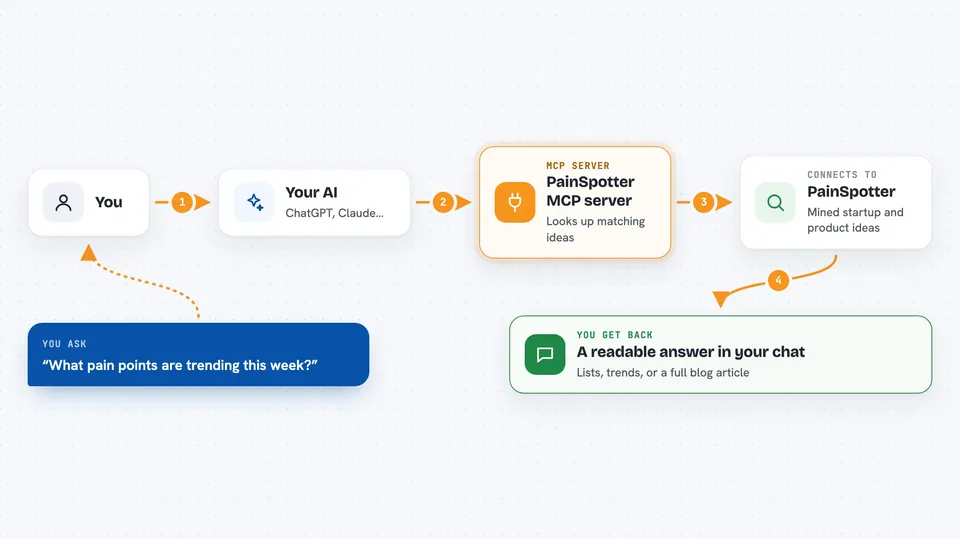
You ask your AI something like which pain points are trending right now. The AI passes your question to this helper, and the helper talks to PainSpotter's servers. PainSpotter looks through its mined discussions and scored opportunities, then sends back the matching results. Your AI turns that into a readable answer in the chat, with the details you asked for.
 Click to zoom
What you can do with it
- Browse the categories and trending snapshot of opportunities
- Search opportunities by keyword, score, platform, recommendation or category
- See which pain points are trending up right now
- Open one theme to see its market signal and the opportunities under it
- Read the full detail of a single opportunity, including any related blog link
- List recent weekly blog analyses
- Read the full text of a blog article in Markdown
Try asking your AI
- “What are the top trending pain points this week?”
- “Show me opportunities in the developer tools category with a high commercial score”
- “List the most recent blog posts on PainSpotter”
- “Give me the full detail on that opportunity about invoicing for freelancers”
What it gives back to you
You get answers written in the chat, built from PainSpotter's data. That can be a list of opportunities with their scores, a summary of trending themes, or the full text of a blog article. For a single opportunity, you get its full detail, including a link to a related blog post when one exists. Nothing is changed on your side; it is all reading.
Before you start
What you need
- A PainSpotter account and API key (create one at painspotter.ai/account; the key is like a password for apps)
- An MCP client such as Claude or Cursor
- For the local option: Python with pip or uvx installed
Good to know
Some tools use up your monthly quota on your PainSpotter key, so heavy searching can eat into your allowance.
Install it with your AI
Add PainSpotter MCP server to your AI, no technical skills needed
You don't install anything by hand. You copy one prompt, paste it into an AI that can work on your computer, and it checks, installs and connects the server for you, asking you when it needs something.
Sign in to get the install prompt
Members get a ready-made prompt that lets the Claude desktop app check PainSpotter MCP server, install it and connect it for them, step by step. You don't need any technical skills: you copy, paste and answer a few questions. Your connected AI can also find and install any of the 4,361 MCP servers here for you.
Who it's for
Founders, product managers, market researchers and writers who want quick, sourced ideas about what people are struggling with online.





