
MCP server · Research
Idea Reality Check MCP server
by mnemox-ai
Your AI can scan GitHub, Hacker News, npm, PyPI and Stack Overflow to see if your idea already exists.
This is a small helper that lets your AI check whether someone has already built the thing you are about to build. You describe your idea in one sentence, and it searches five public places where developers share projects and code. It is handy if you are starting a new product, a side project, or a feature and want to know how crowded the space is before you spend weeks on it.
What is an MCP server? The 30-second version
On its own, your AI can only chat with you. It cannot look things up on GitHub or anywhere else unless you paste the information in yourself. An MCP server is a small helper program that gives your AI one new skill. This one gives it the skill of checking your idea against five public databases, so when you ask, the AI can go look and come back with real numbers instead of a guess.
What this MCP server does
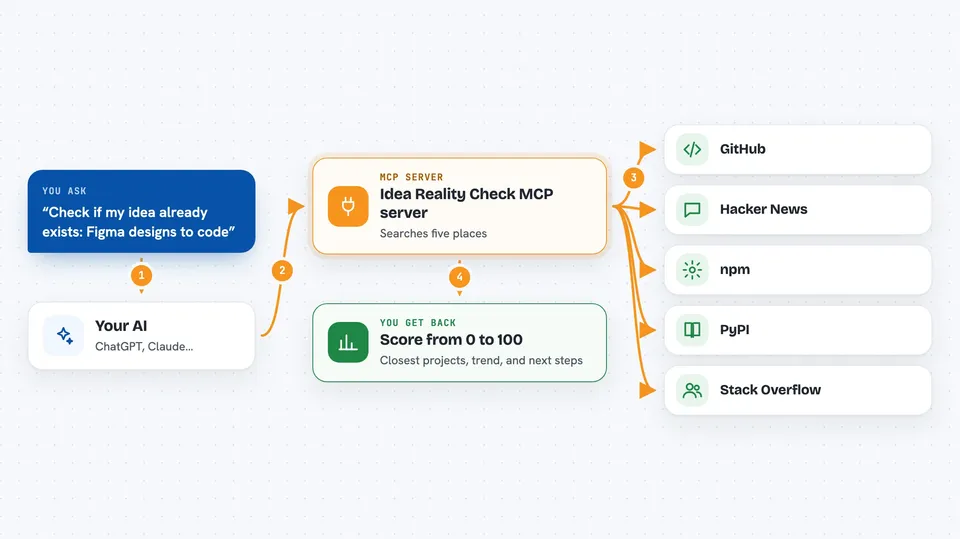
You tell your AI your idea in plain words, like a tool that turns Figma designs into code. The AI passes that sentence to this helper. The helper searches GitHub, Hacker News, npm, PyPI and Stack Overflow for similar projects, packages and discussions. It counts what it finds and turns that into a score from 0 to 100, plus a trend direction and a few suggestions. Your AI then shows you the score, the closest competitors, and what it thinks you should do next.
 Click to zoom
What you can do with it
- Check whether your idea already exists before you start building
- See how many similar projects are on GitHub and how popular the biggest one is
- Find out if the topic is growing or fading over time
- Get a list of the closest existing projects with links and star counts
- Read pivot suggestions when the space looks crowded
- Run a quick check in a few seconds or a deeper scan across more sources
- Ask for a reality check straight from your AI chat without opening a browser
Try asking your AI
- “Before I start building, check if this already exists: a CLI tool that converts Figma designs to React components”
- “Is there already a lot of competition for an AI code review tool?”
- “Do a deep check on a habit tracker app that syncs with your calendar”
- “Check if anyone has built a Slack bot that summarizes long threads”
What it gives back to you
You get a score from 0 to 100, a trend label like accelerating or declining, and a short verdict. Below that comes a list of the closest matching projects with their names, links and star counts, plus the number of packages and discussions found on each source. At the end there are a few pivot suggestions written in plain sentences. All of it appears as text in your chat, so you can read it and decide.
Before you start
What you need
- An AI app that supports MCP servers, such as Claude Desktop, Claude Code or Cursor
- The uvx tool installed on your computer (it comes with the uv Python installer)
- Optionally, a GitHub token for higher search limits (a free personal access token from GitHub)
Good to know
The score is a rough signal built from public search results, not a guarantee, so treat it as one input before you decide to build or drop an idea.
Install it with your AI
Add Idea Reality Check MCP server to your AI, no technical skills needed
You don't install anything by hand. You copy one prompt, paste it into an AI that can work on your computer, and it checks, installs and connects the server for you, asking you when it needs something.
Sign in to get the install prompt
Members get a ready-made prompt that lets the Claude desktop app check Idea Reality Check MCP server, install it and connect it for them, step by step. You don't need any technical skills: you copy, paste and answer a few questions. Your connected AI can also find and install any of the 4,609 MCP servers here for you.
Who it's for
Founders, product managers, developers and anyone about to start a new project who wants a quick reality check first.




