AI agent for inventory control specialists
ABC Cycle Count Scheduling Agent
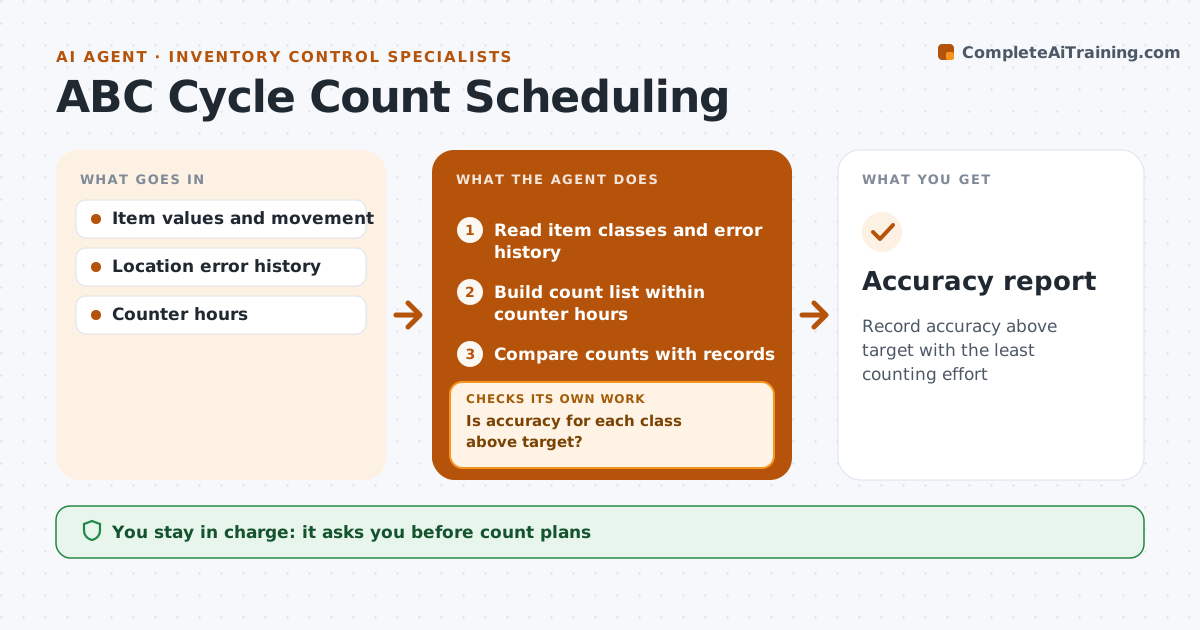
Record accuracy above target with the least counting effort
What it does
Cycle counting keeps stock records accurate without shutting down for a full stocktake, but only if the right items get counted often enough. Each day this agent ranks items by value and movement into A, B and C classes, adds locations with recent errors, and builds a count list that fits the counters' available hours. A items are counted most often, C items least. The inventory manager approves the plan. After counting, the agent compares results with system records and calculates accuracy for each class. If a class falls below its target, it adds extra counts for that class in the next plan and looks for the cause, such as a mislabeled bin or a receiving error. Adjustments to records stay with the person. Edge case: locations with open picks are counted only after that pick wave is done, so moving stock does not look like an error.
How it works
Follow the arrows from top to bottom. The orange dashed arrow is the loop: when a check fails, the agent goes back and tries again.
Read the steps as a list
- Daily plan
- Read item classes and error history
- Build count list within counter hours
- Inventory manager approves the planThe agent waits here for your OK.
- Compare counts with records
- Is accuracy for each class above target?If not: add counts for that class and look for the cause. Back to step 3.
- Accuracy report
How it decides
A items are counted monthly, B quarterly, C twice a year, plus any location with an error in the last 30 days.
- ABC frequencies
- Error locations added
- Open picks wait
Make it yours
Every agent is a starting point. You choose these settings for your own situation.
- Class frequencies
- Accuracy targets
- Counter hours
- Error lookback
What keeps you in control
It always asks you first
- Count plans
Hard limits
- Never adjusts records
- Never changes classes without approval
It stops when
- Done: accuracy on target
- Stop: counters unavailable
Set it up
We guide you through the set-up, step by step
Members get the full set-up guide for this agent. No technical skills needed: you copy, paste and upload.
- One set of instructions to paste into your AI, with the clicks for ChatGPT, Claude, Microsoft 365 Copilot, Gemini and Grok
- The agent then walks you through connecting your own data, one source at a time
- A downloadable copy with the flow chart, the rules and the full guide