AI agent for retail managers
Transfer and Returns to Vendor Agent
Move slow stock to where it sells and return eligible stock before windows close, with counts verified.
What it does
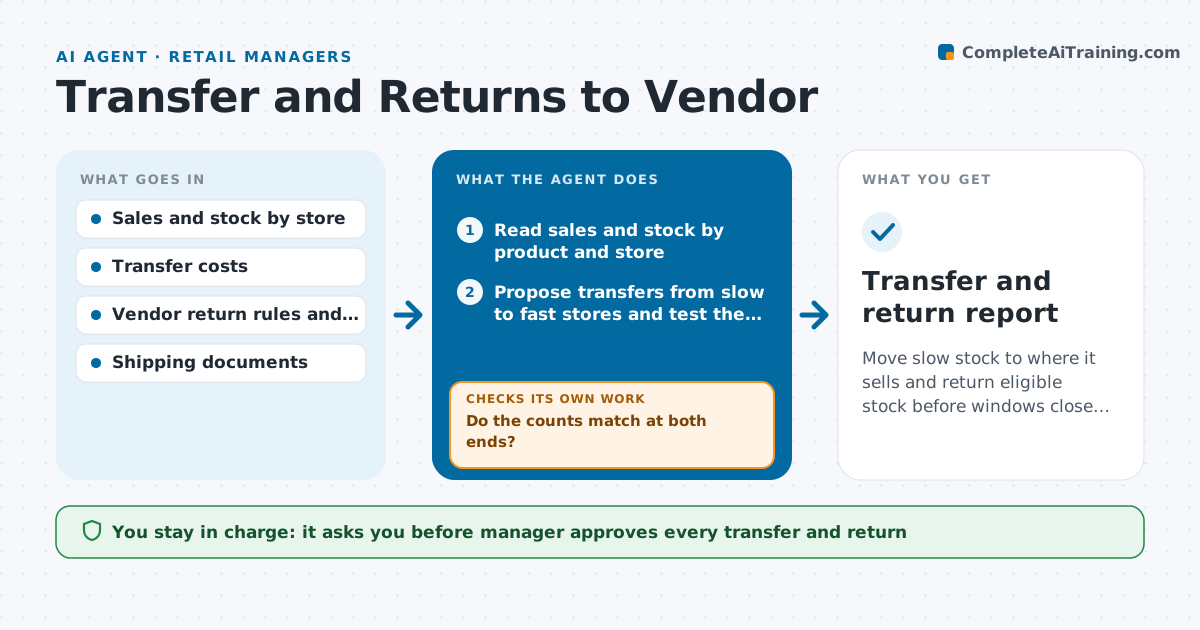
One store has 40 units of a winter jacket that nobody buys, while another has run out and loses sales every weekend. This agent compares sell-through, stock and cover by store for each product. It proposes transfers from slow stores to fast ones and checks that the transfer cost is lower than the gain. It also scans for stock that should go back to the vendor, using the return window, condition rules and quantity minimums, and builds the return lists. After the manager approves, it prepares the transfer and return documents. When the shipment has left or arrived, it compares the counts sent with those received and flags differences. If the count is off, it opens a discrepancy and asks the stores to recount. Edge case: a vendor return window ends in three days, so the agent moves that item to the top.
How it works
Follow the arrows from top to bottom. The orange dashed arrow is the loop: when a check fails, the agent goes back and tries again.
Read the steps as a list
- Weekly stock review
- Read sales and stock by product and store
- Propose transfers from slow to fast stores and test the cost
- Check vendor return windows and conditions
- Build the return lists in order of deadline
- Manager approves transfers and returnsThe agent waits here for your OK.
- Create the transfer and return documents
- Compare counts sent with counts received
- Do the counts match at both ends?If not: open a discrepancy and ask the stores to recount. Back to step 7.
- Did sell-through improve at the receiving store?If not: revise the cover thresholds or propose a different store. Back to step 3.
- Transfer and return report
How it decides
It transfers when the sending store has more than 12 weeks of cover and the receiving store less than 3, and the sales gain exceeds the cost. Return deadlines come first.
- Transfer when the sender has over 12 weeks of cover and the receiver under 3
- Only move when expected sales gain is greater than the transfer cost
- Put items with deadlines under 7 days first on the return list
- Skip returns for items outside vendor condition rules
Make it yours
Every agent is a starting point. You choose these settings for your own situation.
- Cover thresholds (default 12 and 3 weeks)
- Vendors and their return rules
- Transfer cost limit
- Review day
- Document format
What keeps you in control
It always asks you first
- Manager approves every transfer and return
Hard limits
- Never ship or return stock without approval
- Never ignore a vendor's condition rules
It stops when
- Done: counts verified at both ends
- Stop: stock data is older than a week
Set it up
We guide you through the set-up, step by step
Members get the full set-up guide for this agent. No technical skills needed: you copy, paste and upload.
- One set of instructions to paste into your AI, with the clicks for ChatGPT, Claude, Microsoft 365 Copilot, Gemini and Grok
- The agent then walks you through connecting your own data, one source at a time
- A downloadable copy with the flow chart, the rules and the full guide