AI agent for customer onboarding specialists
Account Setup Blocker Chaser Agent
Find stuck customers early and move each of them to the next setup step.
What it does
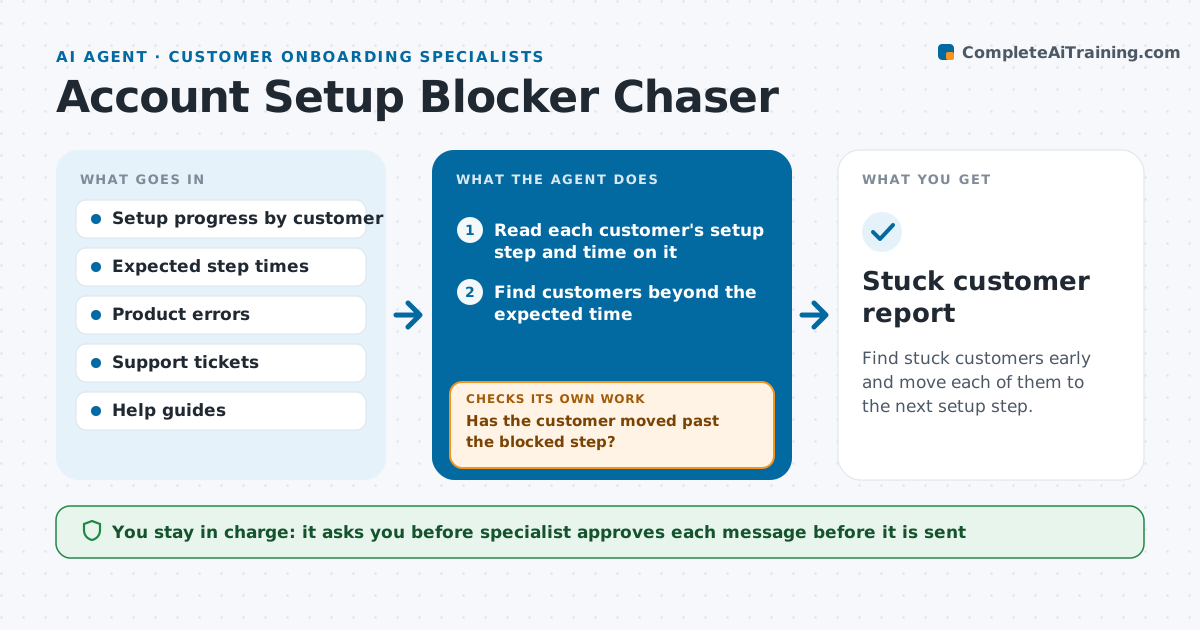
You have 60 customers in setup, and one of them has been stuck on connecting their data for 18 days while you were busy with kickoffs. This agent checks each customer's setup progress every day and compares the time on the current step with what is normal for that plan. It finds who is stuck beyond the expected time and looks for the likely blocker, using product usage, errors and support tickets, such as a failed connection or a missing admin permission. It then drafts a help message that includes the right guide or an offer of a call. It rechecks after a few days to see if the customer moved. If they did not, it proposes a different approach, such as a call or a contact at the customer's company. The specialist approves every message. Edge case: the customer is on holiday, so the agent waits.
How it works
Follow the arrows from top to bottom. The orange dashed arrow is the loop: when a check fails, the agent goes back and tries again.
Read the steps as a list
- Daily progress check
- Read each customer's setup step and time on it
- Find customers beyond the expected time
- Look at errors, tickets and activity for the likely blocker
- Draft a help message with the matching guide or a call offer
- Specialist approves each messageThe agent waits here for your OK.
- Send the approved message and log it
- Recheck the customer's progress after three days
- Has the customer moved past the blocked step?If not: propose another approach such as a call or a different contact. Back to step 4.
- Is the customer on the expected path for the next step?If not: mark them for review and list the next likely blocker. Back to step 3.
- Stuck customer report
How it decides
A customer is stuck when they spend more than 1.5 times the normal time on a step. The blocker is chosen from errors, tickets and the step type.
- Flag a step after 1.5 times its normal duration
- Match the guide to the error shown, not just to the step
- Wait 3 days before chasing again
- Skip customers with a known absence or pause note
Make it yours
Every agent is a starting point. You choose these settings for your own situation.
- Normal duration for each setup step
- Stuck threshold (default 1.5 times normal)
- Wait before chasing again (default 3 days)
- Message tone and signature
- Escalation rule
What keeps you in control
It always asks you first
- Specialist approves each message before it is sent
Hard limits
- Never send a message without approval
- Never contact someone who has asked to be left alone
It stops when
- Done: customer completes setup
- Stop: no response after three messages, so the specialist and account owner decide next steps
Set it up
We guide you through the set-up, step by step
Members get the full set-up guide for this agent. No technical skills needed: you copy, paste and upload.
- One set of instructions to paste into your AI, with the clicks for ChatGPT, Claude, Microsoft 365 Copilot, Gemini and Grok
- The agent then walks you through connecting your own data, one source at a time
- A downloadable copy with the flow chart, the rules and the full guide