AI agent for customer onboarding specialists
Kickoff Call Preparation Agent
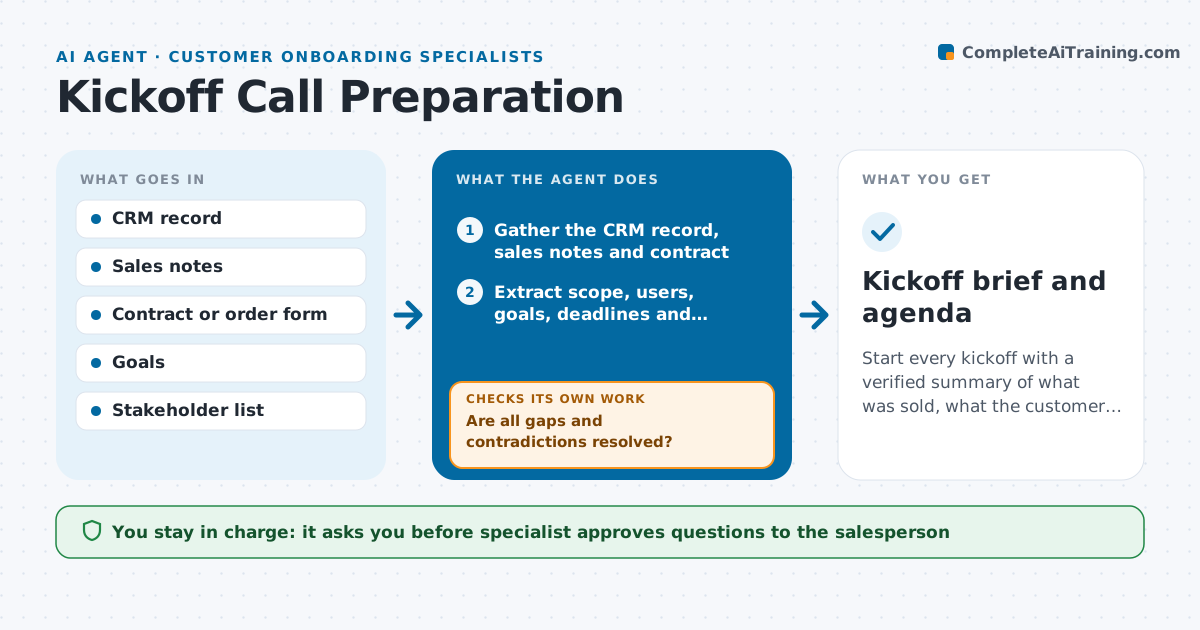
Start every kickoff with a verified summary of what was sold, what the customer expects and who is involved.
What it does
A kickoff call starts, and the customer says the salesperson promised an integration the specialist has never heard of. This agent prepares for each kickoff. It gathers the sales notes, the contract and order form, the stated goals and the list of stakeholders from the CRM. It builds a draft agenda and a one-page brief. It then compares the sources and flags gaps and contradictions, such as a contract that lists 50 users while the notes say 200. It asks the salesperson for the missing items and waits for the replies. After the answers arrive, it checks the brief again for open gaps. The specialist approves the agenda before it is sent to the customer. Edge case: the contract has a custom clause that is not in any notes, so the agent flags it.
How it works
Follow the arrows from top to bottom. The orange dashed arrow is the loop: when a check fails, the agent goes back and tries again.
Read the steps as a list
- Kickoff call is scheduled
- Gather the CRM record, sales notes and contract
- Extract scope, users, goals, deadlines and stakeholders
- Compare the sources and list gaps and contradictions
- Draft questions for the salesperson
- Specialist approves the questionsThe agent waits here for your OK.
- Send the questions and record the replies
- Are all gaps and contradictions resolved?If not: ask the missing questions again and mark remaining items as open. Back to step 3.
- Build the agenda and one-page brief
- Specialist approves the agenda before it is sentThe agent waits here for your OK.
- Kickoff brief and agenda
How it decides
It marks a gap when an item such as scope, users, goals or deadline is missing from a source, and a contradiction when two sources disagree.
- Flag any difference in users, scope or dates between the contract and the notes
- Treat the signed contract as the source of truth
- Ask the salesperson for any missing goal or success measure
- Highlight custom clauses and special promises at the top of the brief
Make it yours
Every agent is a starting point. You choose these settings for your own situation.
- Fields in the brief
- Question templates for gaps
- Agenda format and length
- Time before the call to start preparing (default 2 days)
- Source of truth rules
What keeps you in control
It always asks you first
- Specialist approves questions to the salesperson
- Specialist approves the agenda sent to the customer
Hard limits
- Never send the agenda to the customer without approval
- Never state a promise that the contract does not contain
It stops when
- Done: the brief has no open gaps and the agenda is approved
- Stop: the salesperson does not answer and the call is next day, so the specialist decides
Set it up
We guide you through the set-up, step by step
Members get the full set-up guide for this agent. No technical skills needed: you copy, paste and upload.
- One set of instructions to paste into your AI, with the clicks for ChatGPT, Claude, Microsoft 365 Copilot, Gemini and Grok
- The agent then walks you through connecting your own data, one source at a time
- A downloadable copy with the flow chart, the rules and the full guide