AI agent for customer onboarding specialists
Training Session Attendance Recovery Agent
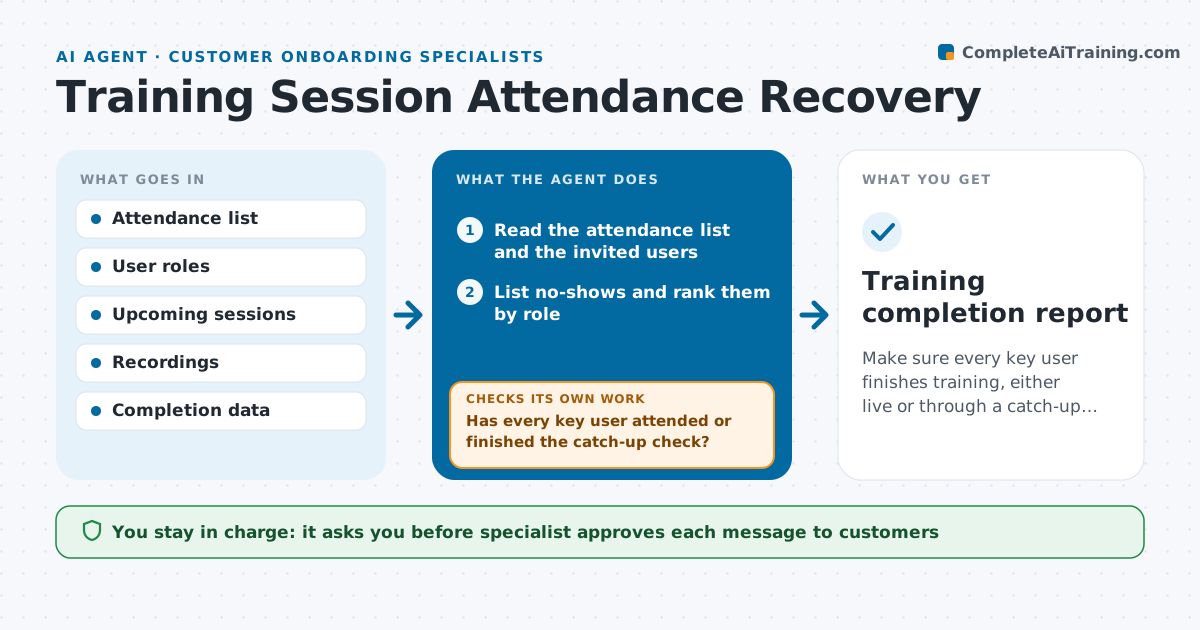
Make sure every key user finishes training, either live or through a catch-up path.
What it does
After a training session for 20 users from one customer, 6 do not show up, including the person who will administer the tool. This agent reads the attendance list after each session and finds the no-shows, ranked by role, with the administrator and key users first. For each one, it drafts a message with the next available session and a link to the recording and quick start guide. After a few days it checks who attended or watched the recording and completed the catch-up step, such as a short check task. Those who did not are chased again, and the agent proposes different options, like a short one-to-one slot. If the key user is still missing after the second round, it proposes escalating to the account owner. The specialist approves every message. Edge case: a user is on leave, so the agent schedules for their return.
How it works
Follow the arrows from top to bottom. The orange dashed arrow is the loop: when a check fails, the agent goes back and tries again.
Read the steps as a list
- Training session ends
- Read the attendance list and the invited users
- List no-shows and rank them by role
- Find the next sessions and recordings
- Draft catch-up messages with slot options
- Specialist approves the messagesThe agent waits here for your OK.
- Send the messages and log them
- After three days, check attendance and recording views
- Has every key user attended or finished the catch-up check?If not: propose a one-to-one slot and draft a second message. Back to step 4.
- Is any key user still missing after the second round?If not: propose escalation to the account owner for approval. Back to step 4.
- Training completion report
How it decides
It ranks no-shows by role importance. A person is caught up only when they attended another session or completed the recording and the catch-up check.
- Rank administrators and managers above general users
- Wait 3 days before the first follow-up check
- Count a recording as complete only after the catch-up task is done
- Escalate after two unanswered messages for key users
Make it yours
Every agent is a starting point. You choose these settings for your own situation.
- Roles counted as key users
- Days before the first check (default 3)
- Catch-up task for each course
- Maximum messages before escalation (default 2)
- Recording and session sources
What keeps you in control
It always asks you first
- Specialist approves each message to customers
- Specialist approves any escalation to the account owner
Hard limits
- Never send a message to a customer without approval
- Never share another customer's recording or materials
It stops when
- Done: all key users are caught up
- Stop: the customer asks to pause training
Set it up
We guide you through the set-up, step by step
Members get the full set-up guide for this agent. No technical skills needed: you copy, paste and upload.
- One set of instructions to paste into your AI, with the clicks for ChatGPT, Claude, Microsoft 365 Copilot, Gemini and Grok
- The agent then walks you through connecting your own data, one source at a time
- A downloadable copy with the flow chart, the rules and the full guide