AI agent for systems analysts
Acquisition Integration Dependency Agent
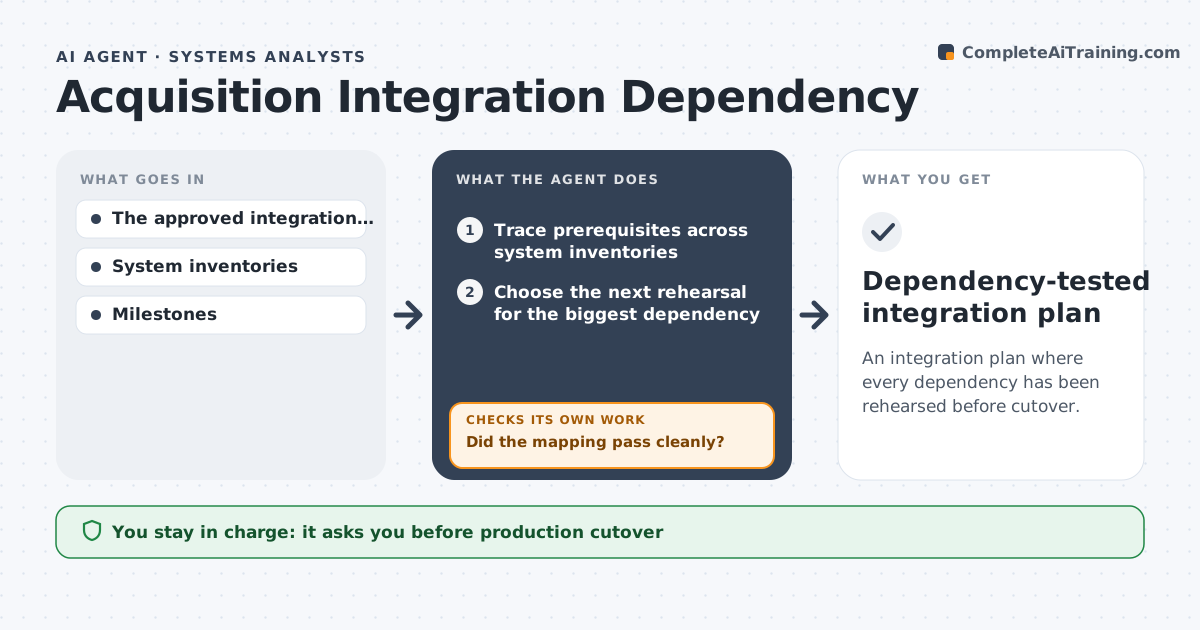
An integration plan where every dependency has been rehearsed before cutover.
What it does
After an acquisition, integration plans often overlook shared systems such as logins, customer records and billing. Cutover day then fails. This agent traces integration prerequisites across both companies' system inventories. It chooses the next safe rehearsal, a dry run in a sandbox, for the biggest unresolved dependency. It runs the dry-run mapping and checks whether it passed cleanly. A failed mapping blocks all related cutover steps until a repair is drafted and a new rehearsal passes. It updates the integration plan from the dry-run evidence. The integration lead approves the cutover plan. Edge case: production data is never used in a rehearsal without masking.
How it works
Follow the arrows from top to bottom. The orange dashed arrow is the loop: when a check fails, the agent goes back and tries again.
Read the steps as a list
- Integration scope approved
- Trace prerequisites across system inventories
- Choose the next rehearsal for the biggest dependency
- Run the dry-run mapping in a sandbox
- Did the mapping pass cleanly?If not: block dependent steps and draft a mapping repair. Back to step 3.
- Update the integration preparation plan
- Integration lead approves the cutover planThe agent waits here for your OK.
- Dependency-tested integration plan
How it decides
It rehearses the largest unresolved dependency first and blocks dependent steps when a rehearsal fails.
- Rehearsal order: largest risk or most dependencies first.
- Block: dependent cutover steps wait for a passing rehearsal.
- Repair: draft a fix and rerun the dry run, never patch in production.
- Masking: rehearse only with masked data.
Make it yours
Every agent is a starting point. You choose these settings for your own situation.
- System inventories in scope (default identity, customer records, billing, ERP)
- Duplicate or error rate that fails a rehearsal (default above 0.1%)
- Sandbox environment and data masking rules
- Rehearsal schedule before cutover (default weekly, then daily in the last 2 weeks)
- Who approves the cutover plan (default the integration lead)
What keeps you in control
It always asks you first
- Production cutover
- Personnel changes
- Contract changes
Hard limits
- Sandbox only.
It stops when
- Done: all dependencies rehearsed.
Set it up
We guide you through the set-up, step by step
Members get the full set-up guide for this agent. No technical skills needed: you copy, paste and upload.
- One set of instructions to paste into your AI, with the clicks for ChatGPT, Claude, Microsoft 365 Copilot, Gemini and Grok
- The agent then walks you through connecting your own data, one source at a time
- A downloadable copy with the flow chart, the rules and the full guide