AI agent for clinical data managers
Inspection Readiness Evidence Agent
Have a complete, current, signed evidence pack for each study before inspection
What it does
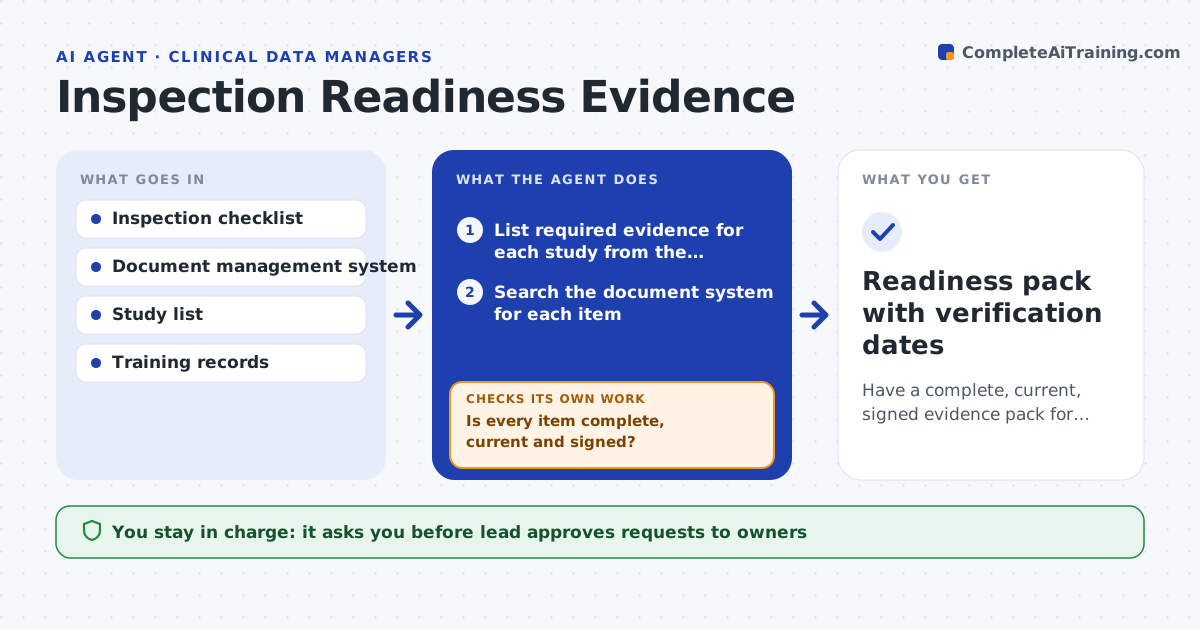
Inspectors ask for the data management plan, validation records, training files, user access reviews and audit trails, and the team scrambles for weeks. This agent builds the list of required evidence for each study from the inspection checklist and the quality system. It checks that each item exists in the document system, is the current version, is signed and dated, and that references between documents line up. It flags gaps and requests the missing items from the owners. It rechecks until the list is complete and keeps a record of when each item was last verified. The lead approves the readiness pack. Edge case: a document is signed but the signer left before the date it says, so the agent flags the inconsistency.
How it works
Follow the arrows from top to bottom. The orange dashed arrow is the loop: when a check fails, the agent goes back and tries again.
Read the steps as a list
- Quarterly review or inspection notice
- List required evidence for each study from the checklist
- Search the document system for each item
- Check version, signatures, dates and cross-references
- List gaps by owner and urgency
- Lead approves the requests to ownersThe agent waits here for your OK.
- Send requests and track replies
- Recheck the system for newly added items
- Is every item complete, current and signed?If not: chase the remaining items and escalate overdue ones. Back to step 6.
- Lead approves the readiness packThe agent waits here for your OK.
- Readiness pack with verification dates
How it decides
It marks an item ready only when it exists, is the current signed version and agrees with its linked documents.
- Require the current version with signature and date
- Flag a signature dated after the signer left the company
- Check that links between plans, specifications and validation agree
- Escalate any gap open over 10 working days
Make it yours
Every agent is a starting point. You choose these settings for your own situation.
- Checklist version
- Owners per document type
- Escalation time (default 10 working days)
- Studies in scope
- Verification schedule
What keeps you in control
It always asks you first
- Lead approves requests to owners
- Lead approves the readiness pack
Hard limits
- Never backdate or edit documents
- Never sign on someone's behalf
It stops when
- Done: all items are complete and verified
- Stop: a missing item cannot be recreated and the lead decides how to disclose it
Set it up
We guide you through the set-up, step by step
Members get the full set-up guide for this agent. No technical skills needed: you copy, paste and upload.
- One set of instructions to paste into your AI, with the clicks for ChatGPT, Claude, Microsoft 365 Copilot, Gemini and Grok
- The agent then walks you through connecting your own data, one source at a time
- A downloadable copy with the flow chart, the rules and the full guide