AI agent for financial analysts
Acquisition Target Financial Diligence Agent
A reconciled financial view of the target with an open questions log
What it does
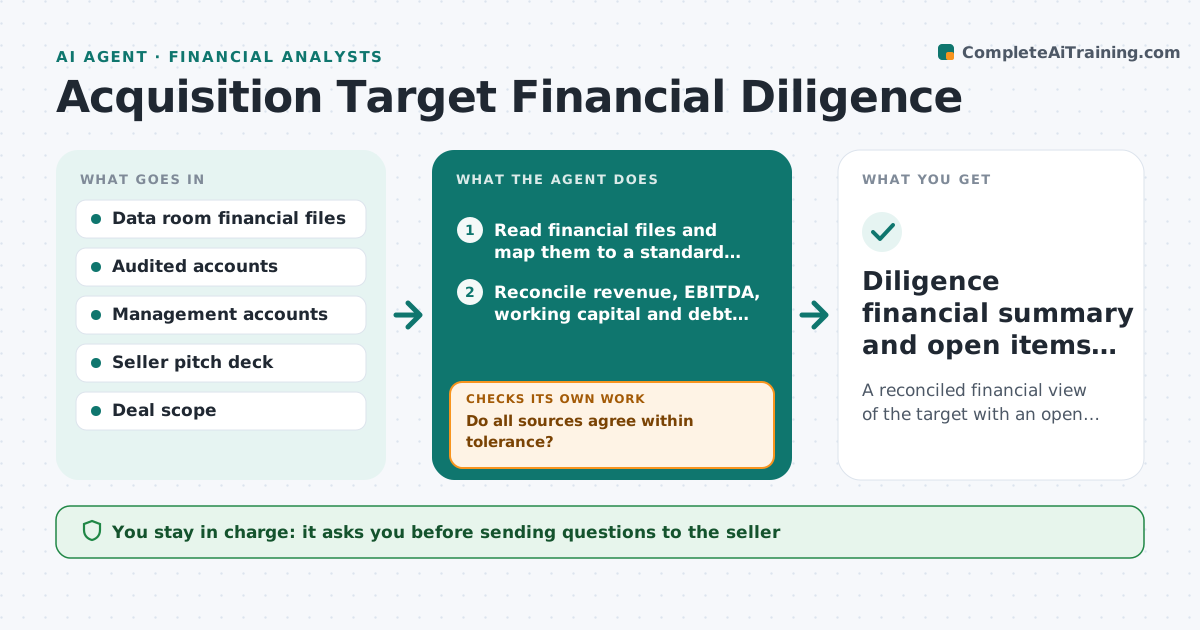
When the company looks at buying a business, analysts must check that the target's numbers hold together, and gaps are often found late. This agent reads the data room financial files and builds a standard view of revenue, margins, working capital and debt. It reconciles management accounts with audited statements and the seller's pitch figures. Each gap is logged as a question for the seller. As answers arrive, it reruns the reconciliation and closes or reopens questions, keeping unsupported amounts open. It also tracks quality of earnings adjustments. If pitch revenue includes a contract signed after period end, it separates it and adjusts the run rate. The deal lead approves every question list and the final summary.
How it works
Follow the arrows from top to bottom. The orange dashed arrow is the loop: when a check fails, the agent goes back and tries again.
Read the steps as a list
- New documents appear in the data room
- Read financial files and map them to a standard chart of accounts
- Reconcile revenue, EBITDA, working capital and debt across sources
- Do all sources agree within tolerance?If not: log a specific question for the seller with the conflicting figures. Back to step 3.
- Deal lead approves the question list before it goes to the sellerThe agent waits here for your OK.
- Read seller answers and update adjustments
- Is every question answered with support?If not: mark it open and draft a follow-up. Back to step 6.
- Diligence financial summary and open items log
How it decides
It reconciles each key figure across sources and raises a question whenever two sources differ by more than the tolerance or an adjustment lacks support.
- Differences above the tolerance become seller questions
- Adjustments without documents stay as proposed, not accepted
- Post-period contracts are excluded from historical run rate
Make it yours
Every agent is a starting point. You choose these settings for your own situation.
- Reconciliation tolerance (default 2%)
- Standard metrics to build
- Question log format
- Who approves outgoing questions
What keeps you in control
It always asks you first
- Sending questions to the seller
- Final diligence summary to the investment committee
Hard limits
- Never contacts the seller directly
- Keeps data room files inside the approved workspace
It stops when
- Done: all material items reconciled or listed as open risks
- Stop: deal paused or data room access ends
Set it up
We guide you through the set-up, step by step
Members get the full set-up guide for this agent. No technical skills needed: you copy, paste and upload.
- One set of instructions to paste into your AI, with the clicks for ChatGPT, Claude, Microsoft 365 Copilot, Gemini and Grok
- The agent then walks you through connecting your own data, one source at a time
- A downloadable copy with the flow chart, the rules and the full guide