AI agent for insurance actuaries
Actuarial Model Change Control Agent
Show exactly what a model change does to results before it goes live.
What it does
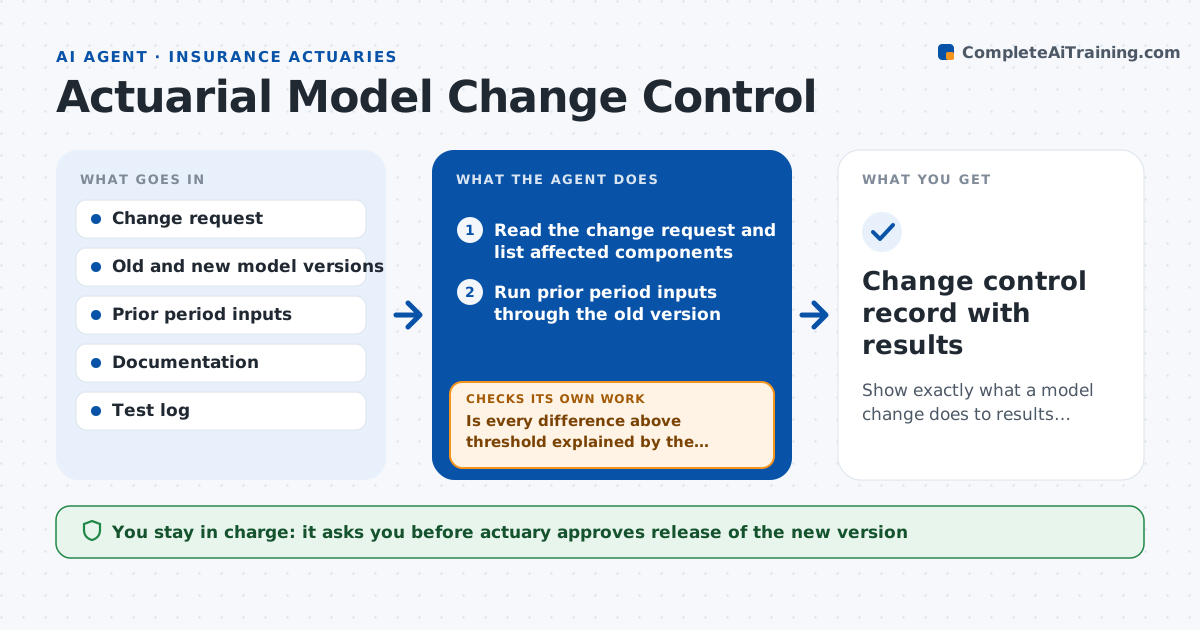
A model update can quietly change reserves or prices, and without testing, nobody knows by how much until a number looks off. This agent reads a proposed model change and reruns prior period results with the old and new versions. It compares outputs line by line, ranks the differences and explains each one in plain words, tying it to the change. It then checks that the documentation, version notes and test records were updated. If a difference cannot be explained by the change, it loops back, narrows the change and reruns to isolate the cause. The actuary approves the release.
How it works
Follow the arrows from top to bottom. The orange dashed arrow is the loop: when a check fails, the agent goes back and tries again.
Read the steps as a list
- Model change submitted
- Read the change request and list affected components
- Run prior period inputs through the old version
- Run the same inputs through the new version
- Compare outputs and rank differences
- Is every difference above threshold explained by the change?If not: isolate the cause by testing components one at a time and rerun. Back to step 2.
- Write an explanation for each difference
- Are documentation, version notes and test records updated?If not: list what is missing and return it to the model owner. Back to step 7.
- Draft the change control summary
- Actuary approves releaseThe agent waits here for your OK.
- Change control record with results
How it decides
It accepts the change when every difference above the threshold is explained by the stated change and documentation is updated.
- Investigate any output difference above 0.5 percent
- Test at least the last 2 reporting periods
- Require updated documentation before release
- Isolate causes by changing one component at a time
Make it yours
Every agent is a starting point. You choose these settings for your own situation.
- Difference threshold (default 0.5 percent)
- Periods to test
- Documents required for release
- Model list
What keeps you in control
It always asks you first
- Actuary approves release of the new version
Hard limits
- Never releases a model to production
- Keeps old and new results side by side
It stops when
- Done: differences explained and release approved
- Stop: prior period inputs cannot be reproduced with the old version
Set it up
We guide you through the set-up, step by step
Members get the full set-up guide for this agent. No technical skills needed: you copy, paste and upload.
- One set of instructions to paste into your AI, with the clicks for ChatGPT, Claude, Microsoft 365 Copilot, Gemini and Grok
- The agent then walks you through connecting your own data, one source at a time
- A downloadable copy with the flow chart, the rules and the full guide