AI agent for insurance actuaries
Climate Scenario Loss Modeling Agent
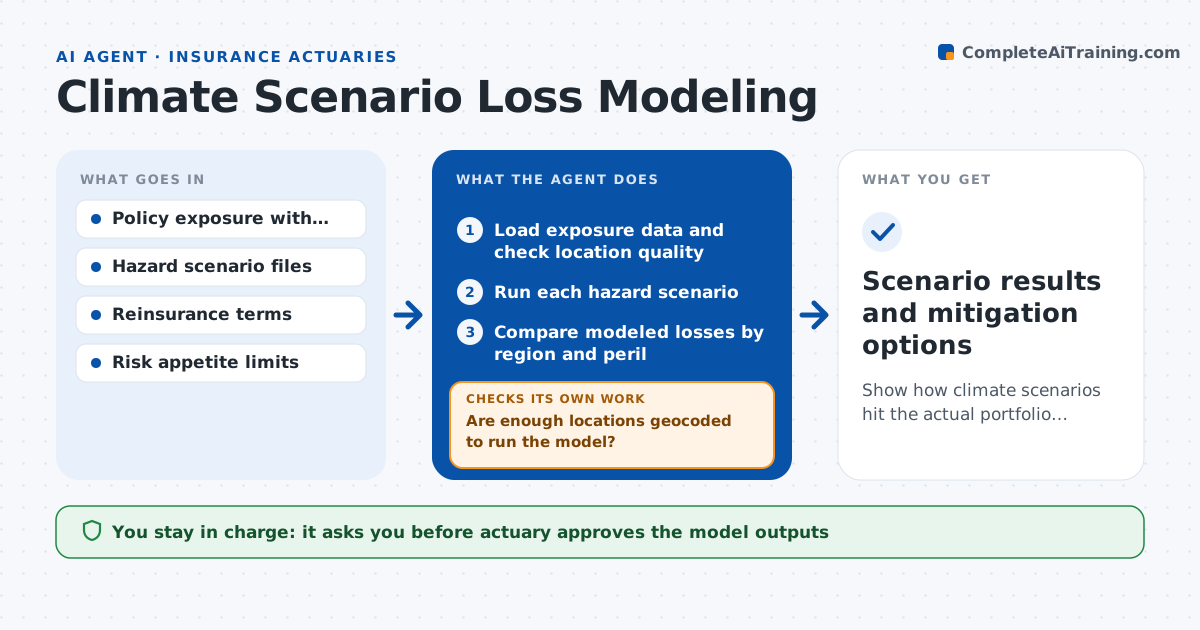
Show how climate scenarios hit the actual portfolio and which mitigations work.
What it does
Climate scenario work often stays at a general level and never reaches the real policy list. This agent reads exposure data by location and building type, runs hazard scenarios such as flood, wildfire or hurricane, and compares modeled losses by region. It looks for concentrations where a single event could produce losses beyond risk appetite. It then tests mitigations, such as lower limits, higher deductibles or added reinsurance, and reruns the model. If a mitigation does not bring losses within appetite, it tries another or combines them. It writes a summary of each scenario and its effects. The actuary approves the outputs.
How it works
Follow the arrows from top to bottom. The orange dashed arrow is the loop: when a check fails, the agent goes back and tries again.
Read the steps as a list
- Annual run or exposure change
- Load exposure data and check location quality
- Are enough locations geocoded to run the model?If not: fix addresses or use zip level for the remainder and flag them. Back to step 2.
- Run each hazard scenario
- Compare modeled losses by region and peril
- Flag concentrations above the appetite limit
- Test mitigations such as limits, deductibles and reinsurance
- Do losses fall within appetite after mitigation?If not: combine or change mitigations and rerun. Back to step 6.
- Draft the scenario summary
- Actuary approves the outputsThe agent waits here for your OK.
- Scenario results and mitigation options
How it decides
It compares modeled losses with appetite limits and picks the mitigation that restores limits at the lowest premium or revenue cost.
- Require 95 percent of exposure geocoded at the address level
- Flag a region where a 1 in 100 loss exceeds 5 percent of capital
- Prefer the mitigation with the lowest cost to hit the limit
- Report each scenario with its assumptions
Make it yours
Every agent is a starting point. You choose these settings for your own situation.
- Hazards and scenarios
- Appetite limit (default 5 percent of capital)
- Geocoding standard (default 95 percent)
- Mitigation options
What keeps you in control
It always asks you first
- Actuary approves the model outputs
- Chief risk officer approves any change to limits
Hard limits
- Never changes policies or reinsurance contracts
- States model limits in every output
It stops when
- Done: results approved and mitigation options documented
- Stop: exposure data is too poor to model
Set it up
We guide you through the set-up, step by step
Members get the full set-up guide for this agent. No technical skills needed: you copy, paste and upload.
- One set of instructions to paste into your AI, with the clicks for ChatGPT, Claude, Microsoft 365 Copilot, Gemini and Grok
- The agent then walks you through connecting your own data, one source at a time
- A downloadable copy with the flow chart, the rules and the full guide