AI agent for affiliate marketing managers
Affiliate Commission Dispute and Reversal Agent
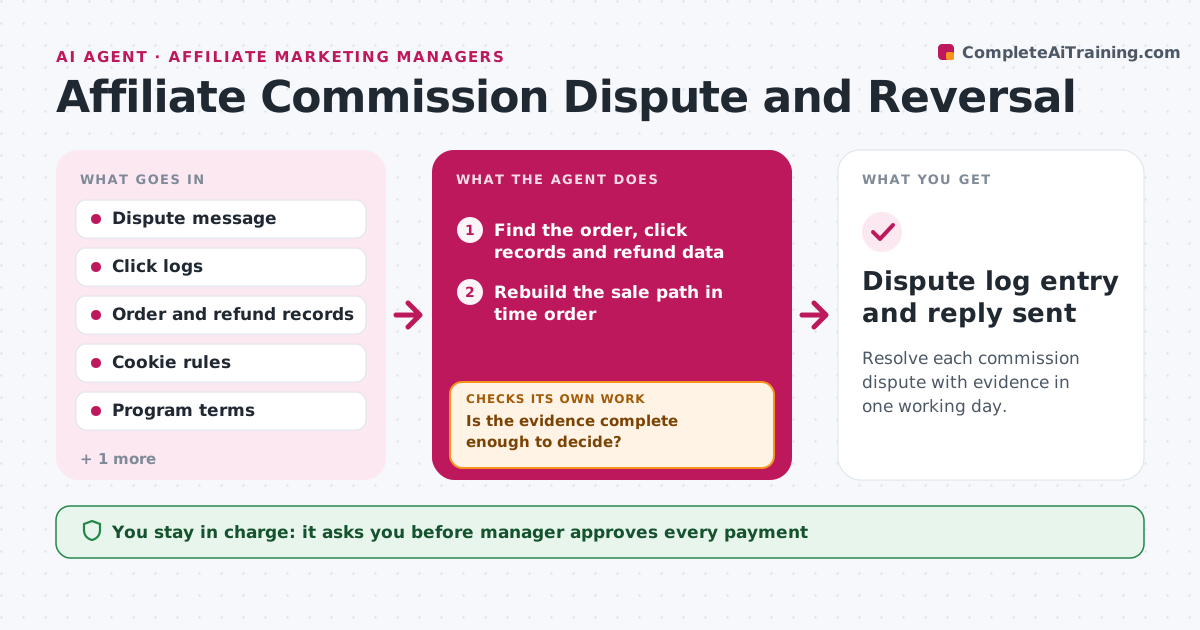
Resolve each commission dispute with evidence in one working day.
What it does
When an affiliate says a commission is missing or a reversal was wrong, someone has to dig through click logs, orders and refunds. This agent takes the dispute and pulls the click logs, order records, refund data and cookie windows. It rebuilds the sale path, checking whether the click came first, whether the cookie was still valid, whether another affiliate was credited, and whether the order was refunded or cancelled. It then decides if the claim is valid. If the evidence is incomplete, it requests more data from the store or the affiliate network and reruns the check. It drafts the reply. The manager approves any payment or denial message.
How it works
Follow the arrows from top to bottom. The orange dashed arrow is the loop: when a check fails, the agent goes back and tries again.
Read the steps as a list
- Dispute received
- Find the order, click records and refund data
- Rebuild the sale path in time order
- Check cookie window, last-click rules and refunds
- Is the evidence complete enough to decide?If not: request missing logs from the store or network and rerun. Back to step 2.
- Decide if the claim is valid and calculate the amount
- Draft the reply with the evidence summary
- Manager approves any payment or denial messageThe agent waits here for your OK.
- Record the decision and update the commission record if approved
- Dispute log entry and reply sent
How it decides
It rebuilds the path and grants a claim when a valid click preceded the sale inside the cookie window with no better claim.
- Grant a claim when a valid click precedes the order within the cookie window
- Deny when the order was refunded or credited to a later click under last-click rules
- Request more data when click logs for the date are missing
- Use the program terms version in force on the order date
Make it yours
Every agent is a starting point. You choose these settings for your own situation.
- Attribution rule (last click or first click)
- Cookie window
- Response time target (default 1 working day)
- Reply tone
What keeps you in control
It always asks you first
- Manager approves every payment
- Manager approves every denial message
Hard limits
- Never pays or denies a claim itself
- Replies state the facts without blaming the affiliate
It stops when
- Done: decision approved and logged
- Stop: logs for the period are no longer available
Set it up
We guide you through the set-up, step by step
Members get the full set-up guide for this agent. No technical skills needed: you copy, paste and upload.
- One set of instructions to paste into your AI, with the clicks for ChatGPT, Claude, Microsoft 365 Copilot, Gemini and Grok
- The agent then walks you through connecting your own data, one source at a time
- A downloadable copy with the flow chart, the rules and the full guide