AI agent for affiliate marketing managers
Affiliate Terms Update Rollout Agent
Make sure affiliates have seen and accepted new terms before they take effect.
What it does
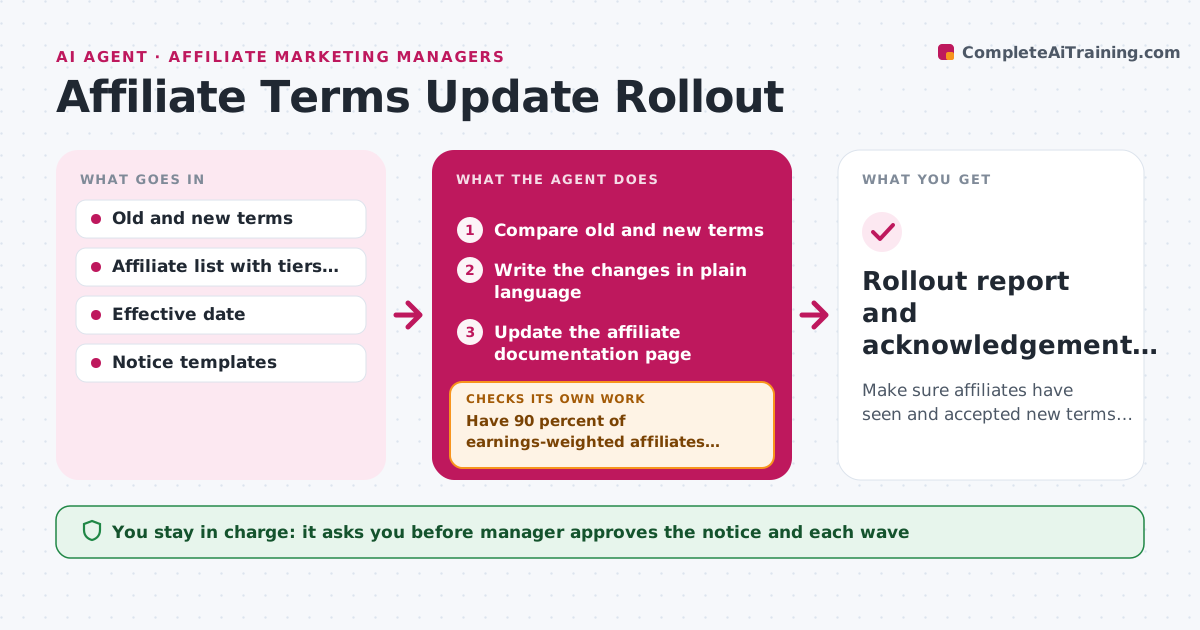
When commission rules change, many affiliates never read the notice and later dispute payouts that follow the new terms. This agent compares the old and new terms and lists the changes in plain language, with the effective date and who is affected. It updates the affiliate documentation and drafts the notice. After approval, it sends the notice in waves, starting with the top partners. It checks who has acknowledged and sends reminders to those who have not. If acknowledgement is still low before the effective date, it escalates to a personal message for the biggest earners. Edge case: affiliates on special deals get a separate note. The manager approves the notice and each wave.
How it works
Follow the arrows from top to bottom. The orange dashed arrow is the loop: when a check fails, the agent goes back and tries again.
Read the steps as a list
- New terms approved
- Compare old and new terms
- Write the changes in plain language
- Update the affiliate documentation page
- Draft the notice and group affiliates into waves
- Manager approves the notice and each waveThe agent waits here for your OK.
- Send the notice and log delivery
- Have 90 percent of earnings-weighted affiliates acknowledged?If not: resend to the rest, then draft personal messages for the top earners. Back to step 7.
- List affiliates still not acknowledged before the effective date
- Rollout report and acknowledgement log
How it decides
It judges rollout by the share of affiliates, weighted by earnings, that have acknowledged the change.
- Send the first wave to affiliates earning the top 20 percent
- Send reminders 7 days and 2 days before the effective date
- Send a separate note to affiliates on special deals
- Target acknowledgement by 90 percent of earnings
Make it yours
Every agent is a starting point. You choose these settings for your own situation.
- Wave order and size
- Acknowledgement target (default 90 percent)
- Reminder timing
- Notice tone and channel
What keeps you in control
It always asks you first
- Manager approves the notice and each wave
- Manager approves personal messages to top affiliates
Hard limits
- Never sends a notice without approval
- Does not change commission settings
It stops when
- Done: acknowledgement target met or the list is handed to the manager
- Stop: the new terms are changed again
Set it up
We guide you through the set-up, step by step
Members get the full set-up guide for this agent. No technical skills needed: you copy, paste and upload.
- One set of instructions to paste into your AI, with the clicks for ChatGPT, Claude, Microsoft 365 Copilot, Gemini and Grok
- The agent then walks you through connecting your own data, one source at a time
- A downloadable copy with the flow chart, the rules and the full guide