AI agent for receptionists
After-Hours Message Handling Agent
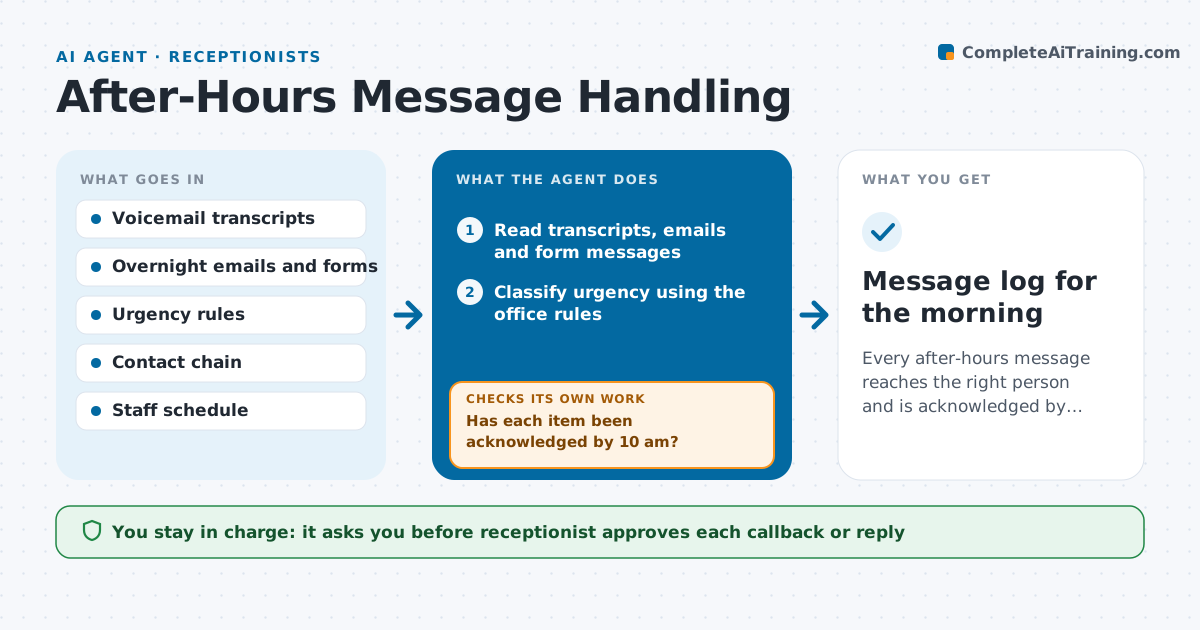
Every after-hours message reaches the right person and is acknowledged by mid-morning.
What it does
Overnight voicemails and messages are read in whatever order they arrive, and urgent ones can sit until noon. The agent reads each voicemail transcript, email and form message left outside office hours. It classifies urgency by the office's own rules, for example a burst pipe or a late patient, and routes each to the right person with a short summary. By mid-morning it checks whether the person acknowledged the item, and if not it tries the next contact in the chain. It drafts callbacks and replies, but the receptionist approves them before anything goes out. Edge case: a message that mentions two different people and has an unclear caller name.
How it works
Follow the arrows from top to bottom. The orange dashed arrow is the loop: when a check fails, the agent goes back and tries again.
Read the steps as a list
- Morning run or new after-hours message
- Read transcripts, emails and form messages
- Classify urgency using the office rules
- Route each message to the right person with a short summary
- Send the routed items
- Has each item been acknowledged by 10 am?If not: Move to the next contact in the chain and resend. Back to step 5.
- Draft callbacks and replies
- Receptionist approves each callback or replyThe agent waits here for your OK.
- Is every message resolved or assigned?If not: Flag the open ones at the top of the next briefing. Back to step 4.
- Message log for the morning
How it decides
It matches message keywords and the caller to the office's urgency rules, and treats an unacknowledged item as unfinished until someone confirms.
- Urgent keywords and callers go first
- Escalate after 60 minutes without acknowledgement for urgent items
- Match unclear callers to the contact book by phone number
- A message with two names goes to both
Make it yours
Every agent is a starting point. You choose these settings for your own situation.
- Urgency rules
- Contact chain for each type
- Acknowledgement deadline (default 10 am)
- Hours counted as after hours
- Where summaries are posted
What keeps you in control
It always asks you first
- Receptionist approves each callback or reply
Hard limits
- Never reply without approval
- Do not share message content outside the chain
It stops when
- Done: every message acknowledged and assigned
- Stop: caller identity or urgency is unclear and the receptionist must decide
Set it up
We guide you through the set-up, step by step
Members get the full set-up guide for this agent. No technical skills needed: you copy, paste and upload.
- One set of instructions to paste into your AI, with the clicks for ChatGPT, Claude, Microsoft 365 Copilot, Gemini and Grok
- The agent then walks you through connecting your own data, one source at a time
- A downloadable copy with the flow chart, the rules and the full guide