AI agent for chief digital officers
AI Use Case Intake and Scoring Agent
A scored, ranked shortlist of AI use cases with data and risk checked
What it does
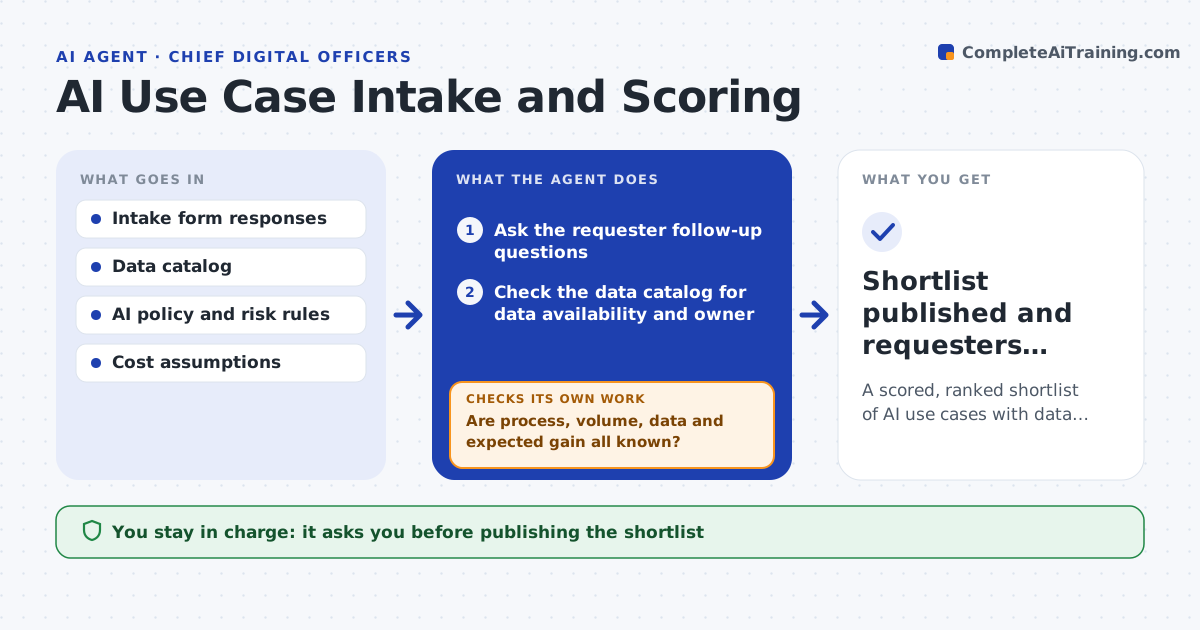
Teams submit AI ideas faster than anyone can assess them, and without a consistent method the loudest idea wins. This agent takes each idea from the intake form and asks the requester follow-up questions until it knows the process, the weekly volume, the data involved and the expected gain. It checks the data catalog to see whether the needed data exists and who owns it, screens the idea against your AI policy, and scores value, feasibility and risk. After each round of questions it checks whether the key answers are complete. If they are still missing after two rounds, it parks the idea and tells the requester exactly what is needed. You approve the shortlist and the order of work. Edge case: an idea that uses customer personal data is routed to privacy review before it can be scored as ready.
How it works
Follow the arrows from top to bottom. The orange dashed arrow is the loop: when a check fails, the agent goes back and tries again.
Read the steps as a list
- New AI idea submitted
- Ask the requester follow-up questions
- Are process, volume, data and expected gain all known?If not: ask a second round of questions, then park the idea with a list of what is missing. Back to step 2.
- Check the data catalog for data availability and owner
- Screen against the AI policy for risk
- Score value, feasibility and risk and rank
- Leader approves the shortlistThe agent waits here for your OK.
- Shortlist published and requesters informed
How it decides
Each idea is scored on value, feasibility and risk. Ideas with high risk or missing data cannot be ranked as ready.
- Send ideas using personal data to privacy review first
- Park ideas missing key answers after two rounds
- Rank by value times feasibility, adjusted for risk
Make it yours
Every agent is a starting point. You choose these settings for your own situation.
- Scoring weights for value, feasibility and risk
- Questions asked at intake
- Risk rules from your AI policy
- Shortlist size and review date
What keeps you in control
It always asks you first
- Publishing the shortlist
- Telling requesters an idea is declined
Hard limits
- Never commits budget or vendors
- Does not access the data itself, only checks it exists
It stops when
- Done: idea scored or parked
- Stop: AI policy not defined (scoring rules missing)
Set it up
We guide you through the set-up, step by step
Members get the full set-up guide for this agent. No technical skills needed: you copy, paste and upload.
- One set of instructions to paste into your AI, with the clicks for ChatGPT, Claude, Microsoft 365 Copilot, Gemini and Grok
- The agent then walks you through connecting your own data, one source at a time
- A downloadable copy with the flow chart, the rules and the full guide