AI agent for chief digital officers
Data Retention and Purge Agent
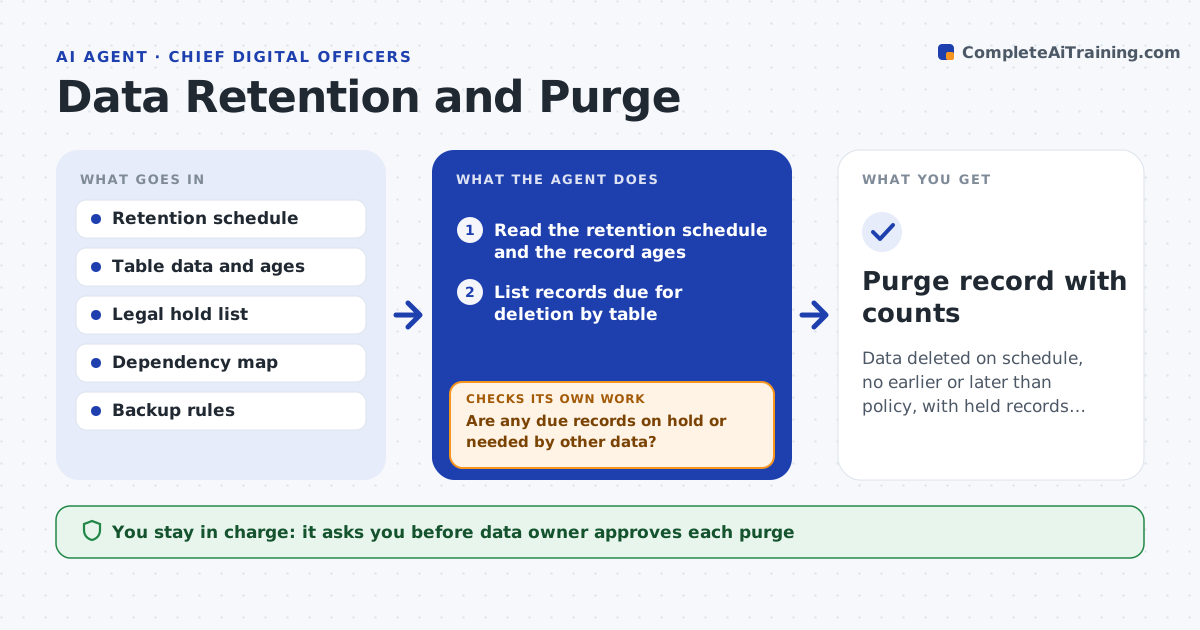
Data deleted on schedule, no earlier or later than policy, with held records protected
What it does
Data is kept longer than policy allows, or deleted too early. This agent compares each table's record ages with the retention schedule and lists the records due for deletion. It checks for legal holds and dependent records, such as invoices tied to a customer. It runs a dry run that shows exactly what would go, and it verifies counts after the purge. If the dry run touches anything on hold or still needed, it removes that from the list and repeats the dry run. The data owner approves each purge. Edge case: a customer record is past retention but has an open dispute, so the agent excludes it.
How it works
Follow the arrows from top to bottom. The orange dashed arrow is the loop: when a check fails, the agent goes back and tries again.
Read the steps as a list
- Monthly retention review
- Read the retention schedule and the record ages
- List records due for deletion by table
- Check the legal hold list and dependent records
- Are any due records on hold or needed by other data?If not: remove them from the list and recheck. Back to step 3.
- Run a dry run and count affected rows
- Data owner approves the purgeThe agent waits here for your OK.
- Run the purge
- Do the counts after the purge match the dry run?If not: stop, restore from backup if needed and report the difference. Back to step 6.
- Purge record with counts
How it decides
A record is due when it exceeds its retention period, has no hold and has no dependent record that needs it.
- Exclude any record under legal hold
- Keep records that other required records depend on
- Require a dry run before every purge
- Verify counts afterward
Make it yours
Every agent is a starting point. You choose these settings for your own situation.
- Retention schedule
- Hold list source
- Run frequency
- Tables in scope
What keeps you in control
It always asks you first
- Data owner approves each purge
Hard limits
- Never deletes without approval and a dry run
- Never touches records under legal hold
It stops when
- Done: the purge matches the dry run and is recorded
- Stop: the legal hold list is unavailable
Set it up
We guide you through the set-up, step by step
Members get the full set-up guide for this agent. No technical skills needed: you copy, paste and upload.
- One set of instructions to paste into your AI, with the clicks for ChatGPT, Claude, Microsoft 365 Copilot, Gemini and Grok
- The agent then walks you through connecting your own data, one source at a time
- A downloadable copy with the flow chart, the rules and the full guide