AI agent for investor relations managers
Analyst Consensus Tracking Agent
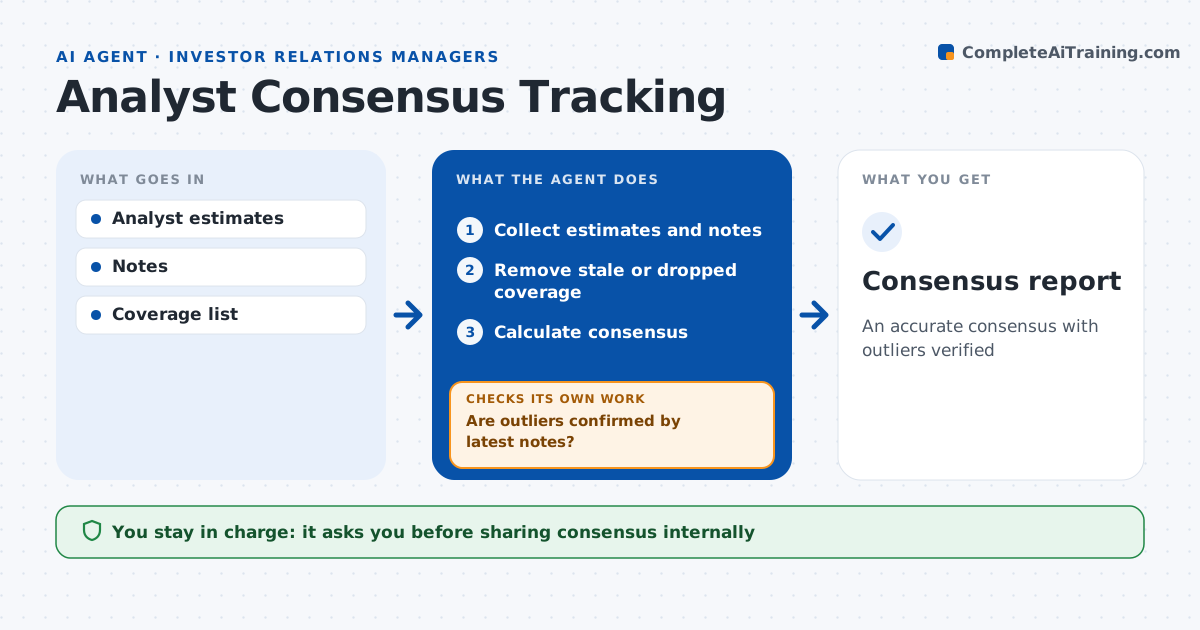
An accurate consensus with outliers verified
What it does
Investor relations teams need an accurate view of analyst consensus to see how guidance will land. This agent collects published estimates from analyst models and notes, records each analyst's figures and date, and calculates consensus. It removes estimates older than the last earnings date. It then checks for outliers more than two standard deviations from the group and confirms them against the analyst's latest note. If an estimate still looks wrong, it marks it for the IR manager to verify and recalculates consensus without it until confirmed. It compares consensus with internal guidance and highlights gaps over 3 percent. The IR manager approves sharing consensus internally and decides any contact with analysts. Edge case: an analyst left their firm and coverage was dropped, so the estimate is removed rather than left to skew consensus.
How it works
Follow the arrows from top to bottom. The orange dashed arrow is the loop: when a check fails, the agent goes back and tries again.
Read the steps as a list
- Weekly update
- Collect estimates and notes
- Remove stale or dropped coverage
- Calculate consensus
- Are outliers confirmed by latest notes?If not: mark for IR to verify and recalculate. Back to step 2.
- IR manager reviews consensusThe agent waits here for your OK.
- Consensus report
How it decides
It includes only current estimates and checks outliers against the latest note.
- Estimate older than last earnings: remove
- Outlier over two standard deviations: verify
- Gap to guidance over 3%: highlight
Make it yours
Every agent is a starting point. You choose these settings for your own situation.
- Metrics tracked
- Stale rule
- Outlier rule
- Report format
What keeps you in control
It always asks you first
- Sharing consensus internally
- Contacting analysts
Hard limits
- Never gives guidance to analysts
- Never shares internal figures
It stops when
- Done: report ready
- Stop: too few estimates
Set it up
We guide you through the set-up, step by step
Members get the full set-up guide for this agent. No technical skills needed: you copy, paste and upload.
- One set of instructions to paste into your AI, with the clicks for ChatGPT, Claude, Microsoft 365 Copilot, Gemini and Grok
- The agent then walks you through connecting your own data, one source at a time
- A downloadable copy with the flow chart, the rules and the full guide