AI agent for presentation designers
Slide Deck Audience Fit Review Agent
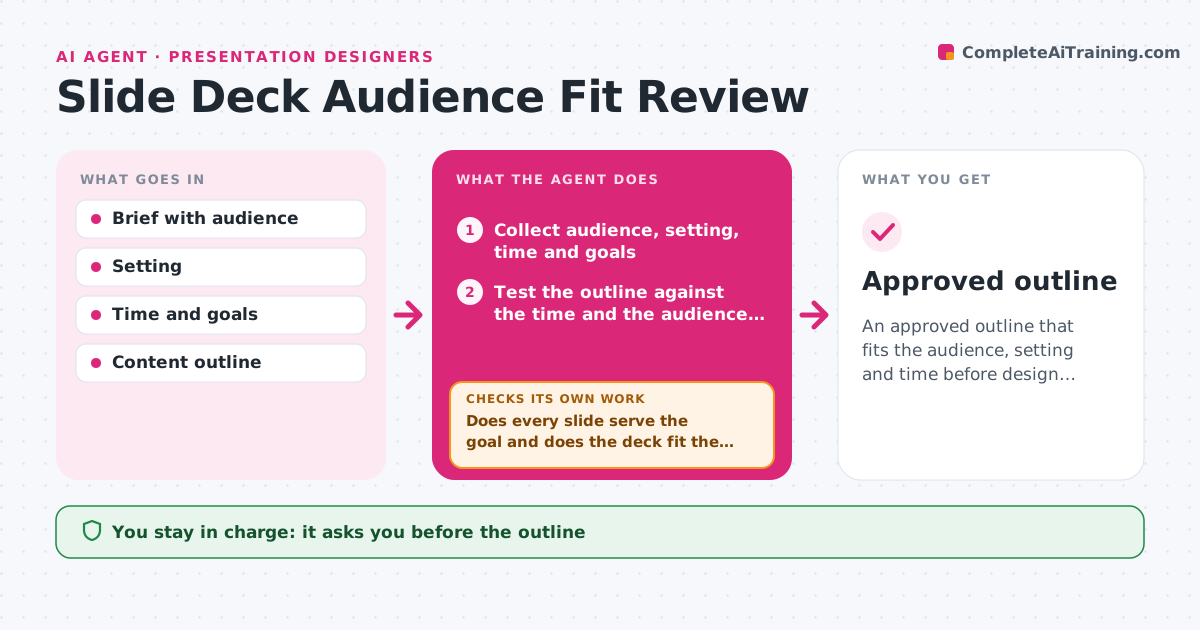
An approved outline that fits the audience, setting and time before design begins
What it does
Decks are designed before anyone confirms who will view them and how, which causes late rework. This agent collects the audience, setting, time and goals, and tests the outline against them. It checks the number of slides against the time, the level of detail against the audience and whether each slide serves the goal. It flags slides that do not, for example a 30-slide deck for a 10-minute slot. After revision, it checks the outline again to see that fixes did not leave a gap in the story. The designer approves the outline before the design starts. Edge case: a deck that will be read, not presented, is judged by different rules, such as more text per slide.
How it works
Follow the arrows from top to bottom. The orange dashed arrow is the loop: when a check fails, the agent goes back and tries again.
Read the steps as a list
- Deck request arrives
- Collect audience, setting, time and goals
- Test the outline against the time and the audience level
- Check that each slide serves the goal
- Does every slide serve the goal and does the deck fit the time?If not: flag the slides to cut, merge or move. Back to step 3.
- Check that the revised outline still tells the story
- Are there gaps in the story after the cuts?If not: suggest a slide to fill the gap. Back to step 3.
- Designer approves the outlineThe agent waits here for your OK.
- Approved outline
How it decides
A slide stays when it serves the goal. The count is checked against about one slide per minute for presented decks, with exceptions listed.
- Presented decks: about 1 slide per minute
- Flag any slide with no link to the goal
- Judge read decks by different rules
- Check the level of detail for the audience
Make it yours
Every agent is a starting point. You choose these settings for your own situation.
- Slides per minute (default 1)
- Setting types
- Required brief fields
- Read or present mode
What keeps you in control
It always asks you first
- The outline
- Starting the design
Hard limits
- Never designs slides
- Never cuts content without approval
It stops when
- Done: outline approved
- Stop: the brief is missing
Set it up
We guide you through the set-up, step by step
Members get the full set-up guide for this agent. No technical skills needed: you copy, paste and upload.
- One set of instructions to paste into your AI, with the clicks for ChatGPT, Claude, Microsoft 365 Copilot, Gemini and Grok
- The agent then walks you through connecting your own data, one source at a time
- A downloadable copy with the flow chart, the rules and the full guide