AI agent for business intelligence analysts
Anomaly Watch Agent
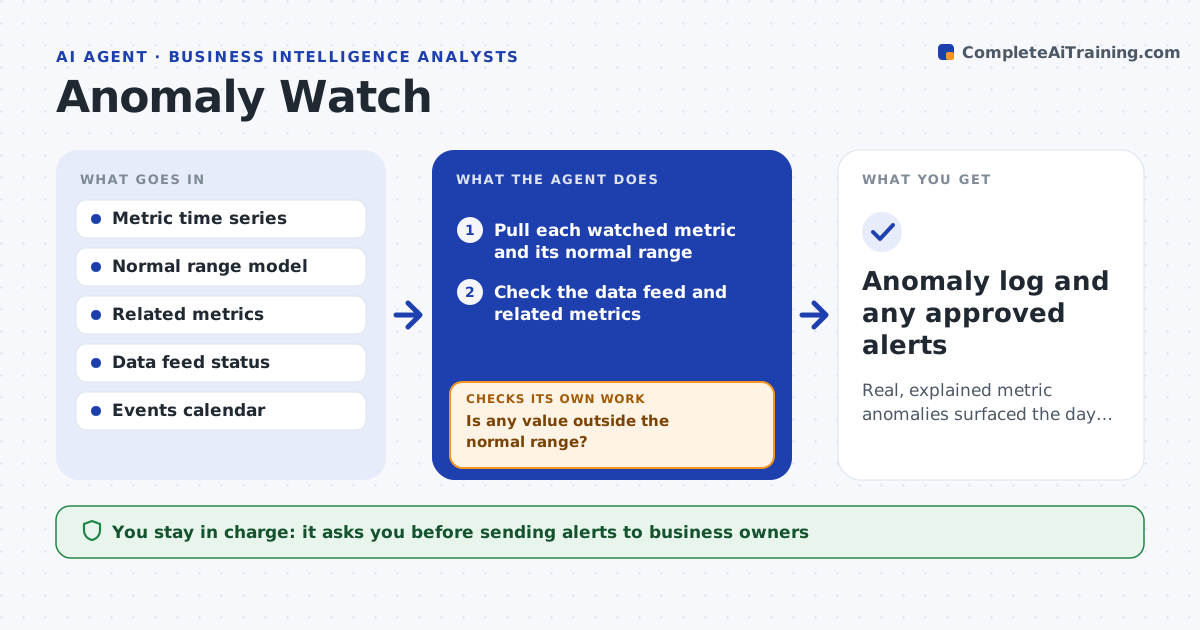
Real, explained metric anomalies surfaced the day they happen
What it does
Important metrics like sales, sign-ups or error rates can shift suddenly, and the monthly report is too slow to catch it. Each day this agent checks each watched metric against its normal range, allowing for weekly and seasonal patterns. It reads your calendar of promotions and launches so planned events are not flagged. When a value falls outside the range, it checks the data feed and related metrics to tell a real change from a data problem. For a real anomaly it breaks the metric down by segment, region or channel to find what drove it, and drafts a short alert with the likely explanation. If it cannot tell a real change from a glitch, it says so instead of raising a false alarm. You approve alerts sent to business owners.
How it works
Follow the arrows from top to bottom. The orange dashed arrow is the loop: when a check fails, the agent goes back and tries again.
Read the steps as a list
- Daily metric check
- Pull each watched metric and its normal range
- Is any value outside the normal range?If not: log a normal result and stop. Back to step 2.
- Check the data feed and related metrics
- Is it a real change rather than a data glitch or planned event?If not: report a possible data issue or note the planned event. Back to step 4.
- Gather context and draft the alert
- Analyst approves alerts to business ownersThe agent waits here for your OK.
- Anomaly log and any approved alerts
How it decides
It flags values outside the seasonally adjusted normal range and confirms they are real, not data errors or planned events, before alerting.
- Adjust the normal range for weekly and seasonal patterns
- Treat a feed problem as a data issue, not an anomaly
- Skip changes explained by the events calendar
Make it yours
Every agent is a starting point. You choose these settings for your own situation.
- Metrics to watch and their ranges
- Sensitivity of the alert threshold
- Events calendar source
- Who receives alerts
What keeps you in control
It always asks you first
- Sending alerts to business owners
Hard limits
- Does not act on the metrics, only reports
- No alerts sent without approval
It stops when
- Done: anomalies explained or none found
- Stop: metric history is too short for a range
Set it up
We guide you through the set-up, step by step
Members get the full set-up guide for this agent. No technical skills needed: you copy, paste and upload.
- One set of instructions to paste into your AI, with the clicks for ChatGPT, Claude, Microsoft 365 Copilot, Gemini and Grok
- The agent then walks you through connecting your own data, one source at a time
- A downloadable copy with the flow chart, the rules and the full guide