AI agent for historians
Archive Research Trip Planning Agent
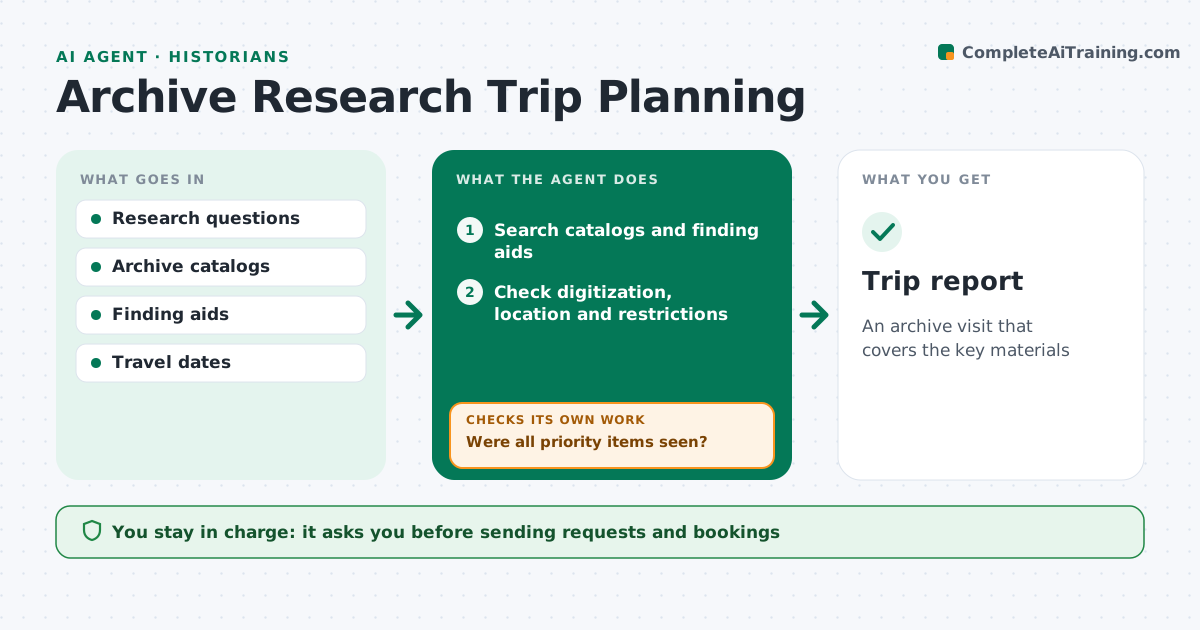
An archive visit that covers the key materials
What it does
Archive time is short and travel is costly, so arriving to find a box off-site or restricted wastes the trip. This agent takes your research questions and searches archive catalogs and finding aids for relevant collections. For each item it checks whether it is digitized, held off-site, restricted, or needs advance booking. It ranks items by how well they match your questions. It drafts request lists and reading room bookings in each archive's format and builds a day-by-day plan with box counts that fit the reading room's limits. After the visit it checks which priority items you actually saw and lists gaps for a follow-up visit or remote copies. You approve all requests and bookings before they go. Edge case: a collection with access restrictions gets a draft permission request.
How it works
Follow the arrows from top to bottom. The orange dashed arrow is the loop: when a check fails, the agent goes back and tries again.
Read the steps as a list
- Trip planned
- Search catalogs and finding aids
- Check digitization, location and restrictions
- Build request list and daily plan
- Historian approves requests and bookingsThe agent waits here for your OK.
- Record items seen after the visit
- Were all priority items seen?If not: list gaps for a follow-up visit or remote copies. Back to step 4.
- Trip report
How it decides
It ranks items by relevance and checks access, location and booking needs.
- Prefer digitized copies when available
- Respect reading room limits
- Draft permission requests
Make it yours
Every agent is a starting point. You choose these settings for your own situation.
- Box limits per day
- Archives
- Request format
- Priority rules
What keeps you in control
It always asks you first
- Sending requests and bookings
Hard limits
- Never sends requests without approval
It stops when
- Done: trip report saved
- Stop: archive closed
Set it up
We guide you through the set-up, step by step
Members get the full set-up guide for this agent. No technical skills needed: you copy, paste and upload.
- One set of instructions to paste into your AI, with the clicks for ChatGPT, Claude, Microsoft 365 Copilot, Gemini and Grok
- The agent then walks you through connecting your own data, one source at a time
- A downloadable copy with the flow chart, the rules and the full guide