AI agent for computer science students
Assignment Deadline Planner Agent
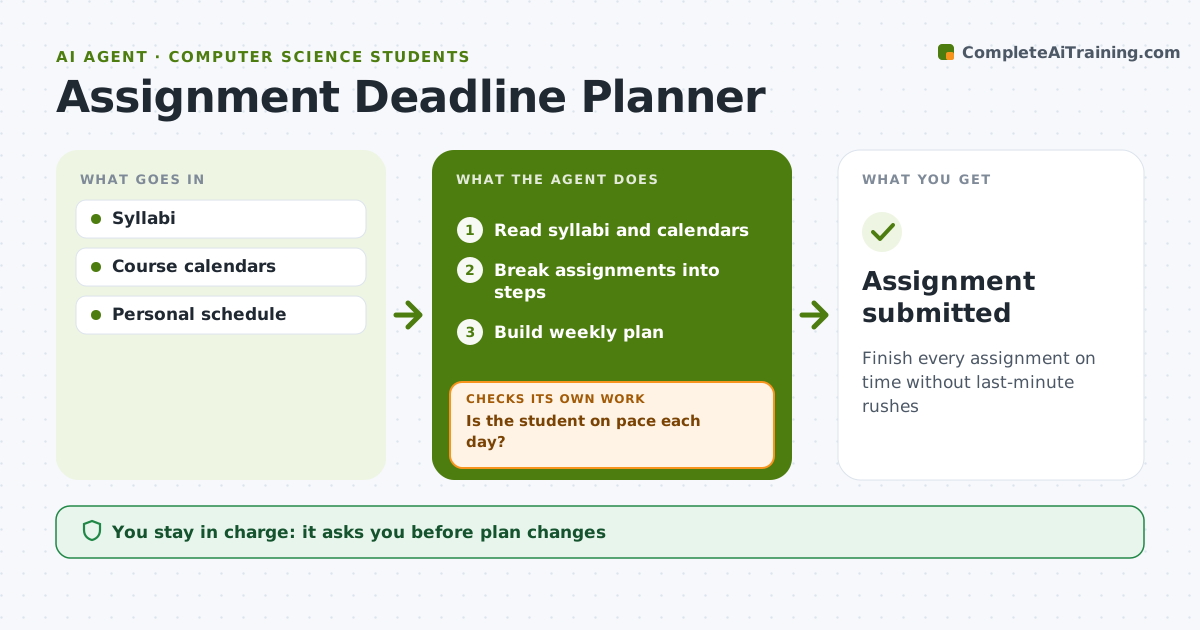
Finish every assignment on time without last-minute rushes
What it does
Students juggle assignments across courses with different deadlines, and big projects tend to start the night before. This agent reads course syllabi and learning platform calendars, lists every deadline, and breaks large assignments into steps with mini-deadlines that leave a two-day buffer. It builds a weekly plan around classes, work and other commitments. Each day it asks what got done and checks whether the student is on pace. If a step slips, it replans the remaining steps and warns when a deadline is now at risk. The student approves any plan change. It never contacts teachers itself. Edge case: if two big deadlines clash in the same week, it flags the clash early and suggests the student ask a teacher for guidance while there is still time to adjust, rather than the day before.
How it works
Follow the arrows from top to bottom. The orange dashed arrow is the loop: when a check fails, the agent goes back and tries again.
Read the steps as a list
- Term starts
- Read syllabi and calendars
- Break assignments into steps
- Build weekly plan
- Student accepts planThe agent waits here for your OK.
- Is the student on pace each day?If not: replan and warn about at-risk deadlines. Back to step 4.
- Assignment submitted
How it decides
Steps are scheduled backward from deadlines, with buffer.
- Two-day buffer before deadlines
- Large tasks split
- Clashes flagged early
Make it yours
Every agent is a starting point. You choose these settings for your own situation.
- Buffer days
- Study hours
- Check-in time
- Courses
What keeps you in control
It always asks you first
- Plan changes
Hard limits
- The agent never does the assignment
It stops when
- Done: term ends
- Stop: student pauses
Set it up
We guide you through the set-up, step by step
Members get the full set-up guide for this agent. No technical skills needed: you copy, paste and upload.
- One set of instructions to paste into your AI, with the clicks for ChatGPT, Claude, Microsoft 365 Copilot, Gemini and Grok
- The agent then walks you through connecting your own data, one source at a time
- A downloadable copy with the flow chart, the rules and the full guide