AI agent for systems administrators
Backup Restore Test Agent
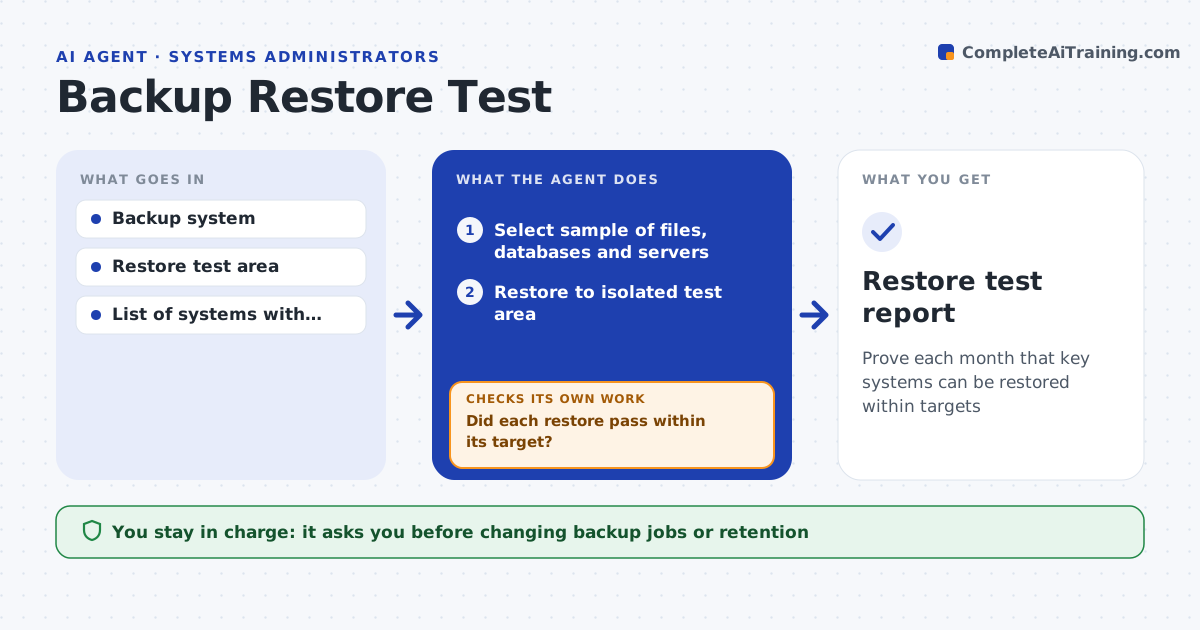
Prove each month that key systems can be restored within targets
What it does
A backup that cannot be restored is useless, and most teams only find out during a real outage. On each monthly test date this agent selects a sample of files, databases and virtual machines, making sure every critical system is tested at least each quarter. It restores them into an isolated test area and verifies them by opening files, comparing checksums and starting services. It times each restore against its recovery target, and a slow restore counts as a failure. If a restore fails, it opens a ticket with the error, waits for the fix and restores again. It writes a restore test report. The admin approves any change to backup jobs. Edge case: encrypted backups are restored using the stored key, to prove the key itself still works.
How it works
Follow the arrows from top to bottom. The orange dashed arrow is the loop: when a check fails, the agent goes back and tries again.
Read the steps as a list
- Monthly test date
- Select sample of files, databases and servers
- Restore to isolated test area
- Verify data and time the restore
- Did each restore pass within its target?If not: open ticket with error, wait for fix, and restore again. Back to step 3.
- Write restore test report
- Admin approves changes to backup jobsThe agent waits here for your OK.
- Restore test report
How it decides
A restore passes if data opens, checksums match and the time is within the recovery target.
- Every critical system is tested at least each quarter
- Encrypted backups test the key
- Slow restores count as failures
Make it yours
Every agent is a starting point. You choose these settings for your own situation.
- Sample size
- Recovery targets
- Test schedule
- Systems list
What keeps you in control
It always asks you first
- Changing backup jobs or retention
Hard limits
- Restores only to isolated area
- Never overwrites production
It stops when
- Done: all samples pass
- Stop: test area unavailable
Set it up
We guide you through the set-up, step by step
Members get the full set-up guide for this agent. No technical skills needed: you copy, paste and upload.
- One set of instructions to paste into your AI, with the clicks for ChatGPT, Claude, Microsoft 365 Copilot, Gemini and Grok
- The agent then walks you through connecting your own data, one source at a time
- A downloadable copy with the flow chart, the rules and the full guide